What is 16x Prompt?
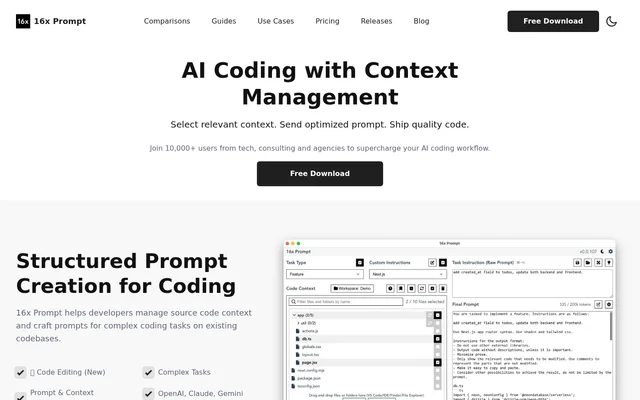
16x Prompt is a desktop application for composing AI coding prompts from task instructions, source code files and formatting instructions. 16x Prompt serves developers handling complex tasks on existing codebases, where selecting relevant context is part of preparing a request for an AI model.
16x Prompt generates prompts locally on the user's machine rather than through a cloud-based prompt generation service. The resulting prompts can be copied into an external model interface or sent through an API integration. Supported programming languages include Python, JavaScript, TypeScript, Java, C++ and SQL, while listed frameworks include React, Vue, Next.js, Flask and Django.
What 16x Prompt can do
16x Prompt combines context selection, reusable instructions and code editing in a desktop workflow. Developers can adjust prompt optimization settings, track token limits and organize repositories into workspaces. API-based workflows also support comparing model outputs, while code editing includes mechanisms for reviewing changes and restoring earlier versions.
- 16x Prompt builds prompts from selected source files and task instructions.
- 16x Prompt saves reusable task instructions and custom formatting instructions.
- 16x Prompt tracks prompt tokens against model limits.
- 16x Prompt groups multiple repositories into a single workspace.
- 16x Prompt compares model responses side by side when using APIs.
- 16x Prompt applies code changes with visual diffs, automatic backups and rollback.
How 16x Prompt works
16x Prompt starts with a task instruction and a selection of source code files. The application adds formatting instructions and optimizes the source code and prompt according to configurable settings. Users can copy the completed prompt into ChatGPT, Claude or DeepSeek, including through an existing ChatGPT Plus or Claude Pro subscription.
16x Prompt can alternatively send prompts through API integrations after users enter their own credentials and select a model. Listed providers include OpenAI, Anthropic Claude, Google Gemini, DeepSeek, OpenRouter, Ollama and Azure OpenAI. Other services offering OpenAI API compatibility are also supported. Cloud API connections require access to the respective services, while local prompt generation works offline.
Who 16x Prompt is for
16x Prompt is intended for developers using AI assistance on existing codebases, including projects that span related repositories. Reusable instructions support recurring development tasks, while workspaces separate projects or combine connected codebases. Developers can use the same context-management workflow with external chat interfaces, API providers or locally running models.
- 16x Prompt supports refactoring tasks with saved task instructions.
- 16x Prompt supports creating pages and writing documentation.
- 16x Prompt organizes frontend and backend repositories together.
- 16x Prompt supports copying prompts into locally running language models.
16x Prompt pricing and plans
16x Prompt is free to download and use, with the free version limited to 10 generated prompts per day. Purchasing a license removes that limit. The page lists individual and team lifetime licenses, and licenses include free application updates. Individual licenses support activation on up to 3 devices, while team licenses support up to 10 devices.
16x Prompt supports self-service device deactivation through application settings so licenses can be transferred between devices. Team lifetime licenses offer invoices, but individual lifetime licenses do not. Enterprise volume discounts and white-label options are available by contacting the provider. Purchases are not refundable, and ChatGPT Plus does not include free OpenAI API access.
Strengths and limitations of 16x Prompt
16x Prompt offers local context preparation alongside a choice between copying prompts and using API integrations. The page states that data is processed locally and is not stored on the provider's servers. Visual diffs and reversible code changes support review, while cloud API use introduces a separate connection to the selected external provider.
- 16x Prompt limits free usage to 10 generated prompts per day.
- 16x Prompt requires user-supplied keys for API integrations.
- 16x Prompt does not include OpenAI API usage with a ChatGPT Plus subscription.
- 16x Prompt does not offer purchase refunds.
16x Prompt FAQ
What is 16x Prompt?
16x Prompt is a desktop application that generates AI coding prompts from task instructions, selected source code files and formatting instructions. Developers can copy the prompts into ChatGPT or other language models, or send them through supported API integrations.
Is 16x Prompt free?
16x Prompt is free to download and use, with a limit of 10 generated prompts per day. A paid license removes that limitation and includes free updates. The page lists individual and team lifetime licenses but does not state their prices.
Does 16x Prompt work offline?
16x Prompt generates prompts locally and works without an Internet connection. Prompts can be copied into locally running language models. API integrations with cloud providers require connecting to those services and supplying the user's own API key.
Which API providers does 16x Prompt support?
16x Prompt supports OpenAI, Anthropic Claude, Google Gemini, DeepSeek, OpenRouter, Ollama and Azure OpenAI. Additional providers offering OpenAI API compatibility are supported, including Fireworks, Hyperbolic and DeepInfra. API integrations use credentials supplied by the user.
Can 16x Prompt edit code and undo changes?
16x Prompt can automatically apply code changes and display visual diffs for review. Every change is automatically backed up and reversible, allowing users to roll back changes when needed.
Can 16x Prompt use a ChatGPT Plus subscription?
16x Prompt can work with an existing ChatGPT Plus subscription by letting users copy the completed prompt into the ChatGPT interface. ChatGPT Plus does not include free OpenAI API access, so API usage requires separate payment.
From the community
No reviews yet
Be the first to review this tool. What you write helps the next person choose.