What is Aftershoot?
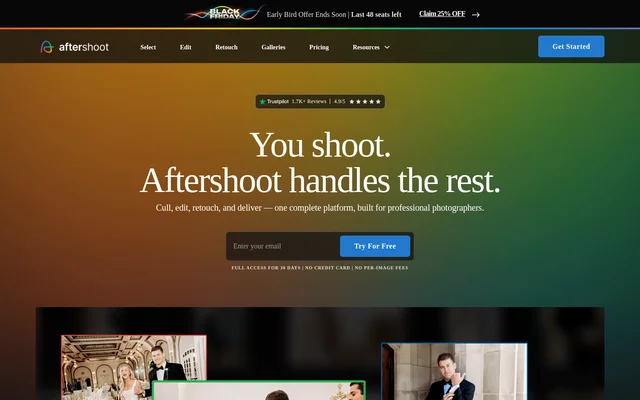
Aftershoot is AI-powered photo post-processing software for professional photographers who need to select, edit, retouch, and deliver photographs. Aftershoot brings these tasks into a Windows and macOS application, alongside client galleries. The supported audiences include wedding, event, school, boudoir, family, and newborn photographers.
Aftershoot combines AI automation with review and manual adjustment tools rather than removing the photographer from the workflow. Photographers can choose assisted culling, refine selections, and adjust images in the built-in RAW editor. Local image processing supports offline work, while non-destructive workflows preserve original files.
What Aftershoot can do
Aftershoot covers selection, consistent editing, album-wide retouching, and client delivery. Editing can start with a photographer's existing work, an imported Lightroom preset, or a pre-built style. Retouching adjustments can be synchronized across a gallery while adapting to individual images, and galleries add client-facing search, proofing, downloads, and print ordering.
- Aftershoot offers automated and assisted AI culling.
- Aftershoot groups duplicates and provides Survey, Grid, and Loupe review views.
- Aftershoot trains editing profiles using previously edited photographs.
- Aftershoot provides a RAW editor for previews, manual edits, and exports.
- Aftershoot retouches skin, stray hair, glasses glare, backgrounds, and clothing creases.
- Aftershoot creates client galleries with face detection, keyword search, and print sales.
How Aftershoot works
Aftershoot starts with a downloadable application installed on a Windows or macOS computer. After downloading, photographers can process images without a constant internet connection. Aftershoot supports RAW, JPEG, and TIFF files, processes images locally, and states that images are never stored on its servers.
Aftershoot lets photographers choose automated or assisted selection before applying an editing profile or style. Profiles can learn from edited images, while Instant AI Profiles can use Lightroom presets. Photographers can refine results in the RAW editor, apply retouching across an album, and create client galleries directly without re-uploading images between tools.
Who Aftershoot is for
Aftershoot serves professional photographers handling post-shoot selection, image consistency, portrait cleanup, and client delivery. The website specifically names wedding, event, school, boudoir, family, and newborn photography. Local processing also addresses workflows involving sensitive photographs or nondisclosure agreements, and the import screen includes a data-sharing opt-out option.
- Aftershoot helps wedding and event photographers review large image collections.
- Aftershoot helps portrait photographers apply retouching across albums.
- Aftershoot helps photographers maintain an established editing style across sessions.
- Aftershoot supports client proofing, favorite selections, downloads, and print ordering.
Aftershoot pricing and plans
Aftershoot offers a full-access 30-day free trial without a credit card, followed by paid subscription options. The complete workflow with unlimited AI culling, editing, and retouching starts at $45/month, billed annually. Individual tools start at $10/month for AI Culling, $30/month for AI Editing, and $20/month for AI Retouching.
Aftershoot offers monthly and annual billing cycles and describes pricing across plans as flat rather than per image. Photographers can choose the Aftershoot Complete plan for an end-to-end workflow or select specific tools. Unlimited image processing means subscription costs do not increase according to the number of photographs processed.
Aftershoot strengths and limitations
Aftershoot combines several post-production tasks with local processing, non-destructive editing, and predictable subscription pricing. Custom profiles and preset-based styles support photographers who want to retain their existing look. Manual selection review and RAW adjustments provide control over automated results, while client galleries extend the workflow beyond image editing.
- Aftershoot requires a paid plan after the free trial.
- Aftershoot lists Windows and macOS compatibility, not other operating systems.
- Aftershoot requires at least 8GB of RAM and a relatively recent CPU.
- Aftershoot warns that preview rendering and retouching may not work reliably with Intel Integrated Graphics or GPUs with less than 2GB VRAM.
Aftershoot FAQ
What is Aftershoot?
Aftershoot is AI-powered photo post-processing software for professional photographers. Aftershoot combines automated or assisted culling, style-based editing, batch retouching, and client galleries, with local image processing on Windows and macOS.
Is Aftershoot free?
Aftershoot offers a full-access 30-day free trial without requiring a credit card, followed by paid subscriptions. The complete culling, editing, and retouching workflow starts at $45/month, billed annually, with flat pricing and unlimited image processing.
Does Aftershoot work offline?
Aftershoot processes images locally on Windows and macOS and does not require a constant internet connection after download. Aftershoot states that images are never stored on its servers and that non-destructive workflows preserve original files.
Can Aftershoot learn my photo editing style?
Aftershoot can learn an editing style from previously edited photographs through Professional AI Profiles. Aftershoot also offers pre-built AI Styles and Instant AI Profiles based on Lightroom presets, with a built-in RAW editor for manual refinements.
What image formats does Aftershoot support?
Aftershoot supports RAW, JPEG, and TIFF images for photography workflows. Aftershoot uses non-destructive processing, and ratings in RAW workflows are typically written to XMP sidecar files rather than changing the original source files.
What are Aftershoot's system requirements?
Aftershoot requires a Windows or macOS computer with at least 8GB of RAM and a relatively recent CPU. Aftershoot warns that preview rendering and retouching may not work reliably with Intel Integrated Graphics or GPUs with less than 2GB VRAM.
From the community
No reviews yet
Be the first to review this tool. What you write helps the next person choose.