What is AI Carousel Generator?
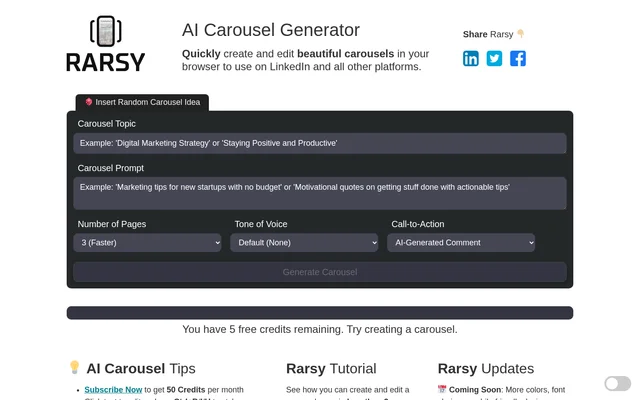
AI Carousel Generator is an OpenAI-powered browser tool for creating and editing carousels for LinkedIn and other platforms. AI Carousel Generator combines content generation with editing controls for text and images, and the page states that no graphic design experience is required. Alongside carousel creation, the service offers AI SEO articles. The page includes a tutorial showing how a carousel page can be created and edited in less than 2 minutes.
What AI Carousel Generator can do
AI Carousel Generator provides controls for changing carousel content and presentation within the browser. AI Carousel Generator supports editing text directly, replacing images and backgrounds, and deciding whether a call to action appears. A random carousel idea option offers a starting point, while dark mode changes the editing interface. The page also describes a screenshot-based approach to preparing carousel content for PDF conversion.
- AI Carousel Generator creates carousels for LinkedIn and other platforms.
- AI Carousel Generator allows direct text editing and keyboard-based text styling.
- AI Carousel Generator supports image and background image replacement.
- AI Carousel Generator can hide or show the call to action.
- AI Carousel Generator offers random carousel ideas.
- AI Carousel Generator also creates AI SEO articles.
How AI Carousel Generator works
AI Carousel Generator runs in the browser, where users can click text to edit and use Ctrl+B, Ctrl+I and Ctrl+U for styling. AI Carousel Generator provides a replace image button for selecting new images and an icon in the bottom right for dark mode. For output, the page recommends taking a high-resolution screenshot and converting that image to PDF, explaining that direct webpage-to-PDF conversion is challenging and unreliable. The Windows+Shift+S shortcut is specifically mentioned for capturing screenshots.
Who AI Carousel Generator is for
AI Carousel Generator is intended for people preparing carousel content for LinkedIn and other platforms, including users without graphic design experience. AI Carousel Generator brings text styling, image changes and call-to-action visibility into the same browser-based workflow. The separate AI SEO article option also serves people creating written content, although the page provides more detail about carousel editing than about the article-generation workflow.
- AI Carousel Generator helps users prepare LinkedIn carousel content.
- AI Carousel Generator supports carousel creation for other platforms.
- AI Carousel Generator lets users revise carousel text, images and backgrounds.
- AI Carousel Generator offers AI SEO article creation.
AI Carousel Generator pricing and access
AI Carousel Generator offers free creation of up to 5 carousels or AI SEO articles. AI Carousel Generator also advertises a subscription that provides 50 credits per month, but the page does not state a subscription price or explain how credits are consumed. The free allowance covers the listed content types together rather than promising a separate allowance for each. Browser access is central to the service, with no installation step described on the page.
AI Carousel Generator strengths and limitations
AI Carousel Generator combines browser-based creation with concrete editing controls and a free allowance for trying carousel or article generation. AI Carousel Generator also provides a tutorial and screenshot guidance for users preparing PDF output. The page distinguishes available editing controls from planned additions: more colors, font choices and a mobile-friendly design appear under coming soon. PDF preparation is described through screenshots because direct webpage conversion can be unreliable.
- AI Carousel Generator limits free creation to up to 5 carousels or AI SEO articles.
- AI Carousel Generator describes screenshots as the route to PDF conversion.
- AI Carousel Generator lists mobile-friendly design and additional color and font options as forthcoming.
AI Carousel Generator FAQ
What is AI Carousel Generator?
AI Carousel Generator is an OpenAI-powered browser tool for creating and editing carousels for LinkedIn and other platforms. AI Carousel Generator includes text editing, image replacement and call-to-action visibility controls, and the page states that no graphic design experience is required.
Is AI Carousel Generator free?
AI Carousel Generator offers up to 5 carousels or AI SEO articles for free. AI Carousel Generator also advertises a subscription with 50 credits per month, but the page does not list a subscription price or explain credit usage.
How do you edit text and images in AI Carousel Generator?
AI Carousel Generator allows users to click text to edit and use Ctrl+B, Ctrl+I and Ctrl+U to style text. AI Carousel Generator also provides image replacement, background image replacement and a control to hide or show the call to action.
Can AI Carousel Generator create PDFs?
AI Carousel Generator describes a screenshot-based workflow for converting carousel content to PDF. AI Carousel Generator recommends high-resolution screenshots because direct webpage-to-PDF conversion is challenging and unreliable, and the page mentions Windows+Shift+S for capturing screenshots.
Does AI Carousel Generator have a mobile-friendly design?
AI Carousel Generator lists a mobile-friendly design as coming soon rather than as an available capability. AI Carousel Generator also lists more colors and additional font choices among its planned updates.
From the community
No reviews yet
Be the first to review this tool. What you write helps the next person choose.