What is AI Tutor?
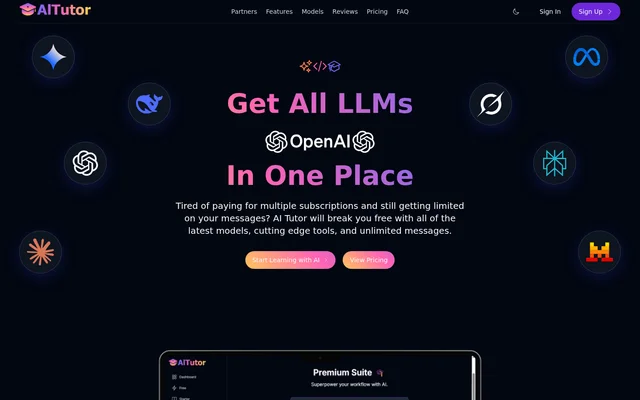
AI Tutor is an AI model and application platform for research, coding, content creation, and other tasks. It brings models and specialized tools into a unified interface for students, educators, developers, researchers, and other users. The Tech in Schools Initiative, a technology education nonprofit, developed AI Tutor to make AI tools available for educational purposes.
AI Tutor offers access to over 200 AI models across its plans, including local model integration and advanced reasoning capabilities. Users can switch models and use separate applications for tasks such as research and bot development. The selection of models and applications available to an individual user depends on the subscription tier.
What AI Tutor can do
AI Tutor combines a model interface with tools for working on documents, software, research, and creative projects. Its applications support both individual prompts and more involved workflows. Available capabilities vary by plan, with advanced applications and model comparison listed in higher subscription tiers.
- AI Tutor switches between AI models in a unified interface.
- AI Tutor analyzes uploaded files, folders, code repositories, and datasets.
- AI Tutor generates, debugs, and optimizes code across programming languages and frameworks.
- AI Tutor uses research tools to crawl web content and analyze sources.
- AI Tutor compares responses from multiple models through Beam.
- AI Tutor creates website bots with Botcraft and Typebot.
- AI Tutor generates articles, marketing copy, and narrations.
How AI Tutor works
AI Tutor gives users access to an interface after sign-up, with models and applications determined by their subscription tier. Users can navigate between applications for tasks such as coding, content creation, research, and application development. The platform also supports local model integration and lets users upload individual files or entire folders and projects for analysis.
AI Tutor includes Beam for submitting the same prompt to multiple models and comparing their responses. Its research applications can crawl web content, analyze datasets, compare sources, and synthesize information. New users are offered a complimentary 30-minute onboarding session, while online documentation provides tutorials, video walkthroughs, and examples.
Who AI Tutor is for
AI Tutor serves learners and educators alongside people applying AI to research, development, content, and support. Its research tools are described for academic research and market analysis, while its developer and bot tools address application building and website interactions. The range of models and applications available for these tasks depends on the user's plan.
- Students and educators can access AI tools for educational purposes.
- Researchers can compare sources, analyze trends, and generate literature reviews.
- Developers can generate and debug code or build applications.
- Content creators can draft articles, blog posts, and marketing copy.
- Website owners can create bots for visitor interactions and customer support.
AI Tutor pricing and plans
AI Tutor has a free plan and paid subscription tiers. The free plan is listed at $0 / Monthly and includes 10+ free models and unlimited messages. Starter is listed at $14.99 / Monthly, Plus at $24.99 / Monthly, Premium at $59.99 / Monthly, and Ultra at $199.99 / Monthly. The page also shows a yearly billing option.
AI Tutor assigns different models and applications to each tier. Premium lists document analysis, developer tools, and Multibot UI, while Ultra lists complex research and running multiple models at once. The page says there are no query limits on any tier and that subscription prices remain locked at the initial sign-up rate.
AI Tutor strengths and limitations
AI Tutor combines access to multiple models with research, coding, content, and bot-building tools. The free plan offers unlimited messages, and new users can receive onboarding and consult online documentation. The Tech in Schools Initiative says each purchased subscription provides an educational license to a student in need. Access to particular models and applications, however, varies by plan.
- AI Tutor limits model and application access according to the subscription tier.
- AI Tutor lists complex research and multiple-model runs under Ultra.
- AI Tutor lists document analysis and developer tools under Premium.
AI Tutor FAQ
What is AI Tutor?
AI Tutor is an AI model and application platform for tasks including research, coding, content creation, and bot development. Developed by the Tech in Schools Initiative, AI Tutor provides a unified interface with access to different models and tools according to the user's subscription tier.
Is AI Tutor free?
AI Tutor offers a free plan listed at $0 / Monthly with 10+ free models and unlimited messages. AI Tutor also offers paid plans starting at $14.99 / Monthly, with additional models and applications available according to the selected tier.
What can you use AI Tutor for?
AI Tutor can be used to research topics, analyze documents and datasets, generate and debug code, create content, and build website bots. AI Tutor also offers model comparison through Beam, although access to individual applications depends on the subscription plan.
Does AI Tutor offer research tools?
AI Tutor offers research applications that can crawl web content, analyze datasets, compare sources, and synthesize information. AI Tutor also describes uses such as literature reviews, trend analysis, and data visualization; complex research is listed under the Ultra plan.
How does AI Tutor compare multiple AI models?
AI Tutor uses Beam to send the same prompt to multiple AI models and compare their responses side by side. AI Tutor says users can also merge insights from model outputs for research, content creation, and complex problem-solving. Running multiple models at once is listed under Ultra.
Does AI Tutor provide onboarding and documentation?
AI Tutor offers every new user a complimentary 30-minute onboarding session and an invitation to its Discord community. AI Tutor also provides online documentation with guides, tutorials, video walkthroughs, and practical examples for its applications and workflows.
From the community
No reviews yet
Be the first to review this tool. What you write helps the next person choose.