What is ai4spaces?
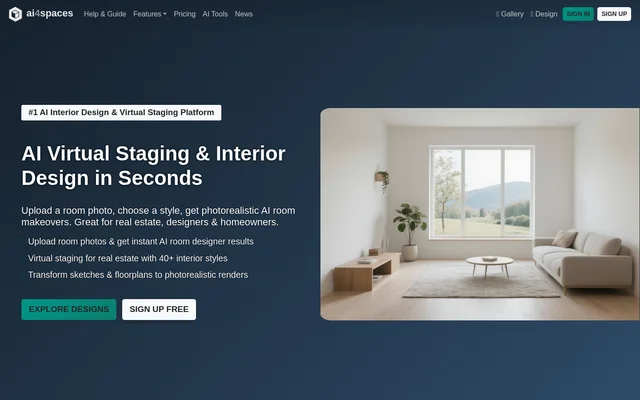
ai4spaces is an AI interior design and architectural visualization tool for creating and modifying views of residential and commercial spaces. ai4spaces serves homeowners planning renovations, designers presenting concepts, architects developing visualizations and real estate agents preparing listing imagery. Supported starting materials include room photos, sketches, floorplans and existing renders.
ai4spaces covers both interior and exterior projects, including living rooms, bedrooms, kitchens, house facades and commercial interiors. Design options include named interior styles and custom styles. Beyond individual images, ai4spaces can produce panoramic views and moving presentations to show a proposed space from different perspectives.
What ai4spaces can do
ai4spaces combines design generation with image editing and architectural transformation tools. Users can explore stylistic changes, furnish empty rooms, remove furniture or visualize structural alterations. The page also describes models that handle technical drawings and stylistic remixes from a prompt, supporting several ways to represent the same property.
- ai4spaces generates room makeovers and virtual staging images from uploaded photos.
- ai4spaces turns sketches and floorplans into photorealistic renders.
- ai4spaces produces ground plans, elevations and isometric views.
- ai4spaces creates alternate angles, aerial shots and exterior walkthroughs.
- ai4spaces generates video walkthroughs and 360° interior views.
- ai4spaces edits colors, adds furniture and supports inpainting and background removal.
- ai4spaces upscales images to 4K.
- ai4spaces visualizes facade changes, extra floors, pools and landscaping.
How ai4spaces works
ai4spaces starts with an uploaded room photo or a written description of the intended design. Users select a preferred style and AI model before generating results. Other supported workflows begin with sketches, floorplans or existing renders, allowing users to move from rough concepts to visualizations or enhance an existing model with textures and lighting.
ai4spaces processes generations in the cloud. Image generation typically takes 10-30 seconds, video generation takes 1-3 minutes, and upscaling takes 30-60 seconds. The page notes that server load and request complexity can change these timings. Credit usage also depends on the selected tool and model quality, with video generation consuming more credits.
Who ai4spaces is for
ai4spaces addresses personal renovation planning and professional property visualization. Homeowners can compare styles before a room makeover, while interior designers can turn sketches into client-facing renders. Real estate agents can use virtual staging for listings, and architects can use architectural visualization features. Commercial-space examples include offices, restaurants, hotel guest rooms and lobbies.
- ai4spaces helps homeowners explore living room, bedroom and kitchen redesigns.
- ai4spaces helps interior designers present alternative concepts to clients.
- ai4spaces supports virtual staging imagery for real estate listings.
- ai4spaces supports renovation visualization for office and hospitality spaces.
ai4spaces pricing and plans
ai4spaces offers a free Trial Plan with 10 credits per month, standard-definition images, 15 styles and public designs. Monthly subscriptions cost $12 for Premium, $36 for Pro and $180 for Pro Plan for Teams. Premium carries a personal-use license; Pro covers commercial use for 1 person, while the team plan covers 5 people.
ai4spaces also offers annual billing and pay-as-you-go packs. Annual Premium costs $108, annual Pro costs $324, and annual Pro Plan for Teams costs $1620. Credit packs cost $19 for 500 credits, $49 for 1500 credits and $129 for 4500 credits. Pack credits never expire, and packs include high-definition images, all AI tools and private designs.
ai4spaces strengths and limitations
ai4spaces brings several visualization workflows together: generating designs from different input types, editing images, creating architectural views and presenting spaces through video or panoramas. Subscription and credit-pack options accommodate ongoing and occasional use. Access conditions differ by plan, particularly for privacy, commercial licensing, advanced tools and the number of simultaneous tasks.
- ai4spaces limits the free Trial Plan to personal use and public designs.
- ai4spaces excludes advanced tools, custom styles and support from the free Trial Plan.
- ai4spaces reserves commercial subscription licensing for professional plans.
- ai4spaces generation times can vary with server load and request complexity.
ai4spaces FAQ
What is ai4spaces?
ai4spaces is an AI interior design and architectural visualization tool for homeowners and property professionals. ai4spaces turns photos, sketches, floorplans and renders into room redesigns, virtual staging images and architectural visualizations, with additional tools for editing, upscaling, panoramic views and video walkthroughs.
Is ai4spaces free?
ai4spaces offers a free Trial Plan with 10 credits per month for personal use. The plan includes standard-definition images, 15 styles and public designs, but excludes advanced tools and custom styles. Paid subscriptions and pay-as-you-go credit packs provide additional access.
How do you use ai4spaces?
ai4spaces generates designs after users upload a room photo or describe their vision, select a preferred style and AI model, and generate an image. ai4spaces also accepts sketches, floorplans and existing renders, with all generation processed in the cloud.
Can ai4spaces be used commercially?
ai4spaces offers commercial licensing through Pro and Pro Plan for Teams. Pro covers commercial use for 1 person, while Pro Plan for Teams covers 5 people. The free Trial Plan and Premium subscription are listed for personal use.
Can ai4spaces create videos and panoramic views?
ai4spaces can transform room photos into video walkthroughs and create 360° interior views. These outputs support property presentations, virtual staging and exploration of proposed interiors. ai4spaces also lists alternate angles, aerial shots and exterior walkthroughs among its architectural transformation capabilities.
How long does ai4spaces take to generate images?
ai4spaces typically generates images in 10-30 seconds, videos in 1-3 minutes and upscaled images in 30-60 seconds. Processing happens in the cloud, and the page states that server load and request complexity can affect generation times.
From the community
No reviews yet
Be the first to review this tool. What you write helps the next person choose.