What is Apache Maka?
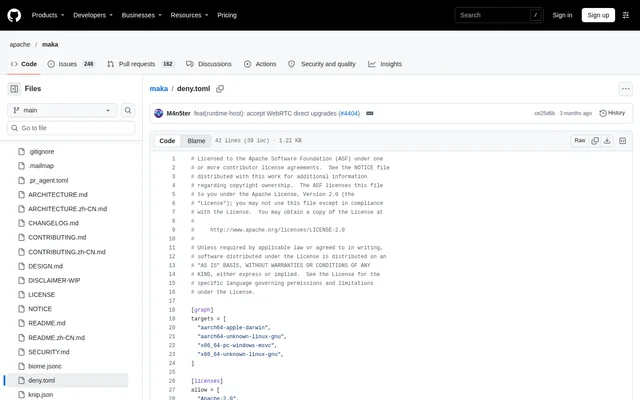
Apache Maka is an open-source agent workspace that executes tasks while retaining a complete runtime record. Apache Maka provides desktop and terminal interfaces for users working with connected models, including developers and contributors. The project is undergoing incubation at The Apache Software Foundation and distributes official releases as signed source archives.
Apache Maka treats its append-only event log as the runtime record rather than relying on the visible conversation alone. Model messages, tool calls, permission decisions, and terminations become runtime events. The interface, subsequent prompts, and crash recovery derive from that log, so removing old tool output from a prompt does not remove the underlying record.
What Apache Maka can do
Apache Maka combines task execution, local records, and evaluation tooling around a shared execution authority. Desktop, terminal UI, command-line, and evaluation clients use the Runtime Host rather than separate execution engines. The repository also includes model adapters, tools, context handling, recovery components, and a provider-neutral Model Context Protocol client integration.
- Apache Maka records model messages, tool calls, permission decisions, and terminations.
- Apache Maka connects to cloud APIs, local models, and compatible gateways.
- Apache Maka stores sessions, settings, and run records locally.
- Apache Maka supports interrupted-turn resume in desktop and terminal clients.
- Apache Maka runs graph implementation operators in isolated Git worktrees.
- Apache Maka publishes evaluation reports with per-task records.
How Apache Maka works
Apache Maka requires users to configure a model connection before starting a task. On first launch, users open Settings, select Models, add an API, local-model, or supported account connection, test the connection, and choose a default model. Apache Maka distinguishes configured, send-ready, and experimental connections rather than presenting an account flow without Runtime support as usable.
Apache Maka can be compiled from a verified release archive or a contributor Git checkout. The documented source workflow installs dependencies with npm and starts the desktop development environment. Terminal users build the workspaces before launching the development CLI. The repository also links to installation and usage guidance for the public npm package.
Who Apache Maka is for
Apache Maka supports developers running repository tasks, contributors testing changes, and researchers examining agent execution. The documented CLI examples cover repository summaries, risk identification, and implementing independent changes before integration and review. Evaluation users can inspect published runs and per-task results, with comparisons using the same model and official verifier.
- Apache Maka can summarize a repository and identify its most important risk.
- Apache Maka can run graph tasks that implement, integrate, and review independent changes.
- Apache Maka provides runtime records for examining agent actions and evaluation results.
Apache Maka pricing and source access
Apache Maka is distributed as an open-source project under the Apache License 2.0. The repository identifies signed source archives as official releases and packages distributed elsewhere as convenience artifacts. Apache Maka does not bundle a shared model account: users supply their own model connection. Successful interrupted-turn continuations call the model and use tokens.
Apache Maka strengths and limitations
Apache Maka offers traceable task execution through durable events, locally stored records, and a shared Runtime Host. Model choice remains with the user, including cloud APIs and local models. Operational constraints include source-build prerequisites, local plaintext credential storage, and upgrade compatibility limits. These details matter when preparing a development environment or moving an existing workspace.
- Apache Maka requires development dependencies when built from source.
- Apache Maka stores API keys in a plaintext file readable only by the operating-system account.
- Apache Maka does not import older JSONL transcripts or Electron safeStorage credentials.
- Apache Maka requires a clean Git worktree for graph implementation operators.
Apache Maka FAQ
What is Apache Maka?
Apache Maka is an open-source AI agent workspace with desktop, terminal UI, and command-line clients. Apache Maka executes tasks through a shared Runtime Host and records model messages, tool calls, permission decisions, and terminations in an append-only event log.
Is Apache Maka open source?
Apache Maka is available under the Apache License 2.0, with signed source archives identified as official releases. Apache Maka does not bundle a shared model account, so users must configure a cloud API, local model, or supported account connection.
Can Apache Maka use local models?
Apache Maka supports local models as well as cloud APIs and compatible gateways. Apache Maka requires users to add a connection in Settings under Models, test the connection, and select a default model before returning to the workspace to start a task.
Does Apache Maka keep data locally?
Apache Maka keeps sessions, settings, and run records local, with workspace data stored under Electron userData by default. Apache Maka stores API keys and similar secrets in a local plaintext credential file readable only by the operating-system account; the renderer does not receive those secrets.
Does Apache Maka support MCP?
Apache Maka includes a provider-neutral Model Context Protocol client integration in its repository. Apache Maka also provides desktop, terminal UI, and CLI clients that share a Runtime Host, with runtime components covering model adapters, tools, context, and recovery.
Can Apache Maka resume interrupted tasks?
Apache Maka provides explicit interrupted-turn resume by default in Desktop and through the CLI and TUI resume command. Apache Maka calls the model and uses tokens when a continuation succeeds; startup recovery does not automatically select an ordinary failed or cancelled turn.
From the community
No reviews yet
Be the first to review this tool. What you write helps the next person choose.