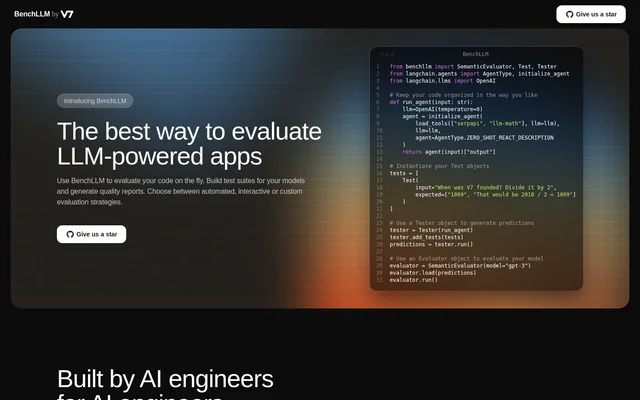
What is BenchLLM?
BenchLLM is an evaluation tool for AI engineers building LLM-powered applications. BenchLLM helps developers test application code, build model test suites, and generate quality reports. Built and maintained by V7, BenchLLM supports evaluation work intended to make AI application results more predictable without giving up flexibility.
BenchLLM offers automated, interactive, and custom evaluation strategies. BenchLLM combines code-based testing with a command-line workflow, allowing engineers to work with application functions and organized test suites. The examples cover both an agent built with Langchain and a chat function using OpenAI.
What BenchLLM can do
BenchLLM brings test definition, model execution, evaluation, and reporting into an engineering workflow. BenchLLM supports tests expressed in JSON or YAML and suites that can be versioned. Evaluation results can be shared with teammates, while automated runs can support model performance monitoring and regression detection.
- BenchLLM defines tests in JSON or YAML format.
- BenchLLM organizes tests into versionable suites.
- BenchLLM supports automated, interactive, and custom evaluations.
- BenchLLM runs and evaluates models through CLI commands.
- BenchLLM supports OpenAI, Langchain, and other APIs.
- BenchLLM generates evaluation reports for team sharing.
- BenchLLM automates evaluations in CI/CD pipelines.
- BenchLLM monitors model performance and detects production regressions.
How BenchLLM works
BenchLLM demonstrates a Python workflow that starts with an application function and Test objects containing inputs and expected responses. A Tester object receives the function, adds the tests, and runs them to generate predictions. A SemanticEvaluator then loads those predictions and runs the evaluation.
BenchLLM also demonstrates a CLI workflow using the command bench run tests/hallucinations. The displayed output separates test execution from evaluation and identifies failures alongside the input, generated output, and expected responses. Another Python example uses the benchllm.test decorator to connect a chat function to a test suite.
Who BenchLLM is for
BenchLLM is built by AI engineers for AI engineers. BenchLLM fits teams developing LLM applications that need repeatable tests, evaluation reports, and checks for changes in model behavior. The examples show agent and chat application testing, while the CLI supports engineering teams incorporating evaluations into CI/CD workflows.
- AI engineers can test LLM application responses against expected answers.
- Development teams can organize evaluation cases into versionable suites.
- Engineering teams can run model evaluations within CI/CD pipelines.
- Teams maintaining production applications can monitor performance and detect regressions.
BenchLLM strengths and limitations
BenchLLM provides flexibility through multiple evaluation strategies, CLI commands, and API-based workflows. BenchLLM also connects test organization with reporting and production regression detection. The demonstrated approach is technical: engineers work with application functions, structured test definitions, evaluation objects, or command-line instructions rather than a described no-code workflow.
- BenchLLM offers both command-line and programmatic testing workflows.
- BenchLLM supports shareable reports and versionable test suites.
- BenchLLM's demonstrated workflows require code, structured test files, or CLI use.
Getting started with BenchLLM
BenchLLM is offered through a Download and Install path. The examples provide a starting workflow: define the application function, create tests with expected responses, generate predictions, and evaluate the results. For file-based suites, BenchLLM shows running a test directory through the CLI and reviewing the resulting failures.
BenchLLM FAQ
What is BenchLLM?
BenchLLM is an evaluation tool for LLM-powered applications, built for AI engineers. BenchLLM supports model test suites, automated, interactive, and custom evaluation strategies, and quality reports. BenchLLM is built and maintained by V7.
Does BenchLLM support OpenAI and Langchain?
BenchLLM supports OpenAI, Langchain, and other APIs out of the box. BenchLLM's examples demonstrate evaluating a Langchain agent and connecting an OpenAI chat function to a test suite through a Python decorator.
Can BenchLLM run evaluations in a CI/CD pipeline?
BenchLLM supports automated evaluations in CI/CD pipelines through its CLI. BenchLLM can run and evaluate models with command-line commands, monitor model performance, and detect regressions in production.
How do you define tests in BenchLLM?
BenchLLM supports test definitions in JSON or YAML and organizes tests into suites that can be versioned. BenchLLM also demonstrates Python Test objects containing inputs and expected responses, followed by prediction generation and evaluation.
What evaluation strategies does BenchLLM support?
BenchLLM supports automated, interactive, and custom evaluation strategies. BenchLLM's Python example demonstrates a SemanticEvaluator that loads predictions generated by a Tester object and runs an evaluation of the model's outputs.
How can teams review BenchLLM evaluation results?
BenchLLM generates evaluation reports that teams can share. BenchLLM's CLI example also displays test failures with the original input, generated output, and expected responses, allowing engineers to inspect mismatches during evaluation.
From the community
No reviews yet
Be the first to review this tool. What you write helps the next person choose.