What is Bing Microsoft AI Translator?
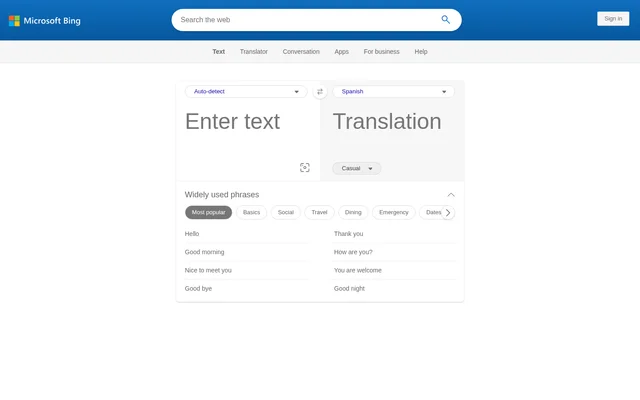
Bing Microsoft AI Translator is a web-based translation tool for working with short text across languages. Bing Microsoft AI Translator provides automatic language detection, language selection and translated-text controls for people who need to understand or express wording in another language. The supplied interface also includes listening, copying and AI regeneration options.
Bing Microsoft AI Translator lists individual languages alongside regional and script-specific options. Examples include English (United Kingdom), Arabic (Moroccan), Inuktitut (Latin), Mongolian (Cyrillic) and Mongolian (Traditional). These entries let users choose a listed variant rather than relying only on a general language label.
What Bing Microsoft AI Translator can do
Bing Microsoft AI Translator combines translation controls with options for hearing and revising text. The interface includes controls for source-language detection, language swapping, image capture and translation copying. AI regeneration has standard, casual and formal choices, while additional areas cover alternative expressions, usage and commonly used phrases.
- Bing Microsoft AI Translator can detect the source language automatically.
- Bing Microsoft AI Translator lets users select and swap languages.
- Bing Microsoft AI Translator provides listening controls for source text and translations.
- Bing Microsoft AI Translator offers an image-capture control for translation.
- Bing Microsoft AI Translator offers AI regeneration in standard, casual and formal styles.
- Bing Microsoft AI Translator provides a control for copying translations.
How Bing Microsoft AI Translator works
Bing Microsoft AI Translator presents source and target language selectors on the translator webpage. Users can choose a source language or leave automatic detection selected, then choose a target language. The language lists support keyboard navigation using Enter or Space, and the interface includes a control for swapping the selected languages.
Bing Microsoft AI Translator provides listening and copying controls alongside the translation workflow. The page also exposes a keyboard control and an option to capture an image for translation. For revised wording, the AI regeneration area offers standard, casual and formal styles. The text interface states that only the first 1000 characters can be translated at once.
Who Bing Microsoft AI Translator is for
Bing Microsoft AI Translator supports people who need short-text translation, spoken playback or alternative wording across languages. The available controls suit tasks such as understanding a brief passage, hearing translated text or comparing styles. The usage and common-phrase areas also provide material for exploring how expressions are used.
- Bing Microsoft AI Translator supports reading short passages in another language.
- Bing Microsoft AI Translator supports listening to translated wording.
- Bing Microsoft AI Translator supports exploring casual and formal translation styles.
- Bing Microsoft AI Translator supports reviewing alternative expressions and usage examples.
Bing Microsoft AI Translator strengths and limitations
Bing Microsoft AI Translator brings language selection, listening, translation copying and style regeneration into the same interface. Regional and script variants provide specific choices within the language menus. These capabilities are accompanied by explicit restrictions: the page limits translation length, includes an allowance-exceeded warning and cautions that automatically generated examples may not be accurate or error-free.
- Bing Microsoft AI Translator translates only the first 1000 characters at once.
- Bing Microsoft AI Translator may require users to try again later after exceeding the translation allowance.
- Bing Microsoft AI Translator warns that automatically generated examples may contain inaccuracies or errors.
Bing Microsoft AI Translator FAQ
What is Bing Microsoft AI Translator?
Bing Microsoft AI Translator is a web-based text translation tool with automatic language detection and source and target language selectors. Bing Microsoft AI Translator also provides listening controls, translation copying and AI regeneration with standard, casual and formal styles.
How much text can Bing Microsoft AI Translator translate at once?
Bing Microsoft AI Translator states that only the first 1000 characters can be translated at once. Bing Microsoft AI Translator also displays an allowance-exceeded warning that asks users to try again later, without specifying the allowance in the supplied text.
Can Bing Microsoft AI Translator read translations aloud?
Bing Microsoft AI Translator provides a control for listening to the translation, along with a listening control for source text. The supplied page does not specify voice choices, audio download options or language-specific playback availability.
Can Bing Microsoft AI Translator change the tone of a translation?
Bing Microsoft AI Translator offers an AI regeneration control with standard, casual and formal styles. Bing Microsoft AI Translator also includes areas for alternative expressions and usage information, with a warning that automatically generated examples may contain errors.
Does Bing Microsoft AI Translator detect languages automatically?
Bing Microsoft AI Translator includes automatic source-language detection alongside manual language selection. Bing Microsoft AI Translator also provides a target-language selector and a language-swap control, with regional and script variants appearing in the language lists.
From the community
No reviews yet
Be the first to review this tool. What you write helps the next person choose.