What is BrandBird?
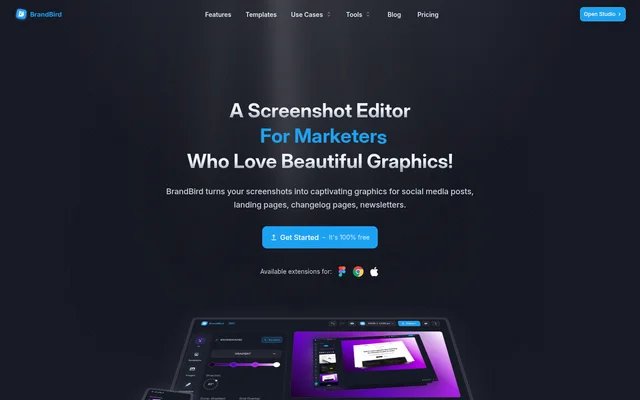
BrandBird is an online screenshot and image editor for founders, marketers, creators, and designers. BrandBird turns screenshots and other uploaded images into visuals for social media, landing pages, changelog pages, newsletters, and blogs. The editor runs in a browser and focuses on screenshot presentation, mockups, and branded marketing graphics.
BrandBird was built by Jim, a designer and engineer who describes creating visuals for recurring product updates, tweets, and newsletters as a tedious part of running a business. BrandBird’s stated purpose is to help founders create graphics with minimal effort, including people without design skills.
What BrandBird can do
BrandBird combines screenshot styling, device presentation, annotation, and branding tools in the same editor. BrandBird provides ready-to-use templates and presets for creating graphics without manually assembling every visual element. The available controls cover backgrounds, image perspective, explanatory labels, watermarks, and output dimensions for social media and website use.
- BrandBird applies solid colors, gradients, patterns, or images as backgrounds.
- BrandBird rotates images in three-dimensional space and applies shadows.
- BrandBird wraps screenshots in device mockups.
- BrandBird adds arrows, emojis, headings, and rectangles as annotations.
- BrandBird creates, uploads, and saves watermarks for consistent branding.
- BrandBird exports images in PNG, JPEG, or WebP format.
How BrandBird works
BrandBird uses an upload, customize, and export workflow. Users upload a screenshot or another image, choose a background style, and apply presets or optional effects. BrandBird also supports adding annotations and branding before export, so the same workflow can produce a product screenshot, a mockup, or a social media graphic.
BrandBird provides built-in social media size presets for X, LinkedIn, Instagram, Facebook, Product Hunt, and other platforms. Custom-size export supports graphics that need specific website dimensions. BrandBird’s website also lists a Chrome extension, Figma plugin, Mac app, API, and JS SDK, without detailing their operation on this page.
Who BrandBird is for
BrandBird targets founders, marketers, creators, and designers who need visual assets for publishing and product communication. BrandBird’s screenshot-focused workflow suits people presenting software features, sharing updates, or preparing branded content across social media and websites. The source also identifies blog creators and newsletter creators among the people using the editor.
- BrandBird creates social media graphics from screenshots.
- BrandBird prepares hero images and feature showcases for landing pages.
- BrandBird produces blog post headers and newsletter visuals.
- BrandBird highlights product features with screenshot annotations.
BrandBird pricing and plans
BrandBird offers a free tier with core editing features and a Pro upgrade for additional capabilities. BrandBird reserves premium backgrounds, advanced export options, and the full toolkit for Pro. The page provides free-start links and access to the browser-based Studio, but does not state a Pro subscription price.
BrandBird strengths and limitations
BrandBird brings backgrounds, mockups, annotations, branding, and export presets into a screenshot-focused editor. BrandBird supports both social media dimensions and custom-size website graphics, making the workflow relevant to several publishing contexts. The main stated constraints concern access to premium tools and the devices recommended for precise editing.
- BrandBird requires a Pro upgrade for premium backgrounds and the full toolkit.
- BrandBird places advanced export options in Pro.
- BrandBird is optimized for desktop browsers; tablet access is available, but laptop or desktop editing is recommended.
BrandBird FAQ
What is BrandBird?
BrandBird is a browser-based screenshot and image editor for founders, marketers, creators, and designers. BrandBird creates screenshot mockups, social media graphics, and marketing visuals using backgrounds, device frames, 3D transforms, annotations, and branding tools.
Is BrandBird free?
BrandBird offers a free tier with core editing features. BrandBird also offers a Pro upgrade for premium backgrounds, advanced export options, and the full toolkit. The page does not list a Pro subscription price.
How do you create a screenshot mockup with BrandBird?
BrandBird creates screenshot mockups by letting users upload a screenshot, select a background, and apply optional 3D transforms and shadows. BrandBird also supports annotations and branding before exporting the finished image as PNG, JPEG, or WebP.
Which social media platforms does BrandBird support?
BrandBird provides built-in social media size presets for X, LinkedIn, Instagram, Facebook, Product Hunt, and other platforms. BrandBird also supports custom-size export for graphics that need dimensions suited to a blog, website, or landing page.
Does BrandBird work on mobile devices?
BrandBird is optimized for desktop browsers, and the page states that tablets can access the editor. BrandBird recommends a laptop or desktop for the full editing experience and precise control over designs.
Does BrandBird have an API or integrations?
BrandBird lists an API, JS SDK, Chrome extension, Figma plugin, and Mac app on its website. BrandBird’s page does not explain their setup, functionality, pricing, or technical requirements in the supplied text.
From the community
No reviews yet
Be the first to review this tool. What you write helps the next person choose.