What is Browse AI?
Browse AI is a no-code tool for extracting website data and monitoring changes over time. Browse AI turns webpages into structured data that businesses can use in spreadsheets, applications, and automated workflows. The service covers recurring data collection as well as extraction tasks, with use cases spanning commerce, real estate, recruiting, legal research, and lead generation.
Browse AI combines self-service scraper creation with fully managed web scraping and monitoring services. The self-service workflow uses AI to propose a data structure from a webpage, while the managed service covers extracting, formatting, and delivering data to a requested system. Browse AI also provides prebuilt robots for common websites and tasks.
What Browse AI can do
Browse AI supports data extraction, recurring monitoring, and delivery into other tools. Browse AI captures dynamic content through interactions such as dropdowns, search bars, and form fills. The page also lists built-in bot evasion, proxy management, automatic retries, rate limiting, and geo-based extraction as capabilities supporting web data collection.
- Browse AI proposes extraction columns and accepts additional fields described in plain language.
- Browse AI extracts data from pages and subpages through deep scraping workflows.
- Browse AI schedules extraction and monitoring hourly, daily, weekly, or monthly.
- Browse AI alerts users to website changes.
- Browse AI connects website data to Google Sheets and Airtable.
- Browse AI exposes web data through APIs and webhooks.
- Browse AI offers 200+ prebuilt scraping and monitoring robots.
How Browse AI works
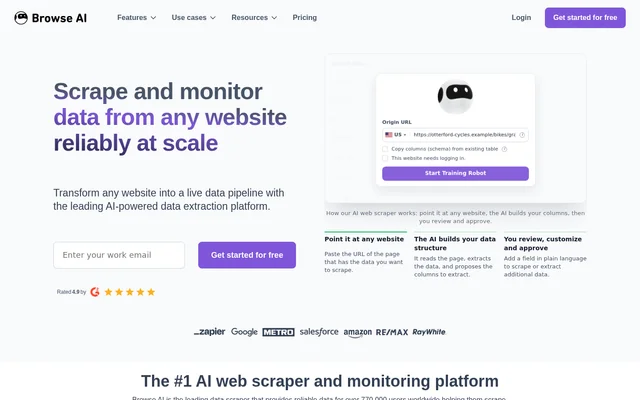
Browse AI starts with the URL of a page containing the desired data. Browse AI reads the page, extracts information, and proposes columns for the resulting dataset. Users then review the structure, customize the fields, and approve the extraction. Additional fields can be requested in plain language rather than defined through code.
Browse AI can connect the resulting data to spreadsheets or other applications and run extraction on a schedule. Browse AI lists integrations with 9,000+ apps, API documentation for building applications, and webhook support for automated workflows. Prebuilt robots offer another starting point for supported extraction and monitoring tasks.
Who Browse AI is for
Browse AI serves businesses and teams that need website information for operational workflows, research, or monitoring. Browse AI lists use cases involving competitors, vendors, property markets, job listings, legal information, and prospective customers. Developers can also use the API to integrate extracted information into applications, while LLM workflows can receive synced web data.
- Commerce teams can monitor product prices, competitors, and vendors.
- Property researchers can collect listings, pricing, and real estate market data.
- Recruiting teams can monitor job listings and candidate information.
- Legal researchers can extract and monitor case data and judgements.
- Sales teams can collect website data for lead generation.
Browse AI pricing and access
Browse AI offers free access to get started and explicitly states that users can extract data from a first website for free. The supplied page links to pricing but does not give plan prices or explain free-access allowances. Browse AI also directs enterprise, customized, complex, and highly scaled scraping projects to sales for consultation.
Browse AI strengths and limitations
Browse AI brings no-code setup, scheduled monitoring, prebuilt robots, and data integrations into the same service. Browse AI also lists SOC 2 Type II certification, GDPR compliance, encrypted data transfer, role-based access control, and dedicated infrastructure for enterprise clients. The supplied page does not establish specific extraction limits, free-access quotas, or plan-by-plan feature availability.
Browse AI FAQ
What is Browse AI?
Browse AI is a no-code AI web scraping and website monitoring tool. Browse AI extracts structured data from webpages, monitors changes, and connects results to spreadsheets, applications, APIs, and webhooks for business workflows.
Is Browse AI free?
Browse AI offers free access to get started and extract data from a first website. Browse AI links to a pricing page, but the supplied text does not state plan prices, free-access quotas, or detailed plan allowances.
How does Browse AI scrape a website?
Browse AI reads a webpage URL and proposes columns for the data to extract. Users review, customize, and approve those columns, with additional fields requested in plain language. Browse AI supports this setup without coding.
Does Browse AI integrate with Google Sheets or have an API?
Browse AI connects website data to Google Sheets and Airtable and supports APIs and webhooks. Browse AI also lists integrations with 9,000+ apps and provides API documentation for integrating with the service or building applications on top of Browse AI.
Can Browse AI monitor website changes automatically?
Browse AI schedules website monitoring and data extraction hourly, daily, weekly, or monthly. Browse AI alerts users to website changes and supports monitoring use cases such as product prices, job listings, and other changing webpage data.
From the community
No reviews yet
Be the first to review this tool. What you write helps the next person choose.