What is Bubbles?
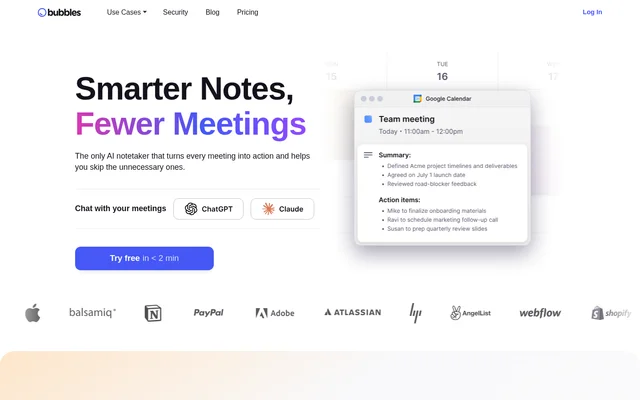
Bubbles is an AI meeting notetaker and async video collaboration tool for teams and freelancers. Bubbles captures meetings, produces summaries and action items, and provides a shared space for recordings and follow-up discussions. The product combines automated meeting documentation with screen recording and video messaging for work that does not require a live call.
Bubbles is available on the web and through a Chrome extension. The website describes uses ranging from client meetings to project check-ins and feedback on designs or documents. Bubbles also supports collaboration with vendors, contractors, and agencies without requiring guests to sign up or install software.
What Bubbles can do
Bubbles combines meeting capture, AI-generated notes, and contextual discussion around recorded content. Bubbles organizes recordings in a workspace where users can search, share, comment, and reply with video. Screen recordings and annotations extend those workflows to project updates, feedback, and questions outside scheduled meetings.
- Bubbles automatically joins supported meetings and records video.
- Bubbles generates AI summaries and action items.
- Bubbles delivers meeting takeaways through email, the workspace, and calendar events.
- Bubbles lets users organize, search, and share recordings.
- Bubbles supports comments and video replies on meeting videos.
- Bubbles captures screens, camera recordings, voice, and full-page screenshots.
- Bubbles provides text, video, screen, and voice annotations.
How Bubbles works
Bubbles starts with a calendar connection and uses meeting links to join calls automatically. Supported meeting services include Zoom, Google Meet, Microsoft Teams, GoTo Meeting, and Webex. After a meeting, Bubbles sends a summary and action items by email. Google Calendar users can also access notes from the corresponding calendar event.
Bubbles offers Google Calendar and Outlook integration, Slack integration, and a Bubbles API. The Chrome extension lets users record live meetings or capture their screen and voice from the browser. Pro users can configure which meetings Bubbles joins and who receives recordings, while Basic applies automatic attendance and sharing rules.
Who Bubbles is for
Bubbles serves teams that need meeting records and ways to collaborate asynchronously, as well as freelancers working with clients. Bubbles also supports external collaboration with vendors, contractors, and agencies. The stated workflows focus on sharing context, tracking next steps, and discussing work without turning every question or update into another meeting.
- Bubbles records client meetings so participants can refer back to discussions.
- Bubbles supports project check-ins about timelines, action items, and next steps.
- Bubbles enables async feedback on designs, websites, documents, and apps.
- Bubbles lets collaborators answer ad-hoc questions through recorded context.
Bubbles pricing and plans
Bubbles offers a free Basic plan with 30-minute recordings, 5 meeting recordings per week, unlimited screen recordings, and AI summaries and action items. Basic recordings lock after 2 weeks. Bubbles Basic joins all eligible calendar meetings and shares recordings with all invitees, rather than offering the attendance and recipient controls included with Pro.
Bubbles Pro Teams costs $12 per member per month with yearly billing or $15 per user per month with monthly billing for workspaces with 3 or more members. Pro Personal costs $18 per member per month yearly or $22 per user per month monthly for 1 or 2 members. Every new workspace receives a 14-day Pro trial.
Bubbles strengths and limitations
Bubbles combines automatic meeting documentation with async screen recordings, comments, and video replies. Bubbles is SOC2 Type II certified, and guest collaboration does not require signup or installation. The main plan differences concern recording limits, access to older recordings, AI transcripts, and control over meeting attendance and recording distribution.
- Bubbles Basic limits meeting recording length and weekly meeting recordings.
- Bubbles Basic locks recordings after 2 weeks.
- Bubbles reserves AI transcripts and configurable attendance and sharing controls for Pro.
- Bubbles Basic requires a supported meeting link and at least 2 invitees for automatic attendance.
Bubbles FAQ
What is Bubbles?
Bubbles is an AI meeting notetaker and async collaboration tool that records meetings, generates summaries and action items, and supports screen recordings. Bubbles also lets teammates and guests discuss recordings through comments and video replies.
Is Bubbles free?
Bubbles offers a free Basic plan with AI summaries, action items, unlimited screen recordings, and 5 meeting recordings per week. Basic recordings are limited to 30 minutes and lock after 2 weeks. Paid Pro plans add unlimited meeting recordings and recording length, AI transcripts, and attendance and sharing controls.
Which meeting platforms does Bubbles support?
Bubbles supports meeting links from Zoom, Google Meet, Microsoft Teams, GoTo Meeting, and Webex. Bubbles connects to a calendar to join meetings automatically and sends summaries and action items by email after meetings.
Can you control which meetings Bubbles joins?
Bubbles allows Pro users, including trial users, to configure meeting attendance using criteria such as organizer status, internal or external invitees, and accepted invitations. Pro users can also enable or disable attendance for specific calls. Basic automatically joins eligible calendar meetings with supported links and at least 2 invitees.
Does Bubbles have an API or integrations?
Bubbles provides an API and integrations with Google Calendar, Outlook, and Slack. Bubbles also supports Zoom, Google Meet, and Microsoft Teams, and offers a Chrome extension for recording live meetings, screens, and voice.
Can guests collaborate in Bubbles without signing up?
Bubbles supports collaboration with clients, vendors, contractors, and agencies without requiring guests to sign up or install software. Bubbles provides async recordings and text, video, screen, and voice annotations for sharing feedback and discussing work.
From the community
No reviews yet
Be the first to review this tool. What you write helps the next person choose.