What is ChattyDocs?
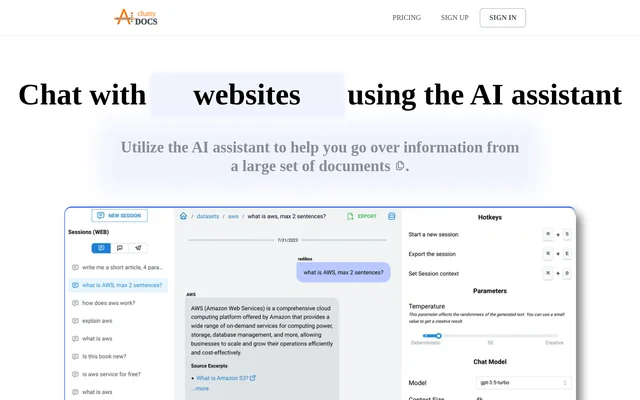
ChattyDocs is an AI assistant for asking questions about information stored in document collections and websites. ChattyDocs lets users organize source material into datasets and chat with that material rather than reviewing every file individually. The service is intended for people working through large sets of documents and users who want to share a knowledge base with other ChattyDocs users.
ChattyDocs connects answers to the underlying material by returning relevant sources. Responses based on multi-page files include the document name and page number, while website-based responses include a source link. These references give users a way to locate the material associated with an answer.
What ChattyDocs can do
ChattyDocs combines document ingestion, configurable AI responses, and dataset-based conversations. Users can add or remove documents as their collections change, control how the assistant responds, and preserve separate chat sessions. ChattyDocs also supports sharing datasets and accessing conversations through different chat sources, including Telegram and embedded web chat.
- ChattyDocs uploads multiple PDFs or text files through a built-in upload manager.
- ChattyDocs downloads and parses website content from a supplied link.
- ChattyDocs indexes uploaded data in the background.
- ChattyDocs provides source references alongside query responses.
- ChattyDocs supports model selection, temperature settings, and system prompts.
- ChattyDocs exports questions and answers.
- ChattyDocs creates public datasets that users can share by link.
- ChattyDocs supports Telegram bots and embedded web conversations.
How ChattyDocs works
ChattyDocs starts with a dataset prepared from uploaded files or a website link. Uploaded material is indexed in the background, and users can see how much uploading credit or subscription quota each source consumes. Dataset settings let users choose a chat model and allocate context, history, and output sizes. System prompts control behavior, response language, and personality.
ChattyDocs then lets users query the dataset through persistent chat sessions. A session can include context that is added to every query alongside information from the dataset. Users can return to previous conversations and preview sessions from the app, an embedded web source, or Telegram. ChattyDocs is available on desktop, mobile, and Telegram.
Who ChattyDocs is for
ChattyDocs serves people who need to examine information spread across documents or websites and organizations that want to share a knowledge base. The available workflows cover individual document review, recurring questions about a dataset, and shared access through public dataset links. Organizations can also request a self-hosted setup when they want to run the application and supporting services themselves.
- ChattyDocs helps users ask questions across uploaded document collections.
- ChattyDocs lets users turn website content into a chat data source.
- ChattyDocs supports sharing knowledge datasets with other ChattyDocs users.
- ChattyDocs provides dataset conversations through Telegram or embedded web chat.
ChattyDocs strengths and limitations
ChattyDocs provides source-linked answers, background indexing, and controls over model behavior and conversation context. Persistent sessions and exports support returning to previous work, while public datasets and multiple chat sources support sharing access. The main constraints concern subscription allowances and feature availability: the trial has limited capacity, and API access is reserved for the higher listed plans.
- ChattyDocs limits trial usage to 20 queries and 900 kilobytes of uploaded text.
- ChattyDocs sets monthly upload and query quotas on every listed subscription.
- ChattyDocs restricts Casual to 20 datasets and 30 documents per dataset.
- ChattyDocs requires Scale or Enterprise for API access.
ChattyDocs FAQ
What is ChattyDocs?
ChattyDocs is an AI assistant for chatting with PDFs, text files, and website content organized into datasets. ChattyDocs answers questions using the dataset and includes relevant sources, such as document names and page numbers or links to websites.
Does ChattyDocs show sources for its answers?
ChattyDocs includes relevant sources with query responses. For an uploaded multi-page file, the reference contains the document name and page number. For website content, ChattyDocs provides a link to the source.
Does ChattyDocs have an API or Telegram integration?
ChattyDocs includes API access on Scale and Enterprise plans and supports creating Telegram bots on all listed paid plans. ChattyDocs also supports embedded web chat and lets users preview sessions from the app, embedded web sources, or Telegram.
Can ChattyDocs be self-hosted?
ChattyDocs offers a custom Docker-based self-hosting solution for organizations. The stated deployment covers the database, vector store, web application, and all services. Organizations must contact ChattyDocs support for self-hosting pricing.
Can ChattyDocs customize how the AI responds?
ChattyDocs lets users select a chat model, allocate context, history, and output sizes, and adjust temperature. ChattyDocs also supports system prompts for behavior, personality, and response language, plus session context that is included in every query.
From the community
No reviews yet
Be the first to review this tool. What you write helps the next person choose.