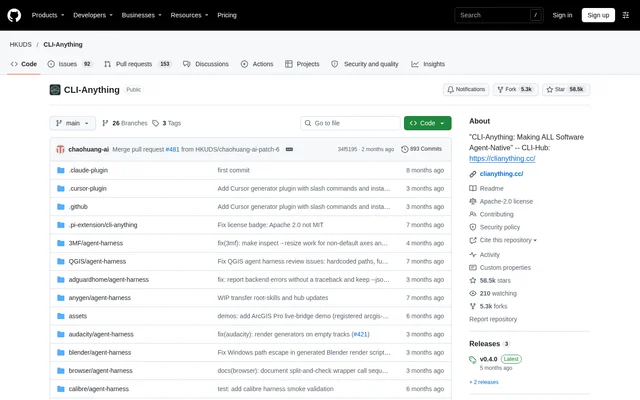
What is CLI-Anything?
CLI-Anything is an open-source project for making software accessible to AI agents through command-line harnesses. CLI-Anything connects agent environments with applications and services, giving developers a way to build software workflows around CLI operations. The repository names Pi, OpenClaw, nanobot, Cursor, and Claude Code as agent environments and includes harnesses for software across creative, research, and development tasks.
CLI-Anything is hosted in the public HKUDS GitHub repository and carries an Apache-2.0 license. CLI-Anything also links to CLI-Hub, a web destination and package manager for community-built CLIs. The repository includes contribution guidance, a security policy, application harness directories, and a central skills directory.
What CLI-Anything can do
CLI-Anything combines application-specific command-line harnesses with tools for discovering and managing those harnesses. CLI-Anything documents workflows ranging from GIS and ebook management to browser control and self-hosted automation. The repository also describes demonstrations in which AI agents use generated CLIs, previews, and trajectory loops to produce artifacts.
- CLI-Anything provides CLI-Hub commands to browse, search, install, update, and uninstall harnesses.
- CLI-Anything supports public CLIs distributed through pip, npm, brew, and bundled or system tools.
- CLI-Anything includes a QGIS harness for GIS and map authoring.
- CLI-Anything includes Calibre workflows for library search, metadata, conversion, and export.
- CLI-Anything includes an Obsidian harness using the Local REST API.
- CLI-Anything includes Safari browser automation through safari-mcp.
How CLI-Anything works
CLI-Anything documents a package-manager workflow beginning with pip install cli-anything-hub, followed by cli-hub install <name> to install a chosen CLI. CLI-Hub handles discovery and lifecycle management, while individual harnesses expose application-specific workflows. CLI-Hub supports both CLI-Anything harnesses and public CLIs, with installation sources including Python packages, npm packages, brew, and bundled or system tools.
CLI-Anything maintains CLI skills under the top-level skills/ directory as a canonical installation source. The documented skill command is npx skills add HKUDS/CLI-Anything --skill <skill-name> -g -y. CLI-Anything also describes root-skill validation checks and REPL skill-path hints, connecting the repository's skill documentation with individual harness workflows.
Who CLI-Anything is for
CLI-Anything is relevant to developers building AI agent workflows and contributors adding command-line access to software. CLI-Anything's examples span desktop applications, knowledge tools, creative software, and automation services. The repository invites contributions of new CLI harnesses and provides a wishlist route for requesting support for particular software or services.
- Developers can connect agents with application-specific command-line workflows.
- Automation builders can use the n8n harness for self-hosted flows.
- Knowledge-management users can work with Obsidian through its Local REST API.
- Contributors can submit new CLI harnesses for review and merging.
CLI-Anything pricing and access
CLI-Anything is available as an open-source project under the Apache-2.0 license rather than as a listed subscription plan. CLI-Anything can be accessed through its public GitHub repository, and CLI-Hub is distributed as a pip-installable package. The supplied page describes repository access, package installation, and contribution paths without listing commercial pricing.
CLI-Anything strengths and limitations
CLI-Anything brings application harnesses, package management, and skill documentation into a shared repository and distribution workflow. CLI-Anything's concrete strengths include multiple installation sources, named agent environments, and harnesses across different software categories. Setup remains technical: the documented entry points use command-line package managers, and some application workflows depend on additional interfaces or services.
- CLI-Anything setup uses command-line installation and skill commands.
- CLI-Anything's Obsidian harness depends on the Local REST API.
- CLI-Anything's Safari automation uses safari-mcp.
CLI-Anything FAQ
What is CLI-Anything?
CLI-Anything is an open-source project that gives AI agents command-line access to software through application-specific harnesses. CLI-Anything includes CLI-Hub for discovering and managing community CLIs, alongside a repository of harnesses and agent skills.
Is CLI-Anything free?
CLI-Anything is available as an open-source project under the Apache-2.0 license through a public GitHub repository. CLI-Anything's page describes repository and package access but does not list paid plans or subscription pricing.
How do you install CLI-Anything harnesses?
CLI-Anything documents installing CLI-Hub with pip install cli-anything-hub, then installing a selected CLI with cli-hub install <name>. CLI-Anything also provides a separate npx skills command for installing individual skills from the repository's central skills directory.
Which AI agent environments does CLI-Anything support?
CLI-Anything names Pi, OpenClaw, nanobot, Cursor, and Claude Code as environments for agent-ready software workflows. CLI-Anything provides command-line harnesses and skill documentation rather than describing a single standalone chat application.
What software can CLI-Anything automate?
CLI-Anything includes harnesses for software such as QGIS, Calibre, n8n, Obsidian, and Safari. CLI-Anything documents map authoring, ebook library operations, self-hosted workflow automation, knowledge management through the Obsidian Local REST API, and Safari automation through safari-mcp.
From the community
No reviews yet
Be the first to review this tool. What you write helps the next person choose.