What is CodeDesign.ai — AI Website Builder?
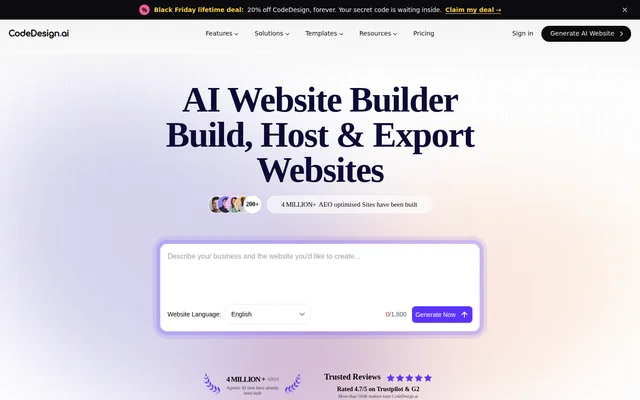
CodeDesign.ai — AI Website Builder is a web-based website creation tool that turns a description of a business or project into a website. The builder generates structure, copy, and visuals, then lets users customize the result. The intended audience includes small business owners, agencies, founders, marketers, creators, and developers who need business websites, landing pages, portfolios, or client drafts.
CodeDesign.ai — AI Website Builder combines website creation with publishing and ongoing site management. Users can keep a site on the service’s cloud hosting, publish to WordPress, or export code for use elsewhere. The page also describes domain registration, automatically renewing SSL certificates, website audits, and visitor analytics within the same dashboard.
What CodeDesign.ai — AI Website Builder can do
CodeDesign.ai — AI Website Builder supports both AI-directed creation and manual design changes. The chat companion generates layouts, writes copy, and applies requested edits, while the visual editor lets users change individual elements without writing prompts. Additional tools cover publishing, search visibility, visitor measurement, customer questions, and appointment booking.
- CodeDesign.ai — AI Website Builder drafts websites from plain-language descriptions.
- CodeDesign.ai — AI Website Builder rewrites headlines and other copy inside the editor.
- CodeDesign.ai — AI Website Builder exports projects as React or HTML code.
- CodeDesign.ai — AI Website Builder audits sites for missing headings, duplicate titles, and missing metadata.
- CodeDesign.ai — AI Website Builder tracks visitors, page views, bounce rate, visit duration, and traffic sources.
- CodeDesign.ai — AI Website Builder provides a support chatbot trained on site pages and PDFs.
- CodeDesign.ai — AI Website Builder handles appointment bookings with time zones and reminders.
How CodeDesign.ai — AI Website Builder works
CodeDesign.ai — AI Website Builder starts with a description or an industry template. Users refine the generated website by describing changes to the AI companion or adjusting colors, copy, and spacing in the visual editor. The prompt-led editor centers on AI instructions, while the visual editor is manual-first and includes optional AI text and image generation.
CodeDesign.ai — AI Website Builder then offers publishing to a domain, a subdomain, or WordPress. Users can register a domain within the service or connect an existing domain. After publication, built-in analytics work without a separate tracking script. Connecting a domain also enables site crawling, an SEO health score, prioritized issues, and repeat crawls to track fixes.
Who CodeDesign.ai — AI Website Builder is for
CodeDesign.ai — AI Website Builder addresses both non-technical website owners and users who want editable output. Small businesses can build their own sites without prior coding or design experience. Agencies and freelancers can prepare client drafts, while developers can start with generated code rather than a blank project. Marketers can create landing pages without depending on a development request.
- Founders can publish a site before a product launches.
- Coaches and creators can maintain portfolios and personal-brand websites.
- Real estate businesses can publish property details and enquiry forms.
- Clinics can present services, doctors, opening hours, and appointment booking.
CodeDesign.ai — AI Website Builder pricing and plans
CodeDesign.ai — AI Website Builder offers a free starting option and free templates, with upgrades available. The page states that no credit card is required and that users can cancel anytime. The supplied pricing information does not explain paid plan prices, feature allowances, or which publishing and management capabilities require an upgrade.
CodeDesign.ai — AI Website Builder strengths and limitations
CodeDesign.ai — AI Website Builder combines prompt-based editing, visual controls, hosting, SEO audits, and analytics in a shared workflow. WordPress publishing and downloadable code provide alternatives to keeping a site on the service’s hosting. The clearest technical boundary on the page is export format support; pricing details also leave some access conditions unspecified.
- Code export is currently available in React and HTML.
- Paid upgrade prices are not detailed in the supplied page.
- Feature availability by plan is not specified in the supplied page.
CodeDesign.ai — AI Website Builder FAQ
What is CodeDesign.ai — AI Website Builder?
CodeDesign.ai — AI Website Builder is a web-based tool that generates websites from plain-language descriptions. Users can customize layouts and copy through AI chat or a visual editor, then use cloud hosting, publish to WordPress, or export the generated code.
Is CodeDesign.ai — AI Website Builder free?
CodeDesign.ai — AI Website Builder offers a free starting option and free templates, with upgrades available. The page states that no credit card is required. The supplied text does not provide paid plan prices or explain which features require an upgrade.
Can CodeDesign.ai — AI Website Builder export code or publish to WordPress?
CodeDesign.ai — AI Website Builder supports direct WordPress publishing and exports projects as React or HTML code. Users can also publish through the service’s cloud hosting, connect an existing domain, or register a domain within the service.
Do beginners need coding skills to use CodeDesign.ai — AI Website Builder?
CodeDesign.ai — AI Website Builder does not require prior coding or design experience for website creation. Beginners can describe a website in chat and request changes through the AI companion, or use the drag-and-drop interface to adjust elements manually.
Does CodeDesign.ai — AI Website Builder include SEO tools and analytics?
CodeDesign.ai — AI Website Builder includes a site-wide SEO audit and built-in visitor analytics. The audit identifies issues such as missing headings, duplicate titles, and missing metadata. Analytics track visitors, page views, bounce rate, visit duration, top pages, and traffic sources without a separate tracking script.
From the community
No reviews yet
Be the first to review this tool. What you write helps the next person choose.