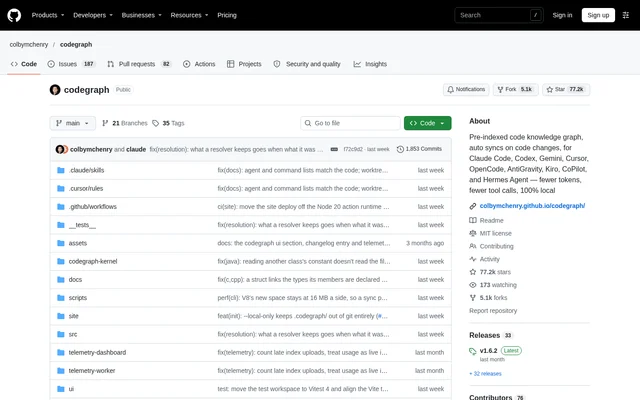
What is CodeGraph?
CodeGraph is an open-source code intelligence project that gives AI coding agents a pre-indexed knowledge graph of a codebase. CodeGraph serves developers who want agents to understand symbols, call paths, and dependencies without repeatedly discovering structure through file searches. The repository distributes the project under the MIT license and describes its code graph as local.
CodeGraph focuses on retrieving relevant code context rather than having an agent reconstruct relationships from individual files. The graph can return source code, paths between symbols, and the potential blast radius of a change. Supported assistants include Claude Code, Cursor, Codex, Gemini, OpenCode, Hermes Agent, Kiro, and GitHub Copilot.
What CodeGraph can do
CodeGraph combines structural extraction, cross-file resolution, and source retrieval in a graph that coding agents can query. CodeGraph also watches project files so the graph follows ongoing edits. The documented capabilities address code discovery and change analysis, including call relationships that ordinary text searches cannot follow through dynamic dispatch.
- CodeGraph indexes code symbols, call edges, and dependencies.
- CodeGraph resolves structural relationships across files.
- CodeGraph returns relevant source code alongside call paths.
- CodeGraph follows dynamic-dispatch hops between symbols.
- CodeGraph provides context about the blast radius of changes.
- CodeGraph updates the graph when files are added, modified, or deleted.
How CodeGraph works
CodeGraph installation begins with a standalone installer for macOS, Linux, or Windows, or an npm package. CodeGraph bundles its own runtime, so the standalone installation does not require Node.js or native compilation. After installation, a new terminal makes the installed command available, and codegraph install detects supported agents and configures their CodeGraph MCP server connections.
CodeGraph requires a separate initialization step inside each project. Running codegraph init creates the local .codegraph/ directory and builds the graph. Agent configuration alone does not index code. Once initialized, CodeGraph enables automatic synchronization by default and watches project changes, including edits made by an agent, without requiring a repeated manual indexing command.
Who CodeGraph is for
CodeGraph is intended for developers using AI assistants to ask questions about code or make changes. CodeGraph supports workflows where an agent needs architectural context, dependency relationships, or relevant source before acting. The repository describes use across both large and small codebases and documents automatic configuration for a range of terminal-based assistants and IDE integrations.
- CodeGraph helps coding agents answer architecture questions from indexed relationships.
- CodeGraph helps developers trace calls and dependencies across files.
- CodeGraph supplies change-impact context before an agent modifies code.
- CodeGraph keeps code context synchronized while developers and agents edit files.
CodeGraph licensing and access
CodeGraph is available as an open-source project under the MIT license. CodeGraph can be obtained through the repository's standalone installation scripts or the @colbymchenry/codegraph npm package. The page also announces a forthcoming hosted product with early beta access, but does not state subscription prices or hosted plan details.
CodeGraph strengths and limitations
CodeGraph combines local indexing, automatic synchronization, and support for multiple coding agents. CodeGraph's bundled runtime reduces installation dependencies, while its graph supplies source and relationships together. The repository also explains an important tradeoff: dense retrieval responses can remain in the context window, leaving a larger persistent footprint even when an agent processes fewer tokens overall.
- CodeGraph needs agent configuration and separate project initialization before graph queries are available.
- CodeGraph's retrieval payloads can increase persistent context occupancy during long sessions.
- CodeGraph uninstall preserves project indexes; codegraph uninit removes them separately.
CodeGraph FAQ
What is CodeGraph?
CodeGraph is an open-source code intelligence tool that builds a local knowledge graph of symbols, calls, and dependencies. CodeGraph gives AI coding agents relevant source code, cross-file call paths, and change-impact context through an MCP server.
Is CodeGraph free and open source?
CodeGraph is available as an open-source project under the MIT license, with standalone installers and an npm package. CodeGraph's repository also mentions a forthcoming hosted product and early beta access, but does not publish hosted pricing details.
Which AI coding agents does CodeGraph support?
CodeGraph supports Claude Code, Cursor, Codex CLI, OpenCode, Hermes Agent, Gemini CLI, Kiro, GitHub Copilot, and other listed assistants. CodeGraph's installer detects supported agents and configures the MCP server connection; installing the CLI alone does not connect an agent.
How do you set up CodeGraph for a project?
CodeGraph setup involves installing the CLI, opening a new terminal, running codegraph install to configure supported agents, and running codegraph init inside the project. CodeGraph creates a local .codegraph/ directory, builds the graph, and enables automatic synchronization by default.
Does CodeGraph use more context in long coding sessions?
CodeGraph can leave more retrieval context resident than a file-reading agent because dense source payloads remain in the context window. CodeGraph's documentation distinguishes this persistent footprint from total tokens processed and advises budgeting for long sessions with small context windows.
From the community
No reviews yet
Be the first to review this tool. What you write helps the next person choose.