What is CodeWhale?
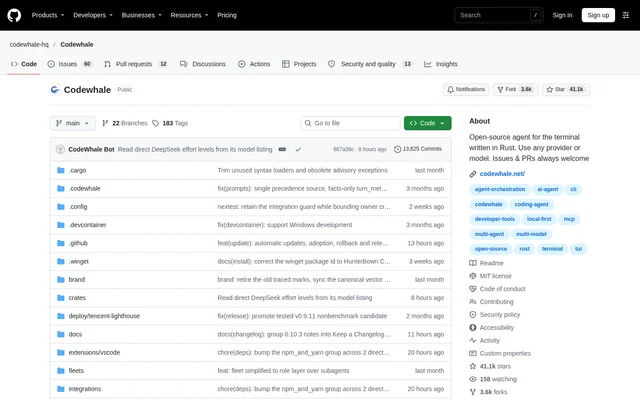
CodeWhale is an open-source coding agent written in Rust for developers working in a terminal. CodeWhale accepts a task, reads the repository, edits files, and runs commands until the task is finished or requires user input. The project supports cloud model providers and models running on the developer's own machine.
CodeWhale combines interactive coding assistance with execution options for automated workflows. The terminal app, headless execution, local web interface, and Runtime API share an engine. A community-maintained VS Code extension connects through the sidebar, while Agent Client Protocol support provides an integration path for editors such as Zed.
What CodeWhale can do
CodeWhale provides tools for repository changes, task planning, and reviewing agent activity. Plan mode reads and searches without changing files, while Work mode edits files and runs commands. Approval settings determine which actions require confirmation, and receipts expose the actions taken during a task.
- CodeWhale reads repositories, edits files, and executes shell commands.
- CodeWhale records changed files, commands, web calls, MCP calls, and approvals.
- CodeWhale reverses the last request and its file changes with /undo.
- CodeWhale delegates work to sub-agents and agent fleets.
- CodeWhale connects MCP servers and loads skills and plugins.
- CodeWhale provides advisory reviews of GitHub pull requests.
How CodeWhale works
CodeWhale runs from the root of a Git repository after the user commits or stashes existing work. The /provider command lets users select a provider, enter an API key, and choose a model. Local runtimes are an alternative when no key is available, and a configured Ollama chat model can be detected automatically.
CodeWhale starts in Work mode with Ask permission on a fresh installation. File edits and shell commands that are not read-only require approval. Accept Edits allows repository file changes without prompting while retaining command approvals. Headless tasks use codewhale exec; adding --auto enables tools with Full Access unless sandbox restrictions are explicitly supplied.
Who CodeWhale is for
CodeWhale serves developers who want coding assistance inside terminal and repository workflows. CodeWhale also supports scripts, CI tasks, editor connections, and GitHub review workflows. Longer objectives can carry across turns through /goal, while checked-in workflows and sub-agents provide ways to organise work beyond a single request.
- Developers can ask CodeWhale to fix failing tests and explain changes.
- Developers can use CodeWhale Plan mode to investigate changes without editing files.
- Teams can run CodeWhale tasks in scripts and CI.
- Maintainers can use CodeWhale for advisory pull request reviews.
CodeWhale pricing and plans
CodeWhale is free and MIT licensed, and no account is required. Users supplying their own API keys pay the model provider directly; local models need no key. CodeWhale displays session costs when pricing is known and labels unknown prices as unknown rather than free. Keys entered through /provider remain on the user's machine.
CodeWhale strengths and limitations
CodeWhale offers model choice, local model access, configurable approvals, and receipts documenting agent activity. These controls let developers inspect changes and choose how much autonomy to allow. Sandbox protection depends on the operating system and permission mode, so the selected execution settings materially affect the boundaries applied to commands.
- CodeWhale has no OS sandbox on Windows yet.
- CodeWhale Full Access disables the sandbox and does not request approvals.
- CodeWhale requires bubblewrap for OS sandboxing on Linux.
- CodeWhale's experimental Computer Use plugin supports macOS only.
- CodeWhale refuses imported Claude Code plugins that require hooks or LSP servers.
Getting started with CodeWhale
CodeWhale provides an installation script for macOS and Linux, with Windows installation available through winget and other methods. npm and Cargo installation paths are also documented. Users should keep a single installation method per machine to avoid conflicting copies on PATH, then launch CodeWhale in a repository, configure a provider or local runtime, and enter a task.
CodeWhale FAQ
What is CodeWhale?
CodeWhale is an open-source terminal coding agent written in Rust. CodeWhale reads repositories, edits files, and runs commands to complete developer tasks, with support for cloud model providers, OpenAI-compatible endpoints, and models running locally.
Is CodeWhale free?
CodeWhale is free and MIT licensed, with no account required. Users who supply their own API keys pay the model provider directly. Local models require no key, and CodeWhale reports unknown model prices as unknown rather than free.
Can CodeWhale use local models?
CodeWhale supports local models through Ollama, vLLM, and SGLang. Local models require no API key. When no provider is configured and Ollama is already serving a chat model, CodeWhale can use that model automatically.
Does CodeWhale have an API or integrations?
CodeWhale provides a local HTTP Runtime API for threads, events, approvals, and file changes. CodeWhale also supports MCP servers, plugins, skills, event hooks, and Agent Client Protocol connections for editors such as Zed, alongside a community-maintained VS Code extension.
Does CodeWhale ask before changing files or running commands?
CodeWhale starts with Ask permission, requesting approval before each file edit and each shell command that is not read-only. Accept Edits permits repository edits without prompting, while Full Access runs without asking and disables CodeWhale's sandbox.
Which operating systems does CodeWhale support?
CodeWhale provides prebuilt binaries for Linux, macOS, and Windows on x64 and arm64. The installation guide also covers Android/Termux as a preview. OS sandboxing is available through Seatbelt on macOS and bubblewrap on Linux when installed, but not yet on Windows.
From the community
No reviews yet
Be the first to review this tool. What you write helps the next person choose.