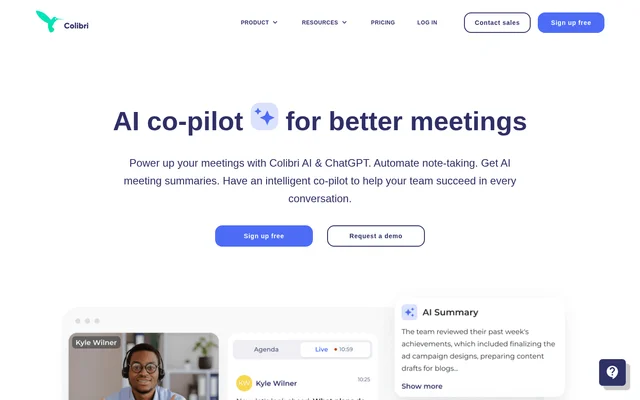
What is Colibri?
Colibri is an AI meeting assistant and conversation intelligence tool for documenting conversations and supporting teams during calls. Colibri combines recording, live transcription, automated notes, and meeting summaries with features for sales coaching and conversation analysis. The website presents AI Notetaker, Sales Copilot, and Colibri Legal as distinct solutions.
Colibri supports internal meetings, client conversations, phone calls, and video conferences. Colibri Legal extends the offering to depositions and court reporting, with rough drafts available in real time and final transcripts prepared by professional legal transcriptionists within 24 hours. Access and feature availability depend on the selected solution and plan.
What Colibri can do
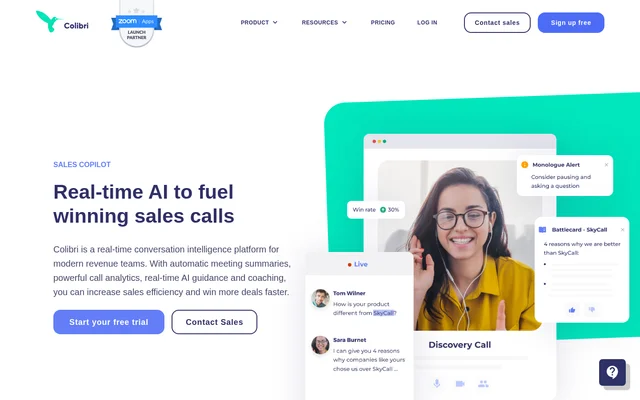
Colibri handles meeting documentation alongside live assistance and post-call analysis. Colibri stores conversation records in a searchable library, allowing teammates to find, review, and share calls. Sales-focused features help representatives respond during conversations and help managers examine performance, customer concerns, and recurring topics without listening through every recording.
- Colibri records meetings and transcribes speech in real time.
- Colibri generates meeting summaries and suggests next steps.
- Colibri checks off agenda items when those topics are mentioned.
- Colibri searches stored recordings, transcripts, and meeting summaries.
- Colibri displays live sales cue cards and coaching prompts.
- Colibri analyzes competitor mentions, customer objections, and team performance.
How Colibri works
Colibri can operate directly inside Zoom through a native app, allowing users to access features without leaving a meeting. Colibri also supports recording and transcription from Chrome for meetings in other apps, with no installation required for that browser workflow. The pricing page additionally lists audio uploads from any source.
Colibri connects meeting records to existing workflows through plan-dependent integrations. Slack integration supports sharing meeting summaries, while Salesforce integration supports logging calls. Colibri lists API access on Pro, Growth, and Scale. Users can prepare conversations with pre-built call templates or custom agendas, then review the resulting recordings, transcripts, and summaries afterward.
Who Colibri is for
Colibri serves teams that need records of internal and external conversations, alongside sales and customer service representatives who need assistance during calls. Colibri also supports managers reviewing conversation trends and performance. The legal offering addresses a separate documentation workflow for depositions and court reporting rather than general team meeting notes alone.
- Colibri helps teams document client and internal meetings.
- Colibri helps sales representatives address customer questions and competitor comparisons.
- Colibri helps managers review talk-to-listen ratios, script adherence, and conversation trends.
- Colibri supports legal professionals with live deposition transcription and final transcripts.
Colibri pricing and plans
Colibri offers a Free plan with 5 transcription hours per month, a 40-minute recording limit, and no credit card requirement. Starter costs $20 per user per month with monthly billing or $16 with annual billing. Starter includes 20 transcription hours per month and a 90-minute recording limit.
Colibri Pro costs $50 per user per month with monthly billing or $40 with annual billing, adding unlimited transcription hours, AI summaries, and team features. Growth costs $60 or $50 and adds real-time coaching and analytics. Scale costs $80 or $70 and includes unlimited recording length and Salesforce integration. Paid plans advertise a 30-day trial, and custom enterprise solutions are available through sales.
Colibri strengths and limitations
Colibri combines meeting documentation, searchable conversation records, and real-time assistance in the same product family. Colibri provides practical access through Zoom and Chrome, while the free plan supports basic recording and transcription. Advanced AI, collaboration, coaching, and integration capabilities are divided across paid tiers, making plan selection important for specific workflows.
- Colibri Free limits transcription hours and individual recording length.
- Colibri places AI summaries, Slack integration, and API access on Pro and higher plans.
- Colibri lists real-time sales coaching under Growth and Scale.
- Colibri retains video for 2 months on Free, 2 years on Starter, Pro, and Growth, and 3 years on Scale.
Colibri FAQ
What is Colibri?
Colibri is an AI meeting assistant and conversation intelligence tool that records, transcribes, and summarizes conversations. Colibri also provides searchable meeting records, agenda tracking, real-time sales guidance, and analytics for teams reviewing customer conversations.
Is Colibri free?
Colibri offers a free plan with 5 hours of transcription per month, a 40-minute maximum recording length, and no credit card requirement. Colibri also offers paid plans for higher usage limits, AI meeting summaries, team workspaces, integrations, and sales coaching.
Does Colibri work with Zoom, Slack, and Salesforce?
Colibri offers a native Zoom app, Slack integration, and Salesforce integration. Colibri includes the Zoom app on the Free plan, lists Slack integration on Pro and higher plans, and lists Salesforce integration under Scale. API access is also listed on Pro, Growth, and Scale.
Can Colibri coach salespeople during calls?
Colibri provides real-time sales guidance when customers ask challenging questions, raise concerns, or mention competitors. Colibri lists live cue cards, monologue alerts, and coaching on Growth and Scale, with real-time alerts to managers included on Scale.
Does Colibri provide legal transcription?
Colibri provides legal transcription through Colibri Legal for depositions and court reporting. Colibri produces rough drafts in real time and provides final transcripts prepared by professional legal transcriptionists within 24 hours.
From the community
No reviews yet
Be the first to review this tool. What you write helps the next person choose.