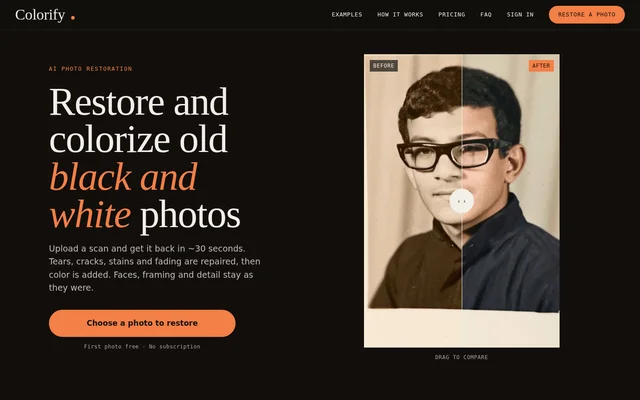
What is Colorify.ai?
Colorify.ai is an AI tool for restoring and colorizing old black and white photographs. Colorify.ai combines damage repair with colorization for images such as family portraits, childhood snapshots, vintage studio portraits and historical street scenes. The service accepts scans and phone photos of prints, including images that are damaged and those that do not need repairs.
Colorify.ai describes restoration as a sequence in which damage is repaired before color is added. The website states that faces, framing and fine detail remain as they were rather than being redrawn during colorization. This preservation of the original image is part of the stated workflow for turning black and white photographs into restored color images.
What Colorify.ai can do
Colorify.ai addresses both visible damage and missing color in old photographs. The repair stage fixes marks and fading and sharpens faded detail, while the colorization stage adds color afterward. The result can be reviewed against the original image before download, and users can choose between two versions.
- Colorify.ai repairs tears, cracks, scratches and stains.
- Colorify.ai repairs fading and sharpens faded detail.
- Colorify.ai adds color to black and white photographs.
- Colorify.ai preserves faces, framing and fine detail during colorization.
- Colorify.ai provides two versions to choose from.
- Colorify.ai supports draggable before-and-after comparisons and downloads.
How Colorify.ai works
Colorify.ai starts with an uploaded black and white scan or a phone photo of a printed photograph. Users can drag the image into the upload area or select a photo from their device. Colorify.ai repairs the image first and then adds color, with an advertised processing time of approximately 30 seconds.
Colorify.ai then presents two versions for review. Users can drag across the photograph to compare the original with the restored result, choose a version and download the image. The upload instructions allow damaged or undamaged photographs, so visible tears or stains are not a requirement for using the colorization workflow.
Who Colorify.ai is for
Colorify.ai is for people who want to restore and colorize old photographs, particularly family pictures and images of past everyday life. The examples on the website include childhood photos, studio portraits and historical street scenes. These examples cover both portraits of people and photographs documenting places or daily activities.
- Colorify.ai can restore damaged family portraits and childhood snapshots.
- Colorify.ai can colorize vintage studio portraits.
- Colorify.ai can restore historical street scenes and everyday-life photographs.
Colorify.ai strengths and limitations
Colorify.ai combines repair, colorization, comparison and download in a single photo-restoration workflow. The free first photo provides a way to review a result before purchasing credits, while non-expiring credits avoid a subscription commitment. The main pricing limitation is that the free offer covers the first photo only; additional restorations require paid credits.
Colorify.ai FAQ
What is Colorify.ai?
Colorify.ai is an AI photo restoration and colorization tool for old black and white photographs. Colorify.ai repairs damage before adding color and supports family portraits, childhood snapshots, historical street scenes and photographs of everyday life.
What photo damage can Colorify.ai repair?
Colorify.ai repairs tears, cracks, scratches, stains and fading in old photographs. Colorify.ai also sharpens faded detail before adding color, with the website stating that faces, framing and fine detail are preserved rather than redrawn during colorization.
How long does Colorify.ai take to restore a photo?
Colorify.ai advertises approximately 30 seconds to repair and colorize an uploaded photograph. Colorify.ai repairs damage first, adds color afterward, and then lets users choose between two versions, compare before and after, and download a result.
How do you upload and download photos with Colorify.ai?
Colorify.ai accepts a black and white scan or a phone photo of a print, uploaded by dragging the image in or selecting it from a device. Colorify.ai provides two versions and a draggable comparison before users download their chosen result.
From the community
No reviews yet
Be the first to review this tool. What you write helps the next person choose.