What is CreateDraft?
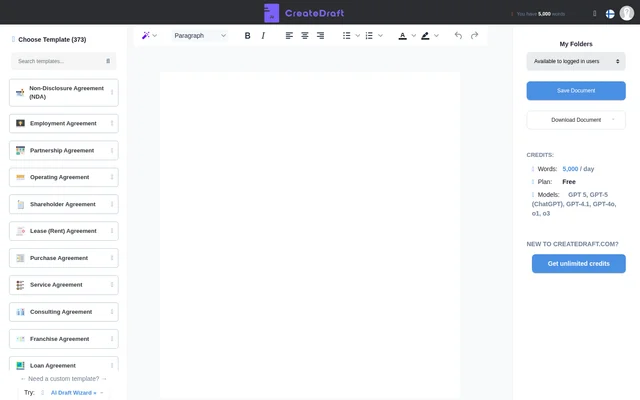
CreateDraft is a legal document drafting tool for people preparing contracts, agreements, policies, and notices. The template picker lists 373 options and includes both broad document types, such as a purchase agreement, and narrower ones, such as a website purchase agreement. CreateDraft also offers an AI Draft Wizard for custom drafts.
What CreateDraft can do
CreateDraft combines a template library with an editor and a separate route for custom drafting. The templates distinguish between related documents, such as a non-disclosure agreement and a mutual non-disclosure agreement, or a lease renewal and a lease amendment. Users can choose a starting point that matches the document they need.
- CreateDraft provides templates for contracts, policies, and legal notices.
- CreateDraft opens selected templates in an editor.
- CreateDraft offers an AI Draft Wizard for custom drafts.
- CreateDraft includes a Saved Drafts area.
How CreateDraft works
CreateDraft offers two routes into drafting. When a listed template matches the document, users can select it and use Open Editor. The template view also shows a Back to Templates control. When a document calls for a custom template instead, the interface points users to the AI Draft Wizard.
Who CreateDraft is for
CreateDraft serves people drafting documents for business transactions, employment, property, or personal matters. The library includes consulting and vendor agreements for business relationships, offer letters for hiring, and lease documents for rental arrangements. Personal templates include wills, parenting plans, and powers of attorney.
- Prepare a service agreement for a client engagement.
- Draft an offer letter or independent contractor agreement.
- Choose a lease termination template for a tenant or landlord.
- Prepare a notice of demand for payment.
- Start a will or power of attorney draft.
CreateDraft pricing and plans
CreateDraft displays a 5,000-word allowance for guests and advertises unlimited credits. The supplied page includes a sign-in option but does not show a subscription price or billing interval for unlimited credits. The guest allowance is expressed in words, while the unlimited option is described in credits.
CreateDraft strengths and limitations
CreateDraft offers specific templates for different roles and stages of a transaction. For example, the property collection includes lease renewals and amendments, as well as separate termination templates for tenants and landlords. The notices collection distinguishes between unpaid rent, a demand for payment, and a material breach of contract.
- Guest access is capped at 5,000 words.
- The supplied page does not list a price for unlimited credits.
- The supplied page does not explain how credits relate to the guest word allowance.
Getting started with CreateDraft
CreateDraft provides a template picker and a Samples & Templates area as starting points. Users can look for a close match to the document they need, select the template, and choose Open Editor. For a document not covered by the picker, the page directs users to the AI Draft Wizard.
CreateDraft FAQ
What is CreateDraft?
CreateDraft is a legal document drafting tool with an editor, a template library, and an AI Draft Wizard for custom drafts. Its templates cover contracts, employment documents, leases, privacy policies, and legal notices.
Is CreateDraft free to try?
CreateDraft offers guest access with a 5,000-word allowance shown in the interface. The site also advertises unlimited credits and provides a sign-in option, but the supplied page does not state a price for unlimited credits.
What legal document templates does CreateDraft offer?
CreateDraft lists 373 templates, including non-disclosure agreements, employment offer letters, independent contractor agreements, leases, terms of service, and privacy policies. The library also includes wills, powers of attorney, and notices for unpaid rent or demands for payment.
Can CreateDraft help draft a document without a listed template?
CreateDraft points users to its AI Draft Wizard when they need a custom template. The wizard is presented as an alternative to choosing a document from the template library and opening it in the editor.
Who is CreateDraft for?
CreateDraft is for people preparing business or personal legal documents. Its templates cover tasks such as drafting a consulting agreement, preparing an employment offer letter, amending a lease, or starting a will.
From the community
No reviews yet
Be the first to review this tool. What you write helps the next person choose.