What is DeskcommCRM?
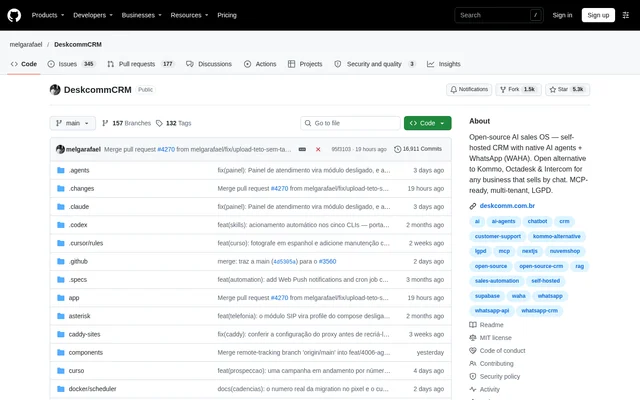
DeskcommCRM is an open-source CRM and AI sales system for businesses that sell through chat, particularly WhatsApp. DeskcommCRM combines native AI agents, customer conversations and sales workflows in software that runs on the user's own server. The repository describes DeskcommCRM as an open alternative to Kommo, Octadesk and Intercom.
DeskcommCRM is distributed under the MIT license and is described as multi-tenant and MCP-ready. The project provides installation documentation and a free visual course covering everyday CRM tasks. The repository also states that the production installation kit was developed in partnership with HostGator, while supporting other VPS providers.
What DeskcommCRM can do
DeskcommCRM brings WhatsApp conversations and sales management into a self-hosted CRM. Native AI agents are described as handling conversations, qualifying prospects and selling through WhatsApp. Supporting capabilities cover inbox use, funnel organisation, conditional automation and administration, with installation tooling that configures the services needed to run those workflows.
- DeskcommCRM connects WhatsApp through WAHA.
- DeskcommCRM uses native AI agents to handle conversations and qualify prospects.
- DeskcommCRM provides an inbox and sales funnel organisation.
- DeskcommCRM runs conditional automation rules through a scheduled process.
- DeskcommCRM supports optional two-step verification with Google Authenticator or Authy.
- DeskcommCRM offers in-app updates with database backups and automatic image rollback.
How DeskcommCRM works
DeskcommCRM uses a VPS-based installation workflow. The administrator connects to the server, clones the repository and runs the installation script in hostgator-setup-kit. The installer uses a prepared application image, offers to install Docker when missing, validates configuration, creates the database schema and administrator account, and starts the stack with automatic HTTPS.
DeskcommCRM setup asks for a domain, database credentials and an AI key from OpenRouter, Anthropic or OpenAI. Supabase can run externally or on the same VPS. After installation, the administrator opens the configured domain and connects a WhatsApp number by scanning a QR code during onboarding; the documentation also mentions the official Meta channel.
Who DeskcommCRM is for
DeskcommCRM is intended for businesses that sell through chat and want customer conversations, AI agents and sales workflows in a self-hosted CRM. The source positions DeskcommCRM as an alternative to established chat-focused CRM products. The deployment instructions are relevant to administrators who can configure a server, domain and service credentials.
- DeskcommCRM supports businesses handling sales conversations through WhatsApp.
- DeskcommCRM supports AI-assisted prospect qualification.
- DeskcommCRM supports teams organising inbox activity and sales funnels.
- DeskcommCRM supports businesses running CRM software on their own servers.
DeskcommCRM pricing and plans
DeskcommCRM is open-source software with no monthly software fee and no locked features, according to the repository. Access is through the public GitHub project under the MIT license. The documented deployment requires a VPS and domain, alongside database configuration and an AI provider key. The setup instructions mention a free Supabase account and a HostGator VPS partnership.
DeskcommCRM strengths and limitations
DeskcommCRM combines source-code access and self-hosting with installation and maintenance automation. The installer validates inputs, generates technical secrets and can resume without duplicating scheduled jobs or recreating users. The update interface backs up the database and tracks progress, while the server-side update agent restores the previous application image if a new image fails.
- DeskcommCRM requires server and service configuration before use.
- DeskcommCRM documentation warns that free Supabase Nano compute may be insufficient.
- DeskcommCRM automatic updates require the server-side update agent to be available.
DeskcommCRM FAQ
What is DeskcommCRM?
DeskcommCRM is an open-source, self-hosted CRM with native AI agents and WhatsApp integration through WAHA. DeskcommCRM is designed for businesses that sell through chat and combines customer conversations, prospect qualification, sales funnels and automation.
Is DeskcommCRM free?
DeskcommCRM has no monthly software fee or locked features and is distributed under the MIT license. DeskcommCRM still requires a self-hosted deployment, including a VPS, a domain, database configuration and an AI provider key.
How do you install DeskcommCRM?
DeskcommCRM is installed by connecting to a VPS, cloning the GitHub repository and running the installation script in hostgator-setup-kit. The installer validates settings, configures the database and administrator account, starts the application stack and enables automatic HTTPS.
Which AI providers does DeskcommCRM support?
DeskcommCRM installation accepts an AI provider key from OpenRouter, Anthropic or OpenAI. DeskcommCRM uses native AI agents for WhatsApp conversations, lead qualification and sales, and the free visual course includes guidance on configuring those agents.
How does DeskcommCRM connect to WhatsApp?
DeskcommCRM provides WhatsApp connectivity through WAHA and lets an administrator connect a number by scanning a QR code during onboarding. DeskcommCRM setup documentation also mentions using the official Meta channel as an alternative connection option.
Can DeskcommCRM update without SSH?
DeskcommCRM provides an update screen that starts updates without an SSH session, backs up the database and displays progress. DeskcommCRM relies on a server-side update agent, which can restore the previous application image if the new image fails.
From the community
No reviews yet
Be the first to review this tool. What you write helps the next person choose.