What is EmailTriager?
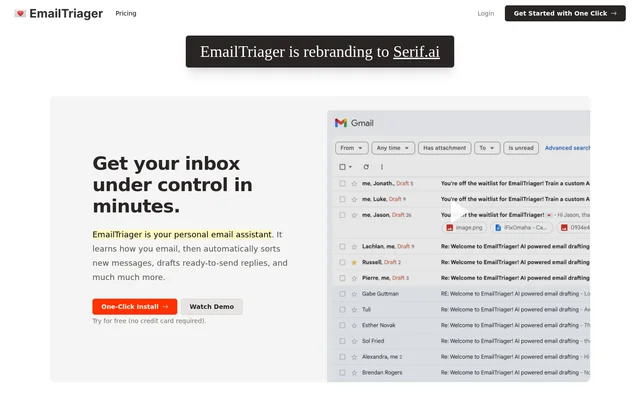
EmailTriager is an AI email assistant that organizes incoming messages and prepares replies directly in Gmail. EmailTriager is intended for people who feel overwhelmed by email and want to shift from writing responses to reviewing prepared drafts. The service works in the background, while the user remains responsible for checking and sending each response.
EmailTriager uses past emails to learn how a user writes rather than requiring the user to train an AI model manually. The website calls this personalization True Voice. EmailTriager's example shows a prepared reply reflecting the sender's voice, information from help documents, past correspondence and a learned sign-off.
What EmailTriager can do
EmailTriager combines incoming email organization with personalized response drafting. The main output is a draft inside Gmail, rather than an automatically sent message. EmailTriager describes a workflow that keeps users in their existing inbox and uses information learned during training to prepare replies that reflect their previous correspondence.
- EmailTriager organizes incoming emails.
- EmailTriager drafts replies in the background.
- EmailTriager places prepared responses directly in Gmail.
- EmailTriager learns writing style from past emails through True Voice.
- EmailTriager lets users view and delete the training Knowledge Base.
- EmailTriager leaves final review and sending to the user.
How EmailTriager works
EmailTriager reads past emails once during training and creates a Knowledge Base containing the information needed to draft responses to new messages. EmailTriager says emails read during this training process are not saved or stored. Users can inspect and delete the resulting Knowledge Base at any time.
EmailTriager begins creating drafts for new emails that need a response once the service is live. Drafts take a little over a minute to appear directly in Gmail. No Chrome extension is necessary. Users can review the suggested response, make changes and send it themselves; EmailTriager never sends emails on their behalf.
Who EmailTriager is for
EmailTriager is for Gmail users who want assistance handling incoming messages without moving to a different email workflow. The website emphasizes reducing the effort involved in composing replies while retaining the user's own writing style. The illustrated example involves responding to a customer question using information from help documents and previous emails.
- EmailTriager helps Gmail users review prepared replies instead of composing every response from scratch.
- EmailTriager supports responses to incoming questions that need an answer.
- EmailTriager helps users maintain their established voice and sign-off in email drafts.
EmailTriager pricing and plans
EmailTriager charges only for Accepted Drafts, defined as drafts that users send with less than 20% of the words changed. A draft that requires heavy editing or is deleted does not count toward the monthly quota. The supplied pricing text explains this billing rule but does not list subscription prices or plan amounts.
EmailTriager strengths and limitations
EmailTriager keeps reply preparation inside Gmail and preserves human control over sending. EmailTriager also states that emails are never used to train general AI models and that only the user has access to their private AI model. The website reports verification by a Google-designated third-party security auditor and CASA Tier 2 accreditation.
- EmailTriager needs to read past emails to perform training.
- EmailTriager drafts take a little over a minute to appear.
- EmailTriager requires users to review and send responses themselves.
EmailTriager FAQ
What is EmailTriager?
EmailTriager is an AI email assistant that organizes incoming emails and drafts replies in the background. EmailTriager places drafts directly in Gmail and learns from past emails to reflect the user's writing style, leaving users to review, edit and send responses.
How does EmailTriager charge for drafts?
EmailTriager charges only for Accepted Drafts, meaning drafts sent with less than 20% of the words changed. Heavily edited or deleted drafts do not count toward the monthly quota. The supplied pricing text does not specify plan prices.
Does EmailTriager send emails automatically?
EmailTriager never sends emails on a user's behalf. EmailTriager only creates responses for the user to review and send, with drafts appearing directly in Gmail a little over a minute after a new email needs a response.
How does EmailTriager use past emails?
EmailTriager reads past emails once during training to create a Knowledge Base for drafting future replies. EmailTriager does not save or store emails read during training, and users can view or delete the Knowledge Base at any time.
Does EmailTriager require a Chrome extension?
EmailTriager does not require a Chrome extension. EmailTriager works directly with Gmail, where prepared replies appear as drafts, so users can keep their existing email workflow rather than moving to a separate interface.
Can EmailTriager be removed without affecting Gmail?
EmailTriager can be removed at any time. After removal, Gmail returns to normal and EmailTriager stops creating drafts. The website explicitly describes removal as a way to stop the service if EmailTriager does not work for the user.
From the community
No reviews yet
Be the first to review this tool. What you write helps the next person choose.