What is Freebuff?
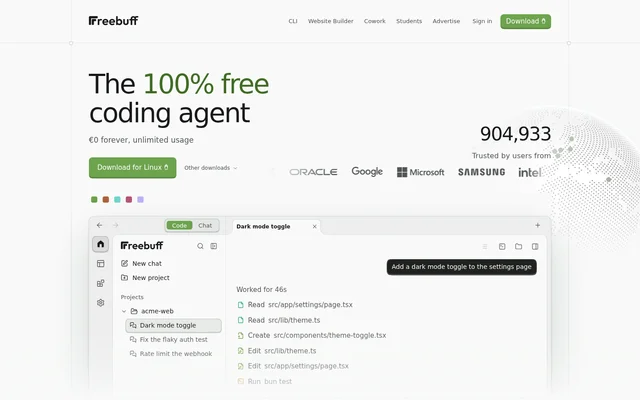
Freebuff is an AI coding agent for developers who want to build and deploy apps or work on existing code through chat. Freebuff accepts requests about a project, and the examples on the product page show command runs, file changes, and explanations in the same conversation. Developers can see what the agent did as well as read its account of why a change was made.
What Freebuff can do
Freebuff can work through a coding request and then respond to follow-up instructions. In the flaky test example, Freebuff runs the test repeatedly, reads and edits a login helper, and reruns the test to check the result. A separate example shows a developer asking the agent to add a test after it implements a webhook rate limit.
- Freebuff reads and edits project files.
- Freebuff runs test commands and reports the results.
- Freebuff shows changed files and code diffs in chat.
- Freebuff can open a pull request and request a review.
How Freebuff works across devices and integrations
Freebuff stores threads in the cloud, so a developer can start a task on a desktop, check it from a phone, and finish in a browser. The chat input supports slash commands and file mentions. Freebuff also lets developers connect tools the agent can use while working, including GitHub, Linear, Stripe, Vercel, Supabase, and Sentry.
Who Freebuff is for
Freebuff is for software developers who want to hand off a coding task and review the resulting changes. The product examples cover both app features and maintenance work, from adding an appearance setting to making a test more reliable. Developers can also use the mobile app to start a task, review changes, or send a follow-up without returning to their desktop.
- Fix a flaky authentication test.
- Add a webhook rate limit and test what happens when it is exceeded.
- Add a dark mode setting or a keyboard shortcut.
- Review a code change and ask the agent to open a pull request.
Freebuff pricing and plans
Freebuff lists its coding agent at €0 forever with unlimited usage. Ads fund access to coding models instead of a subscription, so there is no card requirement or credit balance to track. The product page provides desktop and mobile downloads, a browser entry point, and a terminal installation command.
Freebuff strengths and limitations
Freebuff brings the request, the code diff, and the test results into the same conversation. That gives developers something concrete to review before asking for another change or moving to a pull request. Cloud threads make it possible to continue that review on a different device. The trade-off for free model access is that the service is funded by ads.
- Access to coding models is ad-funded.
- Cross-device thread continuity relies on cloud storage.
- Terminal use requires installing the Freebuff package first.
Getting started with Freebuff
Freebuff can be opened in a browser or downloaded for macOS, Windows, Linux, iOS, and Android. For terminal use, the page lists the command npm install -g freebuff, followed by running freebuff from the project directory. In chat, a developer can select a project, describe the requested change, and use an @ mention to point the agent to a file.
Freebuff FAQ
What is Freebuff?
Freebuff is an AI coding agent for building and deploying apps and working on code through chat. Developers can ask Freebuff to edit project files, run tests, explain changes, and open pull requests.
Is Freebuff free?
Freebuff is free with unlimited usage. Ads fund access to coding models instead of a subscription, and the product page says no card is required and there are no credits to track.
Can Freebuff edit files and run tests?
Freebuff can read and edit project files and run tests. In the product page's flaky authentication test example, Freebuff runs the test, updates a login helper, reruns the test, and explains why the change fixed the timing issue.
Where can I use Freebuff?
Freebuff runs on macOS, Windows, Linux, iOS, and Android, as well as in a browser or terminal. Cloud-stored threads let developers start work on a desktop, check changes from a phone, and continue the conversation in a browser.
What tools does Freebuff integrate with?
Freebuff connects with tools including GitHub, Linear, Notion, Stripe, Vercel, Supabase, Sentry, PostHog, and Resend. Developers can connect accounts through the integrations screen, and the coding agent can use the connected tools while working.
From the community
No reviews yet
Be the first to review this tool. What you write helps the next person choose.