What is Genmo?
Genmo is a developer of video world models and the provider of Mochi 1, an open-source text-to-video model. Genmo describes Mochi as a way to turn written concepts into visual stories. The website offers access for people who want to explore video generation and for technical users who want to run or customize the model.
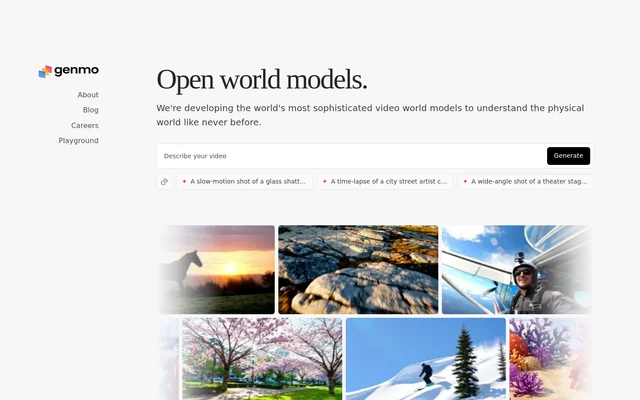
Genmo presents its work as research into video world models that understand the physical world. Alongside the generation interface, Genmo links to research about Mochi and provides routes to its open-source resources. The page combines an interactive testing option with downloadable code rather than describing only a hosted video-generation service.
What Genmo can do
Genmo centers its video-generation offering on Mochi, which accepts written concepts as the basis for video. The website illustrates this approach with scene descriptions involving camera framing, motion, and events. Genmo also provides ways to explore the model interactively or work with the underlying open-source project.
- Genmo generates video from written concepts through Mochi.
- Genmo provides an interactive playground for testing Mochi.
- Genmo supports running Mochi locally.
- Genmo supports customizing Mochi through its open-source repository.
- Genmo offers access to Mochi through ComfyUI.
How Genmo works
Genmo provides a playground where users can test Mochi's features and capabilities. The page also displays a generation interface with a random-prompt option and sample scene descriptions. These examples show how written prompts can describe subjects, actions, and camera perspectives, although the supplied text does not document additional generation controls.
Genmo provides a local quickstart for technical users. The displayed workflow clones the Mochi repository from GitHub, installs dependencies with pip, and runs the command-line demo to generate a first video. Genmo also names ComfyUI as an alternative way to run and customize Mochi and links to HuggingFace.
Who Genmo is for
Genmo supports people exploring text-to-video generation as well as developers interested in adapting an open-source video model. The playground provides a place to test capabilities, while the repository supports local execution, customization, and contributions. The example prompts focus on visual scene descriptions rather than a particular industry or professional role.
- Genmo can turn written scene concepts into videos.
- Genmo lets users explore Mochi through a playground.
- Genmo lets developers customize a locally run video model.
- Genmo invites contributions to its open-source video-generation project.
Genmo pricing and access
Genmo makes Mochi available as an open-source model and points users to a repository, ComfyUI, and an interactive playground. The supplied page does not state subscription prices, paid plans, playground charges, or usage allowances. Open-source availability is explicit, but the page does not provide a named software licence or detailed hosted-access terms.
Genmo strengths and limitations
Genmo offers several ways to work with the same video model: interactive testing, local execution, and ComfyUI. Repository access also allows customization and contributions. The practical distinction is between testing Mochi in the playground and setting up the local code, which requires dependency installation and command-line steps in the published quickstart.
- Genmo local setup requires cloning the Mochi repository.
- Genmo local setup includes installing dependencies.
- Genmo's published local quickstart uses command-line instructions.
Genmo FAQ
What is Genmo?
Genmo is a developer of video world models that offers Mochi 1, an open-source text-to-video model. Genmo provides an interactive playground and open-source resources for generating videos from written concepts, running the model locally, and customizing its behavior.
Can Genmo generate videos from text?
Genmo offers text-to-video generation through Mochi 1, which turns written concepts into visual stories. Genmo's example prompts describe scenes such as glass shattering, a street artist creating a chalk mural, and actors preparing on a theater stage.
Can you run Genmo's Mochi model locally?
Genmo supports running Mochi locally through its open-source repository. Genmo's quickstart shows how to clone the GitHub repository, install dependencies with pip, and run a command-line demo to generate a video.
Does Genmo support ComfyUI?
Genmo names ComfyUI as a way to run and customize Mochi. Genmo also offers an open-source repository for local use and an interactive playground for testing the model's features and capabilities.
Does Genmo publish pricing for its playground?
Genmo does not state playground pricing, subscription plans, or usage allowances in the supplied page text. Genmo identifies Mochi as open source and provides access through a repository, ComfyUI, and an interactive playground.
From the community
No reviews yet
Be the first to review this tool. What you write helps the next person choose.