What is HitPaw Online Ultra?
HitPaw Online Ultra is a browser-based AI editing offering whose online video enhancer improves blurry, noisy and low-resolution recordings. The supplied page focuses on video restoration and upscaling for creators, family archivists, educators and brands. HitPaw Online Ultra is the name in the page's structured product data, while the video enhancement page describes the individual online enhancer.
HitPaw Online Ultra processes video remotely rather than requiring installed editing software. The page positions online enhancement as a way to improve everyday footage, including phone clips, interviews, product demonstrations and older recordings. Free previews provide access to enhancement results, while paid plans provide full exports and higher usage limits.
What HitPaw Online Ultra can do
HitPaw Online Ultra combines video upscaling with models designed for particular restoration tasks. The page describes separate approaches for faces, animation and general noise reduction, alongside black-and-white colorization. These capabilities address different problems rather than relying only on a resolution change, including grain, blurred facial details, compression artifacts and jagged animation edges.
- HitPaw Online Ultra upscales 1080p footage to 4K.
- HitPaw Online Ultra reduces digital grain, motion blur and low-light artifacts.
- HitPaw Online Ultra sharpens facial contours and blurry expressions.
- HitPaw Online Ultra adds color to black-and-white recordings.
- HitPaw Online Ultra provides an Anime Model for animation enhancement.
- HitPaw Online Ultra displays side-by-side enhancement previews.
How HitPaw Online Ultra works
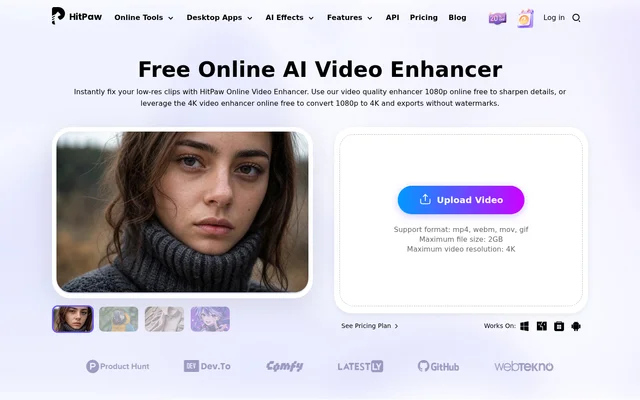
HitPaw Online Ultra begins with a video uploaded through the browser, either by dragging a file into the upload area or selecting an upload control. Users then choose an enhancement model, inspect the side-by-side preview and export the result. The upload interface lists MP4, WebM, MOV and GIF, with a maximum file size of 2GB.
HitPaw Online Ultra performs enhancement on remote servers, so the processing workload does not use the local computer's CPU or GPU. The page says most short clips take a few seconds to a few minutes. Processing time is presented as an estimate for short footage, not a fixed turnaround guarantee for every upload.
Who HitPaw Online Ultra is for
HitPaw Online Ultra targets both everyday restoration and content-production tasks. The page names content creators, family archivists, e-commerce brands, photographers, educators, animation fans, gamers and streamers. The examples focus on improving existing recordings, whether the problem is low resolution, low-light noise, compression or unclear faces in older footage.
- Content creators can upscale mobile footage for TikTok, IG Reels and YouTube Shorts.
- Family archivists can reduce noise and enhance faces in old recordings.
- Brands can improve blurry or low-light product demonstrations.
- Educators can enhance lecture playback and Zoom recordings.
- Animation fans and gamers can sharpen classic clips and compressed captures.
HitPaw Online Ultra pricing and plans
HitPaw Online Ultra offers a free plan with video enhancement previews rather than full video exports. Paid plans use AI credits and increase output allowances. The pricing page lists a weekly offer at $9.99 with 300 AI Credits/Week and up to 600 seconds of video enhancement, excluding tax.
HitPaw Online Ultra also lists a monthly offer at $24.99 with 1200 AI Credits/Month and up to 2400 seconds of video enhancement, excluding tax. The subscriptions renew automatically and can be canceled. The video enhancer FAQ states that upgrading enables watermark-free 4K export, despite broader free-export wording elsewhere on the page.
HitPaw Online Ultra strengths and limitations
HitPaw Online Ultra combines browser access, remote processing and specialized restoration models with previews before full export. These features support checking whether a particular model improves the supplied footage. The page also distinguishes the online enhancer from the desktop version, describing online use as more suitable for smaller files and basic enhancement tasks.
- Full-quality video exports require a paid plan.
- Paid plans cap enhancement usage through credits and video-duration allowances.
- The upload interface lists a maximum file size of 2GB.
- The page gives inconsistent resolution limits, listing 4K in the upload interface and up to 8K in an FAQ.
HitPaw Online Ultra FAQ
What is HitPaw Online Ultra?
HitPaw Online Ultra is a browser-based AI editing offering with an online video enhancer for sharpening footage, reducing noise, restoring faces and colorizing black-and-white recordings. The video enhancement workflow includes uploading a clip, choosing a model, previewing changes and exporting the result.
Is HitPaw Online Ultra free?
HitPaw Online Ultra offers free video enhancement previews, but full-quality exports require a paid plan. The pricing page lists credit-based weekly and monthly subscriptions, while the video enhancer FAQ says upgrading enables watermark-free 4K exports and higher output limits.
Can HitPaw Online Ultra upscale videos to 4K?
HitPaw Online Ultra supports 1080p-to-4K video upscaling, and the FAQ links watermark-free 4K export to a paid upgrade. The page contains inconsistent resolution information: the upload interface lists 4K as the maximum, while another FAQ claims output up to 8K.
Does HitPaw Online Ultra require software installation?
HitPaw Online Ultra runs through a browser without software installation. Users upload footage, select an enhancement model and preview results online. Enhancement runs on remote servers rather than using the local computer's CPU or GPU for processing.
Who is HitPaw Online Ultra for?
HitPaw Online Ultra is intended for content creators, family archivists, e-commerce brands, photographers, educators, animation fans, gamers and streamers. The page describes uses including restoring old recordings, improving product demonstrations, enhancing lectures and sharpening animation or game captures.
What upload limits does HitPaw Online Ultra list?
HitPaw Online Ultra lists MP4, WebM, MOV and GIF in the upload interface, alongside a maximum file size of 2GB and maximum video resolution of 4K. Other page sections mention additional formats and a higher output resolution, so the published specifications are not fully consistent.
From the community
No reviews yet
Be the first to review this tool. What you write helps the next person choose.