What is Humanize AI Text?
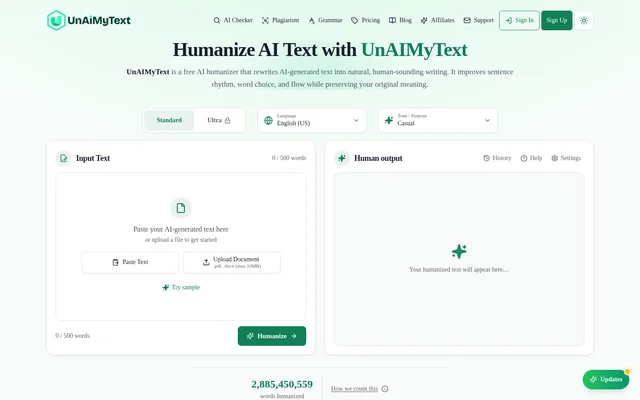
Humanize AI Text is an AI writing editor that revises the phrasing, rhythm, and flow of AI-generated drafts while aiming to keep the original meaning. The site calls the editor UnAIMyText and identifies CoreAI LLC as its developer. Humanize AI Text is designed for people who already have a draft, rather than those looking to generate content from scratch.
Humanize AI Text describes its approach as humanizing rather than rebuilding a draft. The editor varies sentence lengths and replaces repetitive wording to make the text read more naturally. The site says contextual checks help keep the revision aligned with the original meaning.
What Humanize AI Text can do
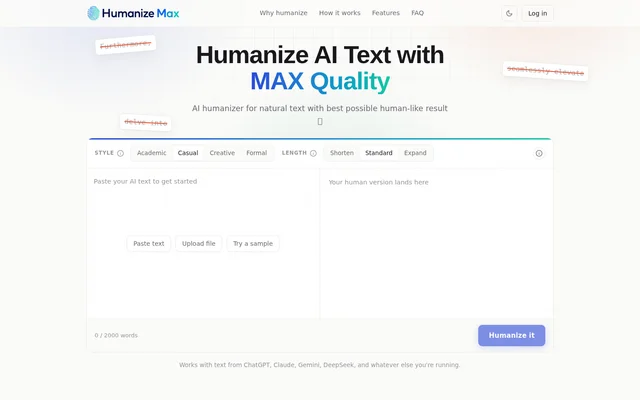
Humanize AI Text combines sentence-level editing with controls for how the revised draft should read. Writers can adjust formality, emotional tone, and creativity, and choose a language for the revision. Standard and Ultra offer different levels of editing, while Pro also allows targeted revisions to individual sentences.
- Humanize AI Text revises sentence rhythm, word choice, and flow.
- Humanize AI Text lets writers adjust formality, emotional tone, and creativity.
- Humanize AI Text supports editing in multiple languages.
- Humanize AI Text accepts PDF and Doc uploads.
- Humanize AI Text lets Pro users rephrase individual sentences.
How Humanize AI Text works
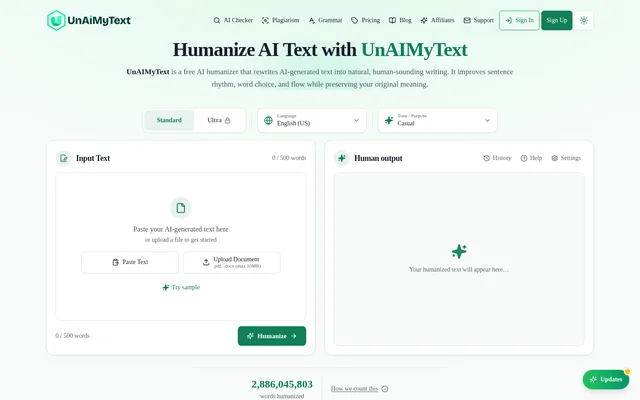
Humanize AI Text accepts drafts pasted into the editor or uploaded as PDF or Doc files. The page names ChatGPT, Claude, and Gemini as examples of where a draft might come from. Once the text is in the editor, the writer selects a mode, language, and tone settings, then runs the rewrite.
Humanize AI Text displays the revision in an output panel where the writer can copy it. Pro users can rephrase a sentence that does not read as intended without changing the rest of the output. The site also says a free account adds saved history, although an account is not needed to use Standard mode.
Who Humanize AI Text is for
Humanize AI Text serves students, researchers, marketers, bloggers, and other writers who use AI to prepare drafts. The site presents Standard as an option for shorter, conversational material and Ultra as an option for academic drafts, reports, and long-form writing. For coursework, the site advises writers to review the output and follow their institution's rules on AI assistance.
- Polish AI-assisted blog posts.
- Adjust the tone of emails and social posts.
- Revise product descriptions.
- Refine academic drafts and reports.
- Edit dialogue and narration in creative drafts.
Humanize AI Text pricing and plans
Humanize AI Text uses a freemium model. Standard mode accepts up to 500 words per input without requiring an account or credit card. The page says there is no total word cap, so the limit applies to each submission rather than to cumulative use.
Humanize AI Text offers a paid Pro plan that raises the limit to 2,000 words per input, unlocks Ultra mode, and adds individual sentence rephrasing. The supplied page text does not list a subscription price, so the stated differences between the plans are the input length and editing options.
Humanize AI Text strengths and limitations
Humanize AI Text makes Standard editing available without signup, and its tone controls give writers a way to guide the revision. Writers who need to submit longer passages in one go or revise individual sentences need Pro. The site publishes its own AI detector tests but notes that no humanizer can guarantee a particular detector score.
- Standard accepts up to 500 words per submission.
- Ultra and individual sentence rephrasing require Pro.
- A particular AI detector score is not guaranteed.
Humanize AI Text FAQ
What is Humanize AI Text?
Humanize AI Text is an AI writing editor that revises AI-generated drafts to make them read more naturally. Humanize AI Text adjusts sentence rhythm, wording, and flow while aiming to preserve the meaning of the original draft.
Is Humanize AI Text free?
Humanize AI Text offers a free Standard mode without signup or a credit card. Standard accepts up to 500 words per input with no total word cap. The paid Pro plan unlocks Ultra mode and raises the limit to 2,000 words per input.
Who is Humanize AI Text for?
Humanize AI Text is for students, researchers, marketers, bloggers, and other writers who want to edit AI-assisted drafts. The site lists essays, reports, blog posts, emails, product copy, and social posts as examples of text that can be revised.
Can Humanize AI Text edit PDF or Doc files?
Humanize AI Text supports PDF and Doc uploads as an alternative to pasting a draft into the editor. After providing the text, writers can select an editing mode and language and adjust settings such as formality, emotional tone, and creativity.
Can Humanize AI Text rephrase just one sentence?
Humanize AI Text lets Pro users rephrase an individual sentence without changing the rest of the revised draft. The site describes this option as useful when a sentence does not read as intended or drifts from the original meaning.
From the community
No reviews yet
Be the first to review this tool. What you write helps the next person choose.