What is Jet Admin?
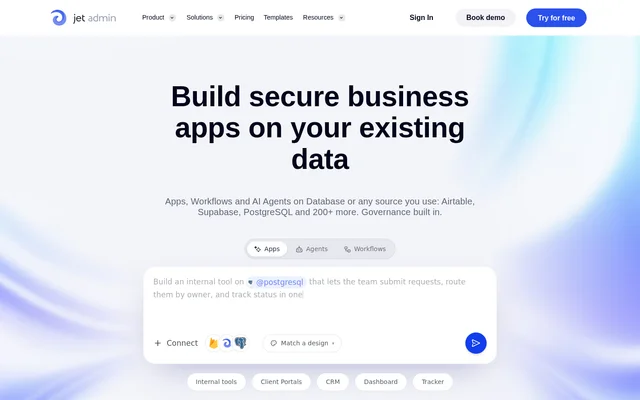
Jet Admin is an AI business app builder for teams creating applications, workflows and agents on existing data. Jet Admin supports internal tools and external-facing applications, including admin panels, dashboards and customer portals. The product combines data connections, automatically generated backend components and application controls rather than requiring teams to assemble the backend separately.
Jet Admin connects to PostgreSQL, MySQL, MongoDB, Supabase, Firebase, Google Sheets, Airtable and REST APIs. Jet Admin provides real-time data access, native SQL and API support, and read and write operations. Business teams can build applications around connected sources while using authentication and governance features appropriate to their plan.
What Jet Admin can do
Jet Admin combines app building with data editing, workflow automation and server-side functions. Jet Admin generates the data model, business logic and APIs behind an application, while allowing users to view and change backend workflow logic. Additional features cover application appearance, login methods and development through a CLI optimized for AI coding agents.
- Jet Admin edits connected data inline and writes changes back to the source.
- Jet Admin builds workflows with triggers, conditions and actions without requiring code.
- Jet Admin runs secure server-side functions that access secrets and external APIs.
- Jet Admin supports magic-link, Google and single sign-on authentication.
- Jet Admin offers light, dark and branded application themes.
- Jet Admin provides a CLI optimized for Claude Code and Cursor.
How Jet Admin works
Jet Admin connects an application to existing databases, spreadsheets or APIs and generates application logic and a data layer automatically. Jet Admin then supports direct editing of connected records and configuration of workflow triggers, conditions and actions. For sensitive operations, server-side functions can handle business logic, use secrets and call external APIs.
Jet Admin offers managed cloud hosting, self-hosting in AWS, GCP or Azure, and on-premise deployment inside an organization's network. Jet Admin also describes support for fully air-gapped environments. Starter adds development features including GitHub sync, environments, version control and API access, while Enterprise includes on-premise deployment and self-hosted AI models.
Who Jet Admin is for
Jet Admin serves business teams that need governed applications rather than standalone prototypes. Jet Admin supports both employee-facing tools and applications used by customers or partners. Deployment choices and access controls also address organizations with security, compliance or data-residency requirements, including teams that need applications to run inside their own infrastructure.
- Jet Admin supports admin panels and dashboards for internal operations.
- Jet Admin supports customer and vendor portals for external-facing services.
- Jet Admin supports CRM and inventory management applications.
- Jet Admin supports workflow automation and AI agents connected to business data.
Jet Admin pricing and plans
Jet Admin offers Free, Starter, Pro and custom Enterprise plans. Jet Admin includes limited app-building credits on Free and states that every plan includes unlimited apps, users and workflows without per-app fees. Starter adds custom domains, branding removal and development features. Pro adds granular permissions, SSO and audit logs, while Enterprise adds an uptime SLA, on-premise deployment, self-hosted AI models and dedicated support.
Jet Admin strengths and limitations
Jet Admin combines existing-data connections, generated backend components and several deployment options in a business app builder. Jet Admin's unlimited apps, users and workflows remove per-app fees, but access to development, governance and deployment capabilities depends on the subscription. The Free plan is suitable for starting to build, with limited credits rather than unrestricted AI usage.
- Jet Admin limits app-building credits on Free.
- Jet Admin places API access and GitHub sync in Starter and higher plans.
- Jet Admin places granular permissions, SSO and audit logs in Pro and higher plans.
- Jet Admin places on-premise deployment and self-hosted AI models in Enterprise.
Jet Admin FAQ
What is Jet Admin?
Jet Admin is an AI business app builder for creating applications, workflows and agents on existing databases and APIs. Jet Admin generates application logic and data layers automatically and supports internal tools, dashboards, customer portals, CRM applications and inventory management tools.
Is Jet Admin free?
Jet Admin offers a Free plan with limited credits for building apps, alongside paid Starter, Pro and custom Enterprise plans. Jet Admin states that all plans include unlimited apps, unlimited users and unlimited workflows, with no per-app fees.
What databases and integrations does Jet Admin support?
Jet Admin connects to PostgreSQL, MySQL, MongoDB, Supabase, Firebase, Google Sheets, Airtable and REST APIs. Jet Admin also lists business app integrations including Hubspot, Slack, Stripe, Zendesk and Salesforce, and supports real-time data access with read and write operations.
Can Jet Admin be self-hosted?
Jet Admin supports self-hosting in an organization's AWS, GCP or Azure account, as well as managed cloud and on-premise deployment. Jet Admin describes support for air-gapped environments and lists on-premise deployment and self-hosted AI models among Enterprise plan features.
Does Jet Admin support SSO and audit logs?
Jet Admin supports SSO, role-based access and audit logs, with granular permissions, SSO and audit logs listed under Pro and higher plans. Jet Admin also supports magic-link and Google login for internal-only or external-facing applications.
Does Jet Admin work with Claude Code and Cursor?
Jet Admin provides a CLI optimized for AI agents such as Claude Code and Cursor. Jet Admin describes instant Skills intended to reduce rework and speed deployment, alongside automatically generated application logic, data models and APIs.
From the community
No reviews yet
Be the first to review this tool. What you write helps the next person choose.