What is JetBrains Air?
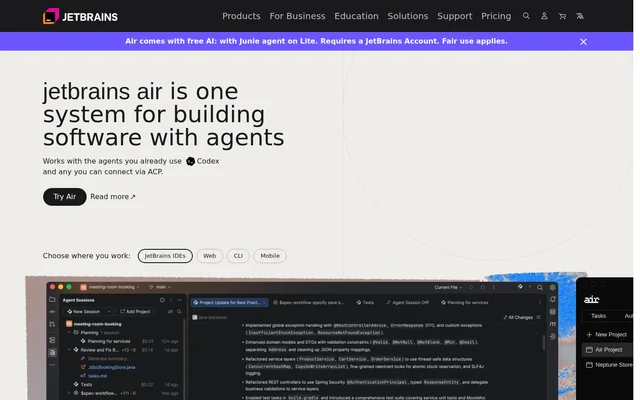
JetBrains Air is a system for building software with coding agents, bringing agent execution, code review, and shared development workflows together. JetBrains Air serves individual developers, software teams, and organizations adopting AI across their development work. Supported agents include Claude Agent, Codex, Junie, Copilot, OpenCode, and other agents connected through ACP.
JetBrains Air presents access through JetBrains IDEs, the web, the command line, and mobile. Cloud execution is intended to let work continue without being tied to a particular machine or team member. The website states that cloud runs are already available to some customers in JetBrains IDEs and browsers, with remaining customers receiving access gradually.
What JetBrains Air can do
JetBrains Air combines developer-facing agent controls with shared team infrastructure and organization governance. Developers can inspect changes in their IDE, while teams can coordinate work in dedicated cloud environments. Air Context adds semantic indexing so agents can begin with an understanding of a project rather than scanning the entire codebase.
- JetBrains Air tracks sessions, changed files, unread updates, and outgoing commits across projects.
- JetBrains Air opens agent-generated diffs and accepts comments on specific lines.
- JetBrains Air automates repeatable tasks such as code review, release notes, and fixes.
- JetBrains Air provides project controls for VM size, internet access, variables, and secrets.
- JetBrains Air centralizes MCP server connections for teams and their agents.
- JetBrains Air provides permissions, spending limits, and analytics for organizations.
How JetBrains Air works
JetBrains Air can be installed as a plugin for running agents inside JetBrains IDEs. JetBrains Air finds compatible agents on the developer’s machine and allows additional agents to be added from an agent registry. Developers can open diffs directly from an agent session, validate changes with IDE tools, and leave line-specific comments for an agent to address.
JetBrains Air also offers browser-based work and session sharing through Air Teams. Air Gateway brings terminal agents such as Claude Code and Codex into Air. AI access can come from an existing provider subscription, API keys, a base URL, or JetBrains AI credits, and subscriptions can be switched during a session.
Who JetBrains Air is for
JetBrains Air addresses developers managing agent-assisted coding, teams sharing software projects, and organizations controlling broader AI adoption. Individual workflows focus on running agents and reviewing changes. Team workflows add dedicated environments and shared external tools, while organizational workflows add permissions, provider access, cost limits, and analytics about tool usage and AI contributions.
- Developers can use JetBrains Air to supervise parallel agent sessions and inspect code changes.
- Software teams can use JetBrains Air to share cloud projects and automate recurring development tasks.
- Organizations can use JetBrains Air to manage provider keys, access permissions, and AI spending.
JetBrains Air pricing and access
JetBrains Air supports JetBrains-managed access or a developer’s existing AI subscription or API key. JetBrains AI usage is billed through credits at public API rates. Organization-level access can use provider keys from Amazon Bedrock, OpenAI, Anthropic, or another provider. Air Teams is offered through early access, and Air Governance provides a demo request path.
JetBrains Air strengths and limitations
JetBrains Air offers flexibility in agent selection and AI access while keeping code review connected to IDE tools. Shared MCP connections, dedicated project environments, and organization controls extend those workflows beyond individual developers. Access remains subject to availability: the website describes a gradual cloud rollout and an early-access path for Air Teams rather than universal availability.
- JetBrains Air cloud runs are currently available to some customers, with broader rollout planned gradually.
- JetBrains Air Teams requires early access.
- JetBrains Air usage through JetBrains AI is billed in credits at public API rates.
JetBrains Air FAQ
What is JetBrains Air?
JetBrains Air is a system for building software with coding agents. JetBrains Air combines agent execution, IDE-based code review, shared cloud projects, automations, and organization controls for developers, software teams, and organizations.
How is JetBrains Air priced?
JetBrains Air supports existing AI provider subscriptions or API keys and JetBrains-managed access. JetBrains AI credits are billed at public API rates. The page does not provide subscription plan prices or specify a free tier.
Which coding agents does JetBrains Air support?
JetBrains Air works with Claude Agent, Codex, Junie, Copilot, OpenCode, and agents connected through ACP. JetBrains Air can find compatible agents on a developer’s machine and allows additional agents to be added from an agent registry.
Can teams use JetBrains Air for shared projects?
JetBrains Air supports shared projects in dedicated cloud environments, with team invitations and centralized access management. Teams can configure environments, manage secrets, connect MCP servers, and automate recurring tasks. Air Teams is offered through early access.
Where can developers use JetBrains Air?
JetBrains Air offers an IDE plugin, browser workflows through Air Teams, and command-line agent access through Air Gateway. The page also presents mobile access. Cloud runs in JetBrains IDEs and browsers are rolling out gradually.
What organization controls does JetBrains Air provide?
JetBrains Air provides organization-wide, team-specific, and individual permissions, along with AI spending limits and usage analytics. Organizations can centrally add provider keys from Amazon Bedrock, OpenAI, Anthropic, or another provider to give developers access.
From the community
No reviews yet
Be the first to review this tool. What you write helps the next person choose.