What is Jetpack AI?
Jetpack AI is a WordPress AI tool for content creation and site management. Jetpack AI combines assistance inside the WordPress editor with access for external AI apps such as ChatGPT and Claude. WordPress site owners can use these options together, writing content in the editor and asking a connected agent to perform tasks across their site.
Jetpack AI works on WordPress sites with Jetpack connected to WordPress.com, including sites hosted elsewhere. A single connection reaches every site on the user's WordPress.com account. The editor focuses on writing and images, while connected agents can work with pages, comments, site settings, statistics and available Jetpack services.
What Jetpack AI can do
Jetpack AI supports content production alongside operational checks for WordPress sites. The editor provides writing assistance, while connected agents can read site information or make permitted changes. The supplied prompt library separates read-only jobs from jobs that can change content and identifies the Jetpack products needed for particular tasks.
- Jetpack AI writes drafts, fixes grammar and generates images in the editor.
- Jetpack AI suggests titles using post content and SEO best practices.
- Jetpack AI provides feedback on content structure.
- Jetpack AI enables connected agents to edit posts, pages or individual blocks.
- Jetpack AI enables connected agents to manage comments and change site titles and taglines.
- Jetpack AI supports checks of views, visitors, backup status and Jetpack Scan results.
- Jetpack AI provides prompts for FAQ drafts and event pages with RSVP forms.
How Jetpack AI connects to WordPress
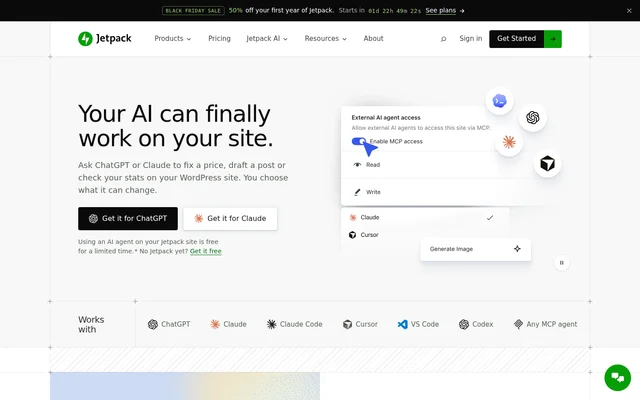
Jetpack AI agent access starts with Jetpack connected to WordPress.com. Users add WordPress to ChatGPT or Claude, sign in with the WordPress.com account associated with their site and approve the connection. MCP turns on through that process without separate configuration. Users can choose read-only access before asking the agent to perform a task.
Jetpack AI also supports Claude Code, Cursor, VS Code, Codex and other MCP-compatible apps. The listed coding agents use a one-line setup command. Change approval depends on the AI app's settings, while WordPress role permissions cap access. Users can choose what an agent reads or changes and disconnect access at any time.
Who Jetpack AI is for
Jetpack AI serves WordPress site owners who want writing assistance or a conversational way to handle site tasks. Publishers can prepare content in the editor, while site administrators can request reports and checks through connected agents. Owners managing multiple sites can use the same account connection to ask about their different sites.
- Jetpack AI helps publishers draft posts, generate featured images and review content structure.
- Jetpack AI helps site owners find and update outdated information across pages.
- Jetpack AI supports launch checks covering pages, search visibility and protection settings.
- Jetpack AI supports weekly reports covering traffic, backups, form messages and pending comments.
Jetpack AI strengths and limitations
Jetpack AI combines editor assistance with external agent access while retaining WordPress role limits and an AI activity log. Read-only connections provide a way to inspect a site without permitting edits. Draft-first requests allow review before publication, but agent approval behavior still depends on the connected app's settings and some changes cannot be undone.
- Jetpack AI agents cannot restore backups, fix security threats or make a site faster.
- Jetpack AI agents cannot show top posts or visitor sources.
- Jetpack AI may require paid Jetpack products for particular checks.
- Jetpack AI cannot guarantee reversal of deleted images or edits that replace old text.
- Jetpack AI sends information read by a connected agent to the chosen app, where that app's privacy rules apply.
Jetpack AI FAQ
What is Jetpack AI?
Jetpack AI is a WordPress AI tool that combines in-editor writing and image assistance with connected AI agent access. Jetpack AI helps site owners draft content, edit pages, manage comments and check site information through apps such as ChatGPT and Claude.
Is Jetpack AI free?
Jetpack AI provides 20 free editor requests per site that do not renew, with paid plans available for further use. Connected AI agent access is free until November 30, 2026. Some agent tasks require paid Jetpack products, such as VaultPress Backup for backup checks.
Which AI apps work with Jetpack AI?
Jetpack AI supports ChatGPT, Claude, Claude Code, Cursor, VS Code, Codex and other apps that support MCP. ChatGPT and Claude connect by adding WordPress and authorizing a WordPress.com account. The listed coding agents use a one-line setup command.
Does Jetpack AI work with WordPress sites hosted elsewhere?
Jetpack AI works with any WordPress site that has Jetpack connected to WordPress.com, regardless of where the site is hosted. A single connection reaches every site on the user's WordPress.com account, allowing connected agents to work across those sites.
Can Jetpack AI change a site without approval?
Jetpack AI connected agents may make changes according to the AI app's approval settings, including manual or automatic modes. Users can choose read-only access to prevent changes. Agent permissions never exceed the user's WordPress role, and actions appear in the Jetpack AI activity log.
Does Jetpack AI use site data to train AI models?
Jetpack AI's page states that WordPress.com does not use data from these tools to train AI models. Information read by a connected agent goes to the chosen app, such as ChatGPT or Claude, as part of the chat and is subject to that app's privacy rules.
From the community
No reviews yet
Be the first to review this tool. What you write helps the next person choose.