What is Limbiks?
Limbiks is an AI flashcard generator for students who want to turn existing study materials into flashcards and review exercises. Limbiks accepts PDFs, presentations, documents, and images, and also generates flashcards from YouTube videos and Wikipedia articles. The website presents Limbiks as a study tool for students across subjects.
Limbiks combines material generation with tools for reviewing the resulting content. Students can study flashcards, use spaced repetition, answer multiple-choice questions, and take practice tests. Limbiks also offers personalized study guides and image occlusion flashcards, extending the available study formats beyond text-based flashcard decks.
What Limbiks can do
Limbiks converts source materials into several study formats and provides tools for reviewing them. The listed capabilities cover flashcard creation, exam practice, personalized guides, and image-based learning. Limbiks also supports downloading study materials and moving flashcards into other study tools, although feature availability and usage limits vary by plan.
- Limbiks generates flashcards from PDFs, PowerPoint presentations, documents, and pictures of notes or text.
- Limbiks creates flashcards from YouTube videos and Wikipedia articles.
- Limbiks generates multiple-choice exams with score reports and study tips.
- Limbiks creates study guides with AI-suggested focus areas, tailored complexity levels, and custom requirements.
- Limbiks extracts images and builds image occlusion flashcards.
- Limbiks provides spaced repetition and hints and explanations.
- Limbiks downloads flashcards and supports direct syncing to Anki.
How Limbiks works
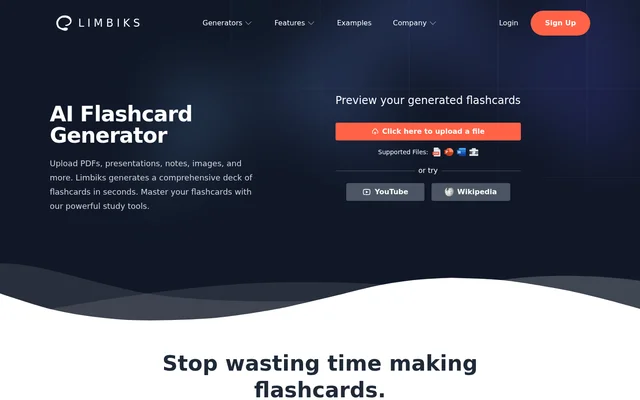
Limbiks starts with a file upload or supported online source. The website offers an upload control, a generated-flashcard preview, and options to try YouTube or Wikipedia. After generation, students can use the included study tools to review flashcards or work with quiz questions and practice tests.
Limbiks lets students download flashcards for import into Anki, Quizlet, Tinycards, Cram, and other study tools. Limbiks also lists direct Anki sync separately from downloads. Personalized study guides can be printed or downloaded, while Pro adds learning objectives and custom instructions to the generation workflow.
Who Limbiks is for
Limbiks is aimed at students who need to memorize material, organize revision, or prepare for exams. The supported inputs accommodate presentation slides, documents, photographed notes, and online reference materials. Limbiks also serves students who want to generate flashcards in one place and continue reviewing them in another study tool.
- Limbiks turns presentation slides and notes into flashcards for review.
- Limbiks supports memorization through spaced repetition.
- Limbiks generates practice tests for exam preparation.
- Limbiks creates personalized study guides from study materials.
Limbiks pricing and plans
Limbiks offers Free at $0 per month and Pro at $5 per month. The pricing page lists 10 uploads per month and 5 pages or slides per upload for Free, compared with 100 uploads per month and 200 pages or slides per upload for Pro. Both plans include flashcard study tools, spaced repetition, downloads, and Anki sync.
Limbiks Free includes 100 multiple-choice questions and 10 practice tests per month, with 10 questions per test. Pro lists unlimited multiple-choice questions and practice tests, with 100 questions per test. Pro also includes learning objectives, custom instructions, AI-generated study guides, and hints and explanations. The website provides free account registration and a Pro subscription option.
Limbiks strengths and limitations
Limbiks combines varied source formats with built-in review tools and flashcard export options. Free access includes spaced repetition and Anki sync, allowing students to review generated materials without requiring Pro for those features. The main constraints are usage caps, paid-only capabilities, and inconsistent information about the free upload page limit.
- Limbiks caps uploads on both Free and Pro.
- Limbiks limits free questions, practice tests, and questions per test.
- Limbiks reserves study guides, custom instructions, learning objectives, and hints and explanations for Pro.
- Limbiks lists 10 free pages or slides on the homepage but 5 on the pricing page.
Limbiks FAQ
What is Limbiks?
Limbiks is an AI flashcard generator for students that creates study materials from uploaded files, YouTube videos, and Wikipedia articles. Limbiks also provides flashcard review, spaced repetition, multiple-choice questions, practice tests, and personalized study guides.
Is Limbiks free?
Limbiks offers a free plan with limited usage and a Pro subscription at $5 per month. The free plan includes flashcard study tools, spaced repetition, downloads, and Anki sync. Pro adds higher limits and features including AI-generated study guides and hints and explanations.
What files can Limbiks turn into flashcards?
Limbiks generates flashcards from PDFs, PowerPoint presentations, documents, and pictures of notes or text. Limbiks also supports YouTube videos and Wikipedia articles as sources, giving students options beyond uploaded files.
Does Limbiks work with Anki and Quizlet?
Limbiks supports downloading flashcards for import into Anki, Quizlet, Tinycards, Cram, and other study tools. Limbiks also offers direct Anki sync, which the pricing page lists as included in both Free and Pro.
Can Limbiks create practice tests and study guides?
Limbiks creates multiple-choice practice tests with score reports and study tips, alongside personalized AI-generated study guides. Study guides support suggested focus areas, tailored complexity levels, and custom requirements. The pricing page includes limited practice tests on Free and reserves AI-generated study guides for Pro.
What are the Limbiks free plan limits?
Limbiks lists 10 uploads, 100 multiple-choice questions, and 10 practice tests per month on the free pricing plan, with 10 questions per test. The pricing page allows 5 pages or slides per upload, while the homepage instead states up to 10.
From the community
No reviews yet
Be the first to review this tool. What you write helps the next person choose.