What is Luminar?
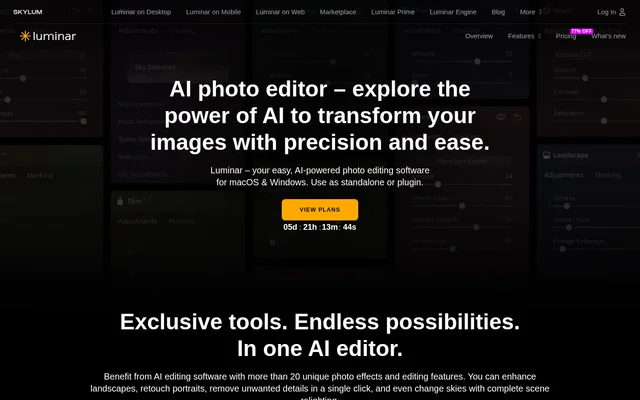
Luminar is an AI photo editor developed by Skylum for photographers, content creators and visual artists. Luminar combines automated image adjustments with tools for RAW processing, non-destructive editing, layers and masks. The desktop application runs on macOS and Windows, either independently or within supported photo-editing applications. The source describes an interface suitable for beginners alongside controls intended for professional workflows.
What Luminar can do
Luminar uses AI to simplify routine adjustments and provide targeted controls for landscapes, portraits and lighting. Luminar includes tools that identify skies, build depth maps and apply content-aware masking, reducing the manual work involved in particular edits. Beyond individual enhancements, the editor supports batch editing and recommends presets based on the image being edited.
- Luminar replaces skies and adds realistic sky reflections with Sky AI.
- Luminar combines exposure, contrast and other adjustments through Accent AI.
- Luminar adds fog, mist or haze with Atmosphere AI.
- Luminar adjusts lighting by image depth with Relight AI.
- Luminar simulates an out-of-focus portrait background with Portrait Bokeh AI.
- Luminar supports portrait retouching, background removal and unwanted-detail removal.
How Luminar works
Luminar works as a standalone desktop application or a plugin for Adobe Photoshop, Adobe Lightroom and Apple Photos. Photographers can apply AI enhancements while retaining access to layers, masks and non-destructive adjustments. Luminar supports major camera brands and RAW formats, including files from Canon, Nikon, Sony and Fujifilm. The page states that editing takes place on-device for privacy.
Luminar also offers mobile applications for Android, iOS and ChromeOS through the plans described on the pricing page. The All Platforms and Max plans include cross-device editing, described as starting work on mobile and continuing on desktop. Web access is included in those plans but is listed as coming in Fall 2026, rather than as an immediately available capability.
Who Luminar is for
Luminar serves beginners seeking automated photo adjustments and professionals who need RAW support and more detailed editing controls. Luminar also targets content creators and visual artists who want to spend less time on repetitive technical edits. The combination of presets, one-click enhancements and manual controls supports both quick image corrections and more deliberate creative changes.
- Photographers can use Luminar to replace skies and relight landscape photographs.
- Portrait creators can use Luminar to retouch subjects and blur backgrounds.
- Content creators can use Luminar to remove distractions and apply consistent batch edits.
Luminar pricing and plans
Luminar offers Desktop Only, All Platforms and Max perpetual-license plans. Desktop Only provides desktop access, while All Platforms adds mobile access, planned web access and cross-device editing. Max adds Luminar Prime benefits, including access to new features during the subscription period and an asset library. The pricing page states that features released during an active Prime subscription remain available to the purchaser.
Luminar includes 365 days of access to selected AI tools, including Restoration, GenErase, GenSwap, GenExpand and AI Assistant. Continued access to those tools requires Luminar Prime. The Max plan includes Prime access that renews automatically unless cancelled. Luminar purchases include a 30-day money-back guarantee, and the Desktop Only terms note that major upgrades may require additional payments.
Luminar strengths and limitations
Luminar combines task-specific automation with a broader editing environment, rather than limiting users to preset effects. Standalone operation, plugin support and on-device editing offer different ways to fit the software into a photography workflow. The main purchasing distinction is between perpetual application access and renewable access to selected AI tools, assets and future feature benefits.
- Luminar requires renewal for selected AI tools after the included access period.
- Luminar may charge separately for major upgrades under Desktop Only.
- Luminar lists web access as a future release in Fall 2026.
Luminar FAQ
What is Luminar?
Luminar is an AI photo editor from Skylum for photographers, content creators and visual artists. Luminar combines automated sky replacement, portrait retouching and lighting adjustments with RAW support, non-destructive editing, layers and masks.
Is Luminar free?
Luminar is sold through paid perpetual-license plans for desktop or broader device access. Selected AI tools include 365 days of access and require Luminar Prime for renewal. The pricing page also states a 30-day money-back guarantee.
Does Luminar work with Photoshop and Lightroom?
Luminar works as a plugin for Adobe Photoshop, Adobe Lightroom and Apple Photos. Luminar also runs as a standalone application on macOS and Windows, allowing photographers to choose between an independent editor and a supported plugin workflow.
Can Luminar edit RAW photos?
Luminar supports RAW files from major camera brands, including Canon, Nikon, Sony and Fujifilm. Luminar also provides non-destructive editing, layers and masks, alongside automated tools for lighting adjustments, portrait retouching and sky replacement.
Is Luminar suitable for beginners?
Luminar is designed for beginners as well as professional photographers. Luminar offers AI-assisted preset suggestions, one-click enhancements and automated adjustments, while retaining layers, masks and RAW support for users who need more detailed editing controls.
Do Luminar AI tools last forever with a perpetual licence?
Luminar separates perpetual application access from access to selected AI tools. Restoration, GenErase, GenSwap, GenExpand and AI Assistant include 365 days of access, after which Luminar Prime is needed to renew access. Max includes Prime on an auto-renewal model.
From the community
No reviews yet
Be the first to review this tool. What you write helps the next person choose.