What is Magic Sketchpad?
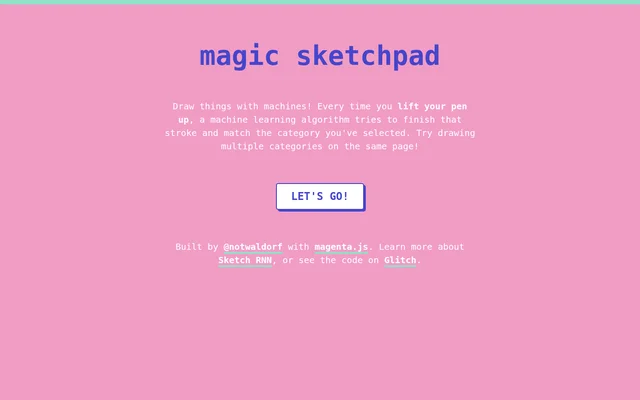
Magic Sketchpad is a machine learning drawing tool that tries to complete a person's strokes. The sketcher supplies the initial mark and chooses the category that guides the algorithm's attempt. Magic Sketchpad was built by @notwaldorf with magenta.js. The project page introduces the drawing activity and provides references for people who want to read about Sketch RNN or look at the code on Glitch.
What Magic Sketchpad can do
Magic Sketchpad lets people choose a drawing category without committing the entire page to that choice. The category applies to the algorithm's attempt to finish the current stroke, while the page can contain drawings from different categories. That distinction makes it possible to work within a category for part of a sketch and use another category elsewhere on the same page.
- Users can select a drawing category.
- Magic Sketchpad tries to finish a stroke when the pen is lifted.
- Users can draw in multiple categories on the same page.
How Magic Sketchpad works
Magic Sketchpad uses pen lifts to trigger the algorithm. A person selects a category, draws a stroke, and lifts the pen. The algorithm then tries to finish what was drawn and match the selected category. The completion attempt happens at the level of an individual stroke rather than waiting until the person has finished the whole sketch. A further pen lift prompts another attempt.
Who Magic Sketchpad is for
Magic Sketchpad is for people who want to see what machine learning adds to a mark they draw themselves. A person can focus on how the algorithm continues strokes within a chosen category or make a page that mixes categories. The linked Sketch RNN information and the Glitch code give technically curious visitors places to look beyond the drawing activity.
- Draw with machine learning assistance.
- Observe how the selected category guides a continuation.
- Mix drawing categories in a single sketch.
Magic Sketchpad pricing and access
Magic Sketchpad is presented as a drawing activity on its project page. The page does not state a price or describe any plans, so it does not establish whether the tool has a free tier or paid options. The link to the code on Glitch is separate from the invitation to start drawing and does not provide pricing information in the page text.
Strengths and limitations of Magic Sketchpad
Magic Sketchpad gives the sketcher control over the starting stroke and the target category while leaving the continuation to the algorithm. The page describes the algorithm as trying to finish the stroke and match the selected category, not as guaranteeing a match. The distinction matters when judging a result: the chosen category guides the attempt, but the page makes no claim about how accurately the result will fit it.
Getting started with Magic Sketchpad
Magic Sketchpad invites visitors to start drawing from the project page. A first sketch can begin with a selected category and a stroke, followed by a pen lift to trigger the completion attempt. To try another category, the sketcher can keep working on the same page. The Sketch RNN and Glitch links are available alongside the drawing activity for visitors who want to explore further.
Magic Sketchpad FAQ
What is Magic Sketchpad?
Magic Sketchpad is a drawing tool that uses machine learning to try to finish a person's strokes. The person selects a category, and the algorithm tries to match that category each time the pen is lifted.
When does Magic Sketchpad try to complete a stroke?
Magic Sketchpad tries to complete a stroke each time the sketcher lifts the pen. The algorithm uses the category the sketcher selected to guide its attempt to finish the mark.
Can you use different drawing categories on the same page in Magic Sketchpad?
Magic Sketchpad supports multiple drawing categories on the same page. A sketcher can keep drawing on the current page while changing categories, and the algorithm tries to match the selected category when continuing a stroke.
Who is Magic Sketchpad for?
Magic Sketchpad is for people who want to draw with machine learning and see how an algorithm tries to continue their strokes. The drawing activity also lets sketchers combine different categories on the same page.
Where can you find the Magic Sketchpad code?
Magic Sketchpad links to its code on Glitch from the project page. The page credits @notwaldorf as the creator, names magenta.js as the technology used to build Magic Sketchpad, and provides a separate link to learn about Sketch RNN.
From the community
No reviews yet
Be the first to review this tool. What you write helps the next person choose.