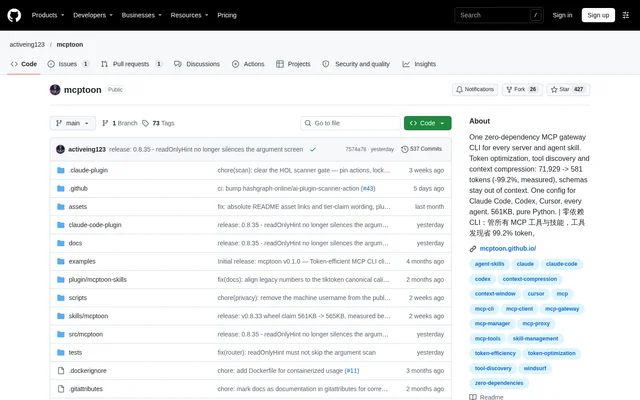
What is Mcptoon?
Mcptoon is an open-source local tool gateway and skill manager for LLM agents. Mcptoon centralizes MCP tools and agent skills for developers working across clients such as Claude Code, Cursor, Codex and Windsurf. The project is implemented in pure Python with no dependencies and is distributed as a native command-line tool.
Mcptoon addresses tool-schema context overhead and duplicated agent configuration. Instead of keeping every installed tool's full description in the agent context, Mcptoon stores descriptions on disk and exposes a compact name index. Full schemas and skill text remain available when needed, so reduced context does not mean removing the underlying definitions.
What Mcptoon can do
Mcptoon combines tool discovery, execution, context management and agent configuration in the same CLI. Mcptoon can scan existing client configurations before searching online registries, allowing users to reuse installed servers. Additional commands cover API access, documentation retrieval and diagnostics rather than limiting the workflow to MCP tool calls.
- Mcptoon retrieves full tool schemas on demand.
- Mcptoon searches MCP registries using plain-language queries.
- Mcptoon calls tools directly from terminals and scripts.
- Mcptoon synchronizes shared skills across agent folders.
- Mcptoon exposes OpenAPI and GraphQL endpoints as commands.
- Mcptoon retrieves documentation chapters or matching passages.
- Mcptoon checks server health and repairs supported environment problems.
How Mcptoon works
Mcptoon installs with pip install mcptoon, followed by mcptoon quickstart to detect servers and configure agents. Quickstart also installs the official /mcptoon skill into detected agents. Users can then ask a supported agent to inspect installed tools, find a tool for a task or retrieve an original output that was truncated.
Mcptoon provides direct CLI access for shell-capable agents and configuration synchronization for GUI clients. The manifest command displays a compact catalog, inspect retrieves schemas, and call executes tools. Mcptoon also supports task-based tool selection, saved connections with secrets referenced through environment variables or files, and manifest exports in OpenAI, OpenAPI or MCP formats.
Who Mcptoon is for
Mcptoon serves developers and agent users who maintain MCP tools or skills across multiple clients. Mcptoon also supports terminal-based workflows that need tool execution without a desktop agent. Documentation routing and API passthrough extend the use cases to retrieving relevant project guidance and accessing services through command-line operations.
- Mcptoon helps developers share tool configurations across coding agents.
- Mcptoon lets script authors call MCP tools headlessly.
- Mcptoon helps agent users load relevant skills without including every skill document.
- Mcptoon routes documentation questions to selected chapters or passages.
Mcptoon pricing and access
Mcptoon is available as an open-source project under the Apache-2.0 license, with source code in a public GitHub repository and installation through pip. The supplied page describes local, offline-first operation without a cloud service or telemetry. The page does not list subscription plans, paid tiers or hosted-service pricing.
Mcptoon strengths and limitations
Mcptoon combines a zero-dependency implementation with local execution, shared configuration and on-demand retrieval. Mcptoon includes benchmarking commands to measure savings against the user's own catalog, alongside reversible compression and access to original results. These capabilities make the distinction between reducing context and discarding tool information explicit.
- Mcptoon may save no context after installation if direct mode leaves the agent unconnected.
- Mcptoon requires a server entry for clients that cannot use the CLI directly.
- Mcptoon result compression varies by output shape rather than delivering a fixed reduction.
Mcptoon FAQ
What is Mcptoon?
Mcptoon is an open-source, local MCP gateway CLI and skill manager for LLM agents. Mcptoon discovers and calls tools, retrieves schemas on demand, and shares tools and skills across clients including Claude Code, Cursor, Codex and Windsurf.
Is Mcptoon open source?
Mcptoon is an open-source project distributed under the Apache-2.0 license through a public GitHub repository. Mcptoon can be installed through pip, and the supplied page does not list paid plans or subscription pricing.
How does Mcptoon reduce context usage?
Mcptoon reduces context usage by exposing a compact tool-name index instead of loading every full schema. Mcptoon retrieves schemas on demand, uses pointers for skills, routes documentation to relevant chapters, and supports reversible output compression. Actual savings depend on configuration and the content being processed.
Which agents does Mcptoon support?
Mcptoon names Claude Code, Cursor, Codex, Windsurf, Claude, Cline and VS Code among supported clients. Mcptoon provides native CLI access for shell-capable agents and configuration synchronization for GUI clients, with the page stating support for 103+ desktop and terminal agents.
Does Mcptoon work locally without telemetry?
Mcptoon is described as local, offline-first and air-gap ready, with no cloud service or telemetry. Mcptoon uses Python's standard library without dependencies. Online registry search and calls to external API endpoints are also available as separate capabilities.
How do you install Mcptoon?
Mcptoon installs with pip install mcptoon, followed by mcptoon quickstart to discover existing MCP servers and configure detected agents. Mcptoon also installs the /mcptoon skill into detected agents. Installation alone may leave direct mode active without delivering context savings.
From the community
No reviews yet
Be the first to review this tool. What you write helps the next person choose.