What is MidJourney Prompt Tool?
MidJourney Prompt Tool is a helper for constructing prompts to run in Midjourney, the AI image generation application. MidJourney Prompt Tool is intended for users who want to work with image parameters and styling options without having to remember every supported setting. The page describes a workflow that starts with an image concept and ends with a prompt ready to copy.
MidJourney Prompt Tool focuses on preparing instructions rather than generating the finished image within the described workflow. Users combine their main concept with selected parameters, presets and weighted prompt elements. The completed text is then transferred to Midjourney, while a PromptFolder account provides a way to keep the prompt available for later use.
What MidJourney Prompt Tool can do
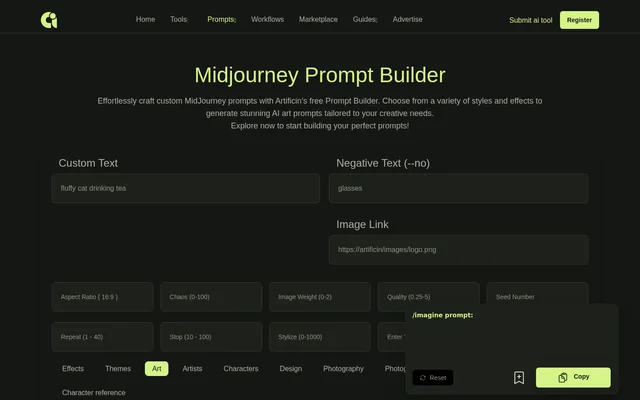
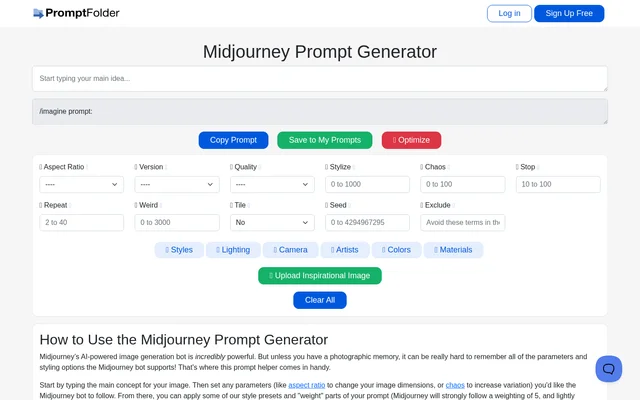
MidJourney Prompt Tool provides controls for shaping both the content and presentation of an image prompt. The page specifically explains aspect ratio, chaos and prompt weighting, while the interface lists styling categories and an inspirational image upload option. An optimization control also presents an AI-optimized prompt with options to accept or cancel.
- MidJourney Prompt Tool lets users set aspect ratio to change image dimensions.
- MidJourney Prompt Tool lets users set chaos to increase variation.
- MidJourney Prompt Tool applies style presets to image prompts.
- MidJourney Prompt Tool weights individual parts of a prompt.
- MidJourney Prompt Tool offers lighting, camera, artist, color and material controls.
- MidJourney Prompt Tool includes inspirational image uploads.
- MidJourney Prompt Tool provides AI prompt optimization.
How MidJourney Prompt Tool works
MidJourney Prompt Tool starts with the main concept for the desired image. Users then set any parameters they want the Midjourney bot to follow, such as aspect ratio or chaos. After those settings, users can apply style presets and weight parts of the prompt to influence how strongly Midjourney follows particular instructions.
MidJourney Prompt Tool explains that Midjourney strongly follows a weighting of 5 and lightly considers a weighting of 1. Once the prompt is ready, users copy the text to the clipboard and run the prompt in Midjourney. The page also directs users to save completed prompts to a PromptFolder account so they can return to them later.
Who MidJourney Prompt Tool is for
MidJourney Prompt Tool is for Midjourney users who need help remembering and combining the bot’s parameters and styling options. The described use cases center on turning an image idea into a more detailed prompt, adjusting the desired output and keeping useful prompts accessible. The page does not identify a particular profession or industry as the intended audience.
- MidJourney Prompt Tool helps users develop a main image concept into a styled prompt.
- MidJourney Prompt Tool helps users specify image dimensions and variation.
- MidJourney Prompt Tool helps users preserve completed prompts through PromptFolder.
MidJourney Prompt Tool strengths and limitations
MidJourney Prompt Tool brings several prompt-building decisions into the same workflow, including parameters, visual styling and the relative emphasis of prompt elements. Copying and saving support the transition from drafting instructions to using or revisiting them. The described workflow still depends on Midjourney to execute the prompt and on a PromptFolder account to retain saved prompts.
- MidJourney Prompt Tool requires users to run copied prompts separately in Midjourney.
- MidJourney Prompt Tool requires a PromptFolder account for the described saving workflow.
- MidJourney Prompt Tool prepares image instructions rather than generating images in the described workflow.
MidJourney Prompt Tool FAQ
What is MidJourney Prompt Tool?
MidJourney Prompt Tool is a prompt helper for Midjourney image generation. MidJourney Prompt Tool combines a main image concept with parameters, style presets and weighted instructions, producing a prompt that users copy and run in Midjourney.
How do you use MidJourney Prompt Tool?
MidJourney Prompt Tool starts with an image concept, followed by parameter settings, style presets and optional prompt weighting. Users copy the finished prompt to the clipboard and run the text in Midjourney, with an option to save the prompt to a PromptFolder account.
What settings does MidJourney Prompt Tool offer?
MidJourney Prompt Tool offers aspect ratio and chaos parameters, style presets and prompt weighting. The interface also lists lighting, camera, artists, colors and materials, plus inspirational image uploads and an AI prompt optimization control.
Can MidJourney Prompt Tool save prompts?
MidJourney Prompt Tool supports saving prompts to a PromptFolder account for later access. The page also includes a Copy Prompt control, allowing users to transfer the finished prompt to the clipboard and run the prompt in Midjourney.
Does MidJourney Prompt Tool generate images?
MidJourney Prompt Tool prepares prompts for image generation in Midjourney rather than generating images in the workflow described on the page. Users build and refine their instructions, copy the finished prompt, and then run the prompt in Midjourney.
From the community
No reviews yet
Be the first to review this tool. What you write helps the next person choose.