What is MoneyPrinterTurbo?
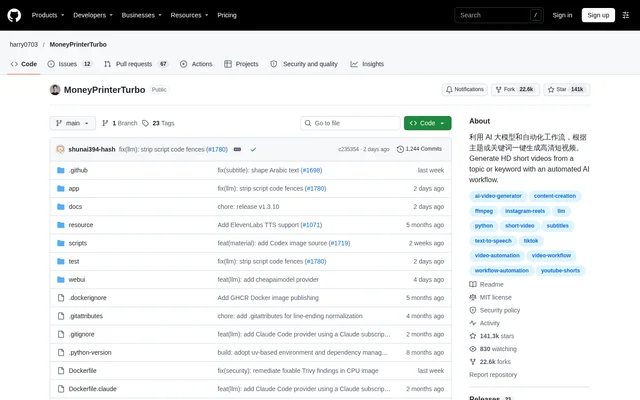
MoneyPrinterTurbo is an open-source AI video-generation project that produces HD short videos from a topic or keyword. MoneyPrinterTurbo combines script generation, narration, visual materials, subtitles, background music and editing in an automated workflow. The project is intended for short-video creation and supports both interactive use and integration into automated production processes.
MoneyPrinterTurbo is published on GitHub under the MIT license. The repository documents a browser-based WebUI, an API, a command-line interface and an AI Agent workflow. These access methods let creators work through a visual interface while developers can incorporate video generation into scripts or other services.
What MoneyPrinterTurbo can do
MoneyPrinterTurbo automates the production workflow without requiring every component to be AI-generated. MoneyPrinterTurbo accepts custom scripts, local images and videos, uploaded narration and local music alongside generated content. Output controls cover video orientation, clip duration, visual fitting, material ordering, subtitle appearance and separate background-music volume.
- MoneyPrinterTurbo generates or rewrites multilingual video scripts.
- MoneyPrinterTurbo retrieves stock footage from Pexels, Pixabay and Coverr.
- MoneyPrinterTurbo supports AI video generation and OpenAI-compatible image generation.
- MoneyPrinterTurbo provides voice previews and full narration previews.
- MoneyPrinterTurbo generates subtitles with adjustable fonts, placement, colors and backgrounds.
- MoneyPrinterTurbo creates portrait, landscape and square videos.
- MoneyPrinterTurbo supports batch generation and task history.
- MoneyPrinterTurbo can automatically upload finished videos to TikTok, Instagram and YouTube Shorts.
How MoneyPrinterTurbo works
MoneyPrinterTurbo starts with a video topic, keyword or custom script and coordinates the selected model, media and speech services. Users configure the relevant credentials in the WebUI settings before using online services. Supported language-model options include OpenAI, Anthropic Claude, Google Gemini, DeepSeek and Kimi, while Ollama is listed among compatible local environments.
MoneyPrinterTurbo can be installed through the official mpt Python package, deployed from source or run with Docker. The documentation also offers a Windows launch package and Google Colab access. The AI Agent route uses a supplied Skill document and local terminal access to handle installation, configuration and generation, requesting missing API keys when needed.
Who MoneyPrinterTurbo is for
MoneyPrinterTurbo suits creators producing short-form videos and developers connecting video production to automated workflows. MoneyPrinterTurbo supports multilingual scripts and multiple output formats, making the workflow applicable to narrated content for different channels. Custom materials and uploaded audio also support creators who already have assets rather than needing every element generated.
- Creators can turn a topic into a narrated, subtitled short video.
- Content teams can generate multiple finished videos in batches.
- Developers can trigger video production through the API or CLI.
- Creators can reuse local images, footage and recorded narration.
MoneyPrinterTurbo pricing and access
MoneyPrinterTurbo is an MIT-licensed open-source project available from GitHub and through the official mpt package maintained by harry0703. MoneyPrinterTurbo includes free Edge TTS without an API key and identifies Pexels and Pixabay as free stock sources. External model and media providers have their own access requirements, and some integrated services use usage-based billing.
MoneyPrinterTurbo strengths and limitations
MoneyPrinterTurbo combines several production stages while retaining control over scripts, materials, speech and subtitle styling. MoneyPrinterTurbo offers browser-based and programmatic access, plus deployment choices for different environments. A GPU is not mandatory, although the documentation recommends dedicated graphics hardware for faster local transcription, heavier processing and smoother batch generation.
- MoneyPrinterTurbo requires Python 3.11 or later for local deployment.
- MoneyPrinterTurbo requires relevant provider credentials for cloud services.
- MoneyPrinterTurbo currently documents AI Agent setup support for macOS and Windows.
- MoneyPrinterTurbo downloads a model when local Whisper transcription is first used.
MoneyPrinterTurbo FAQ
What is MoneyPrinterTurbo?
MoneyPrinterTurbo is an open-source AI short-video generator that turns a topic or keyword into a finished video. MoneyPrinterTurbo automates scripts, voiceovers, visual materials, subtitles, background music and editing, with support for custom content at individual stages.
Is MoneyPrinterTurbo free?
MoneyPrinterTurbo is available as an MIT-licensed open-source project. MoneyPrinterTurbo supports free Edge TTS without an API key and free stock sources including Pexels and Pixabay, but external model, speech and media services can require separate paid usage.
Does MoneyPrinterTurbo have an API or CLI?
MoneyPrinterTurbo provides an API and CLI alongside a WebUI and AI Agent workflow. MoneyPrinterTurbo documents browser-free video generation, sequential batch tasks and API access for automated workflows, with Docker deployment instructions and local API documentation.
Does MoneyPrinterTurbo need a GPU?
MoneyPrinterTurbo does not require a GPU for basic operation. MoneyPrinterTurbo recommends dedicated graphics hardware for local transcription, faster video processing and smoother batch generation, while workflows relying on cloud models, cloud speech and online materials place greater importance on CPU and memory.
Can MoneyPrinterTurbo publish videos to social media?
MoneyPrinterTurbo supports automatic uploads to TikTok, Instagram and YouTube Shorts after video generation. MoneyPrinterTurbo also produces portrait, landscape and square output, allowing creators to select the video format for their intended publishing workflow.
How do you install MoneyPrinterTurbo?
MoneyPrinterTurbo can be installed through the official mpt Python package, deployed from source or run through Docker. MoneyPrinterTurbo also provides a Windows launch package and a Google Colab option. Local deployment requires Python 3.11 or later.
From the community
No reviews yet
Be the first to review this tool. What you write helps the next person choose.