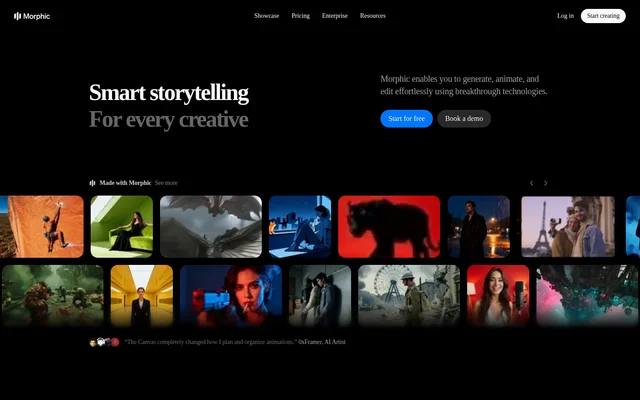
What is Morphic?
Morphic is an AI image and video creation tool for creatives and teams working on visual stories. Morphic combines generation, animation, editing, and sound with ready-made creative pipelines. The website identifies gaming, marketing, filmmaking, and animation as use cases, alongside workflows for individual creators.
Morphic organizes creative work around Canvas, Copilot, and Compose. Canvas is presented as a place to explore ideas, Copilot as a chat-based creative partner, and Compose as a way to turn moments into stories. Morphic also supports collaboration across projects, files, and a shared workspace without downloads or installation.
What Morphic can do
Morphic combines prompt-driven creation with controls for refining individual images and developing moving scenes. Morphic can generate images, add motion, and connect the result with sound. Editing capabilities include object selection, segmentation, upscaling, and prompt-guided changes, while saved references support a coherent visual style across generations.
- Morphic generates video between selected scene frames.
- Morphic saves characters and styles as reusable references.
- Morphic adds, removes, or refines objects through inpainting.
- Morphic extends images and videos beyond their original frames.
- Morphic transfers color palettes, tone, and mood between images.
- Morphic controls camera pans, tilts, zooms, and pedestal movements.
How Morphic works
Morphic offers ready-made workflows that begin with inputs such as prompts, photos, scene descriptions, lyrics, or reference videos. A cinematic storyboard workflow uses a scene description and character references to produce shot angles and mood. A motion transfer workflow pairs a character image with a reference video to reproduce the reference motion.
Morphic also supports workflows built around existing visual material. A still image can be combined with camera angles placed in 3D space to generate depth-based video motion. Character and style references can be saved for later generations. Team members can be invited to create, exchange ideas, and stay aligned across shared work.
Who Morphic is for
Morphic serves individual creatives and collaborative production teams. Morphic highlights tools for game asset creation, in-house marketing production, filmmaking, and animation. The workflow library also covers social content, product presentation, and portrait creation, giving users starting points tied to particular creative outputs rather than requiring every project to begin from scratch.
- Morphic helps filmmakers develop short films and cinematic storyboards.
- Morphic creates UGC-style ads from product photos and a selected format.
- Morphic generates professional headshot sets from a selfie.
- Morphic pairs garment and person photos for virtual try-on.
- Morphic turns lyrics and a visual style into scene visuals and a screenplay.
Morphic strengths and limitations
Morphic brings visual generation, targeted editing, animation, and sound into a creative workflow that requires no installation. Reusable references support consistency, while ready-made pipelines cover specific tasks such as storyboarding and short-film production. Access and production capacity depend on the selected plan, and credit consumption varies according to the operation performed.
- Morphic restricts free access to limited models and up to 20 credits.
- Morphic Basic and Standard are single-user plans.
- Morphic charges extra for additional Pro and Max users.
- Morphic requires a valid school email address for Education.
Morphic FAQ
What is Morphic?
Morphic is an AI creative tool for generating, animating, and editing images and videos. Morphic combines prompt-based creation, sound, reusable character and style references, and ready-made workflows for visual storytelling, marketing content, filmmaking, animation, and game assets.
Is Morphic free?
Morphic offers a forever-free plan with up to 20 credits, limited models, workflows, and a single user. Morphic also offers paid subscriptions with monthly credits, an Education plan requiring a valid school email address, and Enterprise plans with custom pricing.
Can Morphic keep characters consistent across scenes?
Morphic supports saving characters and styles as references for reuse in later generations. Morphic describes this capability as a way to maintain a consistent look across scenes, including a coherent tone and visual style.
What can you create with Morphic workflows?
Morphic workflows cover short films, cinematic storyboards, headshots, virtual try-on, UGC-style ads, music video planning, and motion transfer. Morphic accepts workflow-specific inputs such as scene descriptions, character references, product photos, lyrics, and reference videos.
Does Morphic support team collaboration?
Morphic lets team members create, collaborate, exchange ideas, and work across projects, files, and a shared workspace. Morphic Pro and Max offer shared monthly credits and additional users at extra cost, while Enterprise provides custom seat limits.
Does Morphic require a download?
Morphic requires no downloads or installation, according to the website. Morphic provides online entry points for starting creative work, logging in, exploring workflows, and booking a demo, with free and paid access options.
From the community
No reviews yet
Be the first to review this tool. What you write helps the next person choose.