What is Multica?
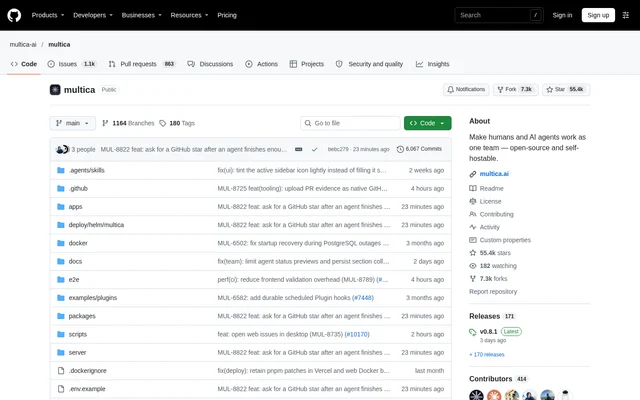
Multica is a workspace for software teams that assign development work to AI coding agents alongside human teammates. Multica connects an issue with the agent's progress, decisions, execution history, and resulting code changes. The repository presents Multica as an open-source project and describes the workspace as source-available and self-hostable, with licensing governed by the custom Multica License.
Multica addresses the coordination involved in running agents across separate terminal sessions. An assigned agent picks up an issue, works on a runtime controlled by the team, comments on progress, and returns the result for review. Human review remains part of the workflow rather than allowing completed agent work to move directly into the main branch.
What Multica can do
Multica combines task assignment, agent configuration, execution monitoring, and team coordination in a shared workspace. Agents receive names, providers, and runtimes so they can appear on the board like teammates. Projects supply repository and document context, while skills turn solved problems into reusable playbooks. Scheduled autopilots handle recurring work without requiring someone to initiate each run.
- Multica assigns issues directly to AI coding agents.
- Multica groups people and agents into squads with a leader routing work.
- Multica schedules standups, audits, and reports through cron.
- Multica records timestamped tool calls, commands, and errors.
- Multica reports run costs by agent and issue.
- Multica supports replies during active runs for supported providers.
- Multica retries failed runs or stops them with an explanation.
How Multica works
Multica drives agent CLIs already installed and authenticated on a connected machine; Multica does not ship a model. A local daemon executes the selected CLI next to the team's code. Supported providers include Claude Code, Codex, Cursor, GitHub Copilot CLI, and OpenCode. Desktop automatically registers its computer as a runtime and detects installed agent CLIs.
Multica's setup workflow starts by connecting a laptop or cloud machine, then creating an agent with a runtime, provider, and name. A user files an issue and selects that agent as assignee. Multica also supports GitHub, GitLab, Gitea, and Forgejo, including self-hosted Git services, and exposes a CLI and API for scripted workflows.
Who Multica is for
Multica serves software teams that already use coding agents and need shared task ownership, execution visibility, and human review. Multica also supports teams that want agents to run on their own machines or infrastructure. Separate workspaces isolate agents, issues, and settings per team, while roles and access scopes control which agents individual members can run.
- Development teams can delegate coding issues and review the resulting work.
- Team leads can coordinate human and agent work through squads.
- Teams can automate recurring audits, reports, and standups.
- Developers can inspect execution logs when an agent becomes stuck.
Multica pricing and access options
Multica offers cloud signup at multica.ai, desktop downloads for macOS, Windows, and Linux, and deployment on a team's own infrastructure. Self-hosting supports Docker Compose or Helm. The Multica License contains the Apache License 2.0 text plus additional conditions for hosted services, commercial embedding, and branding, so deployment and reuse should be considered alongside those specific terms.
Multica strengths and limitations
Multica combines provider choice with a connected record of assignments, runs, decisions, and code changes. Multica also provides review gates, execution logs, and usage analytics for teams supervising agent work. Deployment flexibility extends from cloud access to self-hosted infrastructure, but agent execution still depends on separately installed and authenticated CLIs, and some client and messaging options have explicit availability limits.
- Multica requires a supported agent CLI on each machine that runs agents.
- Multica's iOS app builds from source and is not yet on the App Store.
- Multica limits new Feishu/Lark connections to mainland-China Feishu.
- Multica's DingTalk, WeCom, and Telegram connections are community-maintained.
- Multica self-hosted servers send an anonymous deployment snapshot daily unless telemetry is disabled.
Multica FAQ
What is Multica?
Multica is a self-hostable workspace where human teammates and AI coding agents share an issue board. Multica lets teams assign work to agents, follow progress and execution logs, and review completed results while keeping the issue, decisions, and code changes connected.
Which AI coding agents does Multica support?
Multica supports existing agent CLIs including Claude Code, OpenAI Codex, Cursor Agent, GitHub Copilot CLI, OpenCode, and Kimi. Multica drives supported CLIs installed and authenticated on a connected runtime rather than supplying its own model.
Can Multica be self-hosted?
Multica can be self-hosted on a team's own infrastructure using Docker Compose or Helm. Multica provides installation scripts and self-hosting documentation, and agents execute through a daemon on a connected laptop or cloud machine.
What license does Multica use?
Multica uses the Multica License, which includes the complete Apache License 2.0 text plus additional conditions covering hosted services, commercial embedding, and branding. Multica's repository directs users to LICENSE for exact terms and NOTICE for attribution notices.
Does Multica integrate with Git and team chat tools?
Multica supports GitHub, GitLab, Gitea, and Forgejo, including self-hosted Git services. Multica also connects with Slack, Feishu/Lark, DingTalk, WeCom, and Telegram to trigger and follow agent work. New Feishu/Lark connections are limited to mainland-China Feishu, and some chat connections are community-maintained.
How do you start using Multica?
Multica can be accessed through cloud signup, desktop downloads, or self-hosting. Multica users connect a runtime, create an agent with a provider and name, and assign an issue. The agent machine needs a supported CLI installed and signed in before work can run.
From the community
No reviews yet
Be the first to review this tool. What you write helps the next person choose.