What is Notebook Copilot?
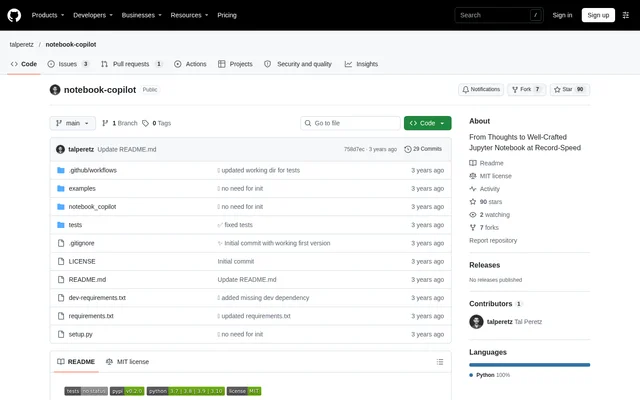
Notebook Copilot is an open-source AI coding assistant for Jupyter notebooks, aimed at data scientists and engineers. Notebook Copilot generates code and markdown cells from user inputs and uses the surrounding notebook context to guide generation. The repository describes the project as inspired by GitHub Copilot, with a focus on developing notebooks rather than starting each notebook from a blank page.
Notebook Copilot combines code generation with documentation, optimization, and visualization functions. The project is distributed as a Python package through PyPI and published in a public GitHub repository under the MIT license. The documented workflow uses an OpenAI API key supplied by the user.
What Notebook Copilot can do
Notebook Copilot provides notebook magic functions for different stages of notebook development. The documented functions cover continuing a notebook, generating code from comments, explaining existing code, proposing faster alternatives, and creating visualizations. Automatic context retrieval is described as using the full notebook context to support consistent and relevant code generation.
- Notebook Copilot generates code and markdown cells continuously in assistant mode.
- Notebook Copilot turns comments into code for the next cell.
- Notebook Copilot creates markdown cells that explain existing code.
- Notebook Copilot generates alternative code cells optimized for speed.
- Notebook Copilot generates cells to visualize data.
- Notebook Copilot retrieves notebook context to inform generated code.
How Notebook Copilot works
Notebook Copilot is installed with pip install notebook_copilot and loaded inside a Jupyter notebook with %load_ext notebook_copilot. The walkthrough instructs users to obtain an OpenAI API key before using the extension. Users can provide the key through the OPENAI_API_KEY environment variable, and the repository includes an optional getpass-based example for setting that variable.
Notebook Copilot exposes %copilot for assistant mode and the cell magic functions %%code, %%explain, %%optimize, and %%visualize for specific tasks. The examples show comments requesting model evaluation plots as input for code generation. Other examples place existing code beneath a magic command to request explanations, optimization, or visualization.
Who Notebook Copilot is for
Notebook Copilot is designed for data scientists and engineers developing Jupyter notebooks. The documented use cases combine writing executable code with explaining that code in markdown. The examples also cover model evaluation plots, making the tool relevant to notebook workflows that involve analyzing model results and presenting data visually.
- Notebook Copilot can generate plotting code from written comments.
- Notebook Copilot can document code through generated markdown explanations.
- Notebook Copilot can propose faster alternatives to an existing code cell.
- Notebook Copilot can continue a notebook with code and markdown cells.
Notebook Copilot pricing and access
Notebook Copilot is explicitly described as free and open source, and the repository lists the MIT license. Users obtain the package through PyPI and supply their own OpenAI API key for generation. The product documentation does not state API usage prices or describe paid Notebook Copilot plans.
Notebook Copilot strengths and limitations
Notebook Copilot brings code generation, markdown documentation, optimization, and visualization into a notebook-based workflow. Notebook context retrieval and task-specific magic functions are documented strengths. The setup requires package installation, extension loading, and an OpenAI API key. Support for additional LLM providers, including Starcoder and Anthropic, appears in the roadmap rather than the current feature list.
- Notebook Copilot requires users to supply an OpenAI API key.
- Notebook Copilot requires installation and extension loading before use.
- Notebook Copilot lists additional LLM provider support as planned work.
Notebook Copilot FAQ
What is Notebook Copilot?
Notebook Copilot is a free, open-source AI assistant for Jupyter notebooks. Notebook Copilot uses GPT-based generation and notebook context to create code and markdown cells for data scientists and engineers.
Is Notebook Copilot free?
Notebook Copilot is free and open source under the MIT license. Notebook Copilot requires users to bring their own OpenAI API key, and the repository does not state API usage prices.
How do you install Notebook Copilot?
Notebook Copilot installs from PyPI using pip install notebook_copilot. Users then load the extension in a Jupyter notebook with %load_ext notebook_copilot, provide an OpenAI API key, and run %copilot or a task-specific magic function.
What can Notebook Copilot do in a Jupyter notebook?
Notebook Copilot can generate code from comments, explain code in markdown cells, generate alternatives optimized for speed, and create visualization cells. Notebook Copilot also provides an assistant mode that continuously generates code and markdown cells.
Does Notebook Copilot support LLM providers other than OpenAI?
Notebook Copilot documents an OpenAI API key as part of the current setup. Notebook Copilot lists support for more LLM providers, including Starcoder and Anthropic, in the roadmap rather than as an available feature.
From the community
No reviews yet
Be the first to review this tool. What you write helps the next person choose.