What is NoteGen?
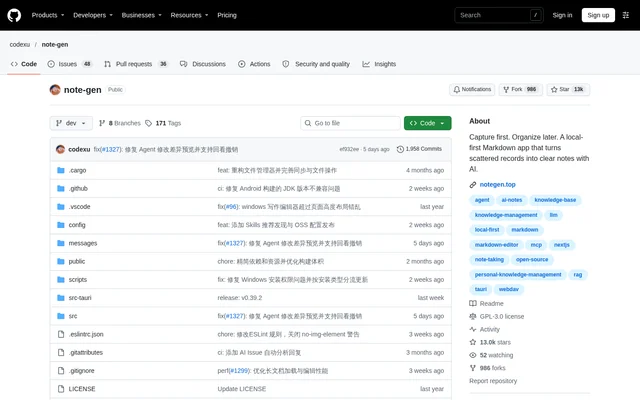
NoteGen is an open-source, local-first Markdown app for capturing information and turning related records into structured notes with AI. NoteGen supports workflows such as meeting documentation, research collection, and report writing. The central approach separates saving information from deciding how that information should be titled, organized, and developed.
NoteGen keeps written notes as ordinary Markdown files in a workspace chosen by the user. Those files can be opened in another Markdown editor, kept in Git, or moved without exporting from a proprietary format. NoteGen adds capture, search, AI assistance, and organization around those files.
What NoteGen can do
NoteGen combines record capture, Markdown editing, knowledge retrieval, and visual organization. Configured AI models can help structure source material or revise existing text, while the editor keeps the result available for review and further writing. NoteGen also supports using notes, records, images, and knowledge base content as conversation context.
- NoteGen captures thoughts, voice recordings, screenshots, images, links, files, and todos.
- NoteGen organizes selected records into summaries, reports, articles, or other Markdown structures.
- NoteGen supports tables, task lists, code blocks, math, diagrams, and document outlines.
- NoteGen can continue, shorten, expand, rewrite, or translate existing text.
- NoteGen combines semantic retrieval with local text search.
- NoteGen creates editable flowcharts, mind maps, timelines, drawings, and data charts.
- NoteGen supports MCP servers, installable Skills, and Agent tools for notes and files.
How NoteGen works
NoteGen begins with captured records rather than a finished document structure. Users filter records by tag, time, or type, select related items, and choose a template or describe the intended output. NoteGen then organizes the material into a Markdown draft that users can review, restructure, and extend in their own words.
NoteGen connects to AI providers and models configured by the user, with different models available for chat, writing, embeddings, image recognition, OCR, and audio. Notes stay local first. Optional synchronization supports GitHub, GitLab, Gitee, Gitea, S3-compatible storage, and WebDAV, while local backups can be used without cloud sync.
Who NoteGen is for
NoteGen suits people whose writing starts with scattered source material rather than a blank document. The documented examples include meeting recordings, saved reading fragments, weekly reporting, and collections of topic-related images and documents. NoteGen lets users select those materials for drafting or use them as context when asking questions.
- NoteGen turns meeting recordings and screenshots into meeting notes.
- NoteGen organizes saved links and reading fragments into research notes.
- NoteGen helps prepare weekly reports from recent records filtered by tag.
- NoteGen uses collected images and documents as context for questions.
NoteGen access and open-source licensing
NoteGen is released under the GNU General Public License v3.0 and is available through platform downloads, with GitHub Releases offered as a fallback mirror. Windows, macOS, and Linux downloads are marked Beta. Android is marked Alpha with an ARM64 APK, while iOS Alpha access uses TestFlight. The repository does not specify NoteGen subscription plans or AI service pricing.
NoteGen strengths and limitations
NoteGen emphasizes file portability, local storage, and editable AI output. Ordinary Markdown files remain usable outside NoteGen, and cloud synchronization is optional. NoteGen also allows writing before configuring every advanced feature: users can choose a workspace and create a note directly, then configure an AI provider when AI assistance is needed.
- NoteGen desktop releases are marked Beta.
- NoteGen mobile releases are marked Alpha, with Android ARM64 and iOS TestFlight access specified.
- NoteGen AI features require an AI provider configuration.
NoteGen FAQ
What is NoteGen?
NoteGen is an open-source, local-first Markdown app that captures scattered information and organizes selected records into structured notes with AI. NoteGen supports meeting notes, research notes, reports, and articles while keeping written notes as ordinary Markdown files.
Is NoteGen open source?
NoteGen is open source under the GNU General Public License v3.0. NoteGen provides platform downloads and a GitHub Releases fallback mirror, but the repository text does not specify subscription plans or pricing for configured AI model services.
Does NoteGen store notes locally?
NoteGen stores notes locally first as ordinary Markdown files in a workspace chosen by the user. NoteGen supports opening those files in other Markdown editors, keeping them in Git, and making local backups without enabling cloud synchronization.
Which platforms does NoteGen support?
NoteGen offers Beta downloads for Windows, macOS, and Linux. NoteGen provides macOS downloads for Apple Silicon or Intel and Linux packages as AppImage, DEB, or RPM. Mobile access is Alpha through an Android ARM64 APK or iOS TestFlight.
How does NoteGen use AI?
NoteGen connects to AI providers and models configured by the user. NoteGen can organize selected records, revise or translate text, answer questions using personal material, search local content before answering, and generate diagrams and charts from notes.
What sync services does NoteGen support?
NoteGen supports synchronization through GitHub, GitLab, Gitee, Gitea, S3-compatible storage, and WebDAV. NoteGen stores notes locally first and also supports local backups, so cloud sync does not need to be enabled to keep a backup.
From the community
No reviews yet
Be the first to review this tool. What you write helps the next person choose.