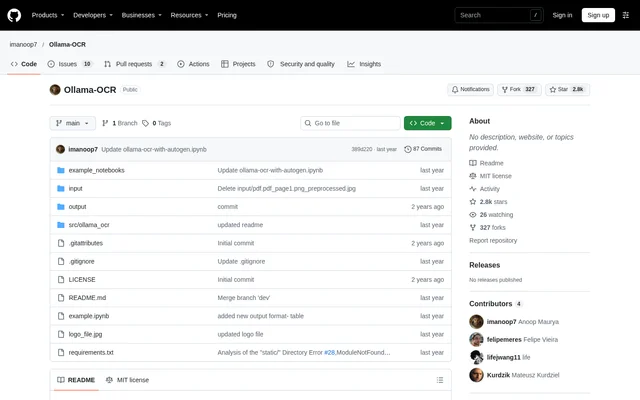
What is Ollama-OCR?
Ollama-OCR is an open-source optical character recognition package for extracting text from images and PDFs with vision language models through Ollama. Ollama-OCR offers a Python package for code-based processing and a Streamlit web application for file uploads. These access options support users working with document images, PDF files and batches of images.
Ollama-OCR supports LLaVA, Llama 3.2 Vision, Granite3.2-vision, Moondream and Minicpm-v. The repository describes model options for tasks including complex document recognition and visual document understanding. Ollama-OCR also provides example notebooks covering Google Colab, Autogen and LangGraph, alongside a general usage notebook.
What Ollama-OCR can do
Ollama-OCR combines text extraction with output-format controls and batch-processing options. Users can select an output representation, provide custom instructions and specify the text language. Ollama-OCR also exposes preprocessing and progress information for image batches, making the package applicable to both individual files and folder-based extraction workflows.
- Ollama-OCR extracts text from images and PDF files.
- Ollama-OCR produces Markdown, plain text, JSON, structured, key-value and table outputs.
- Ollama-OCR processes multiple images in parallel with progress tracking.
- Ollama-OCR supports recursive folder searches and optional image preprocessing.
- Ollama-OCR accepts custom extraction prompts and a text-language setting.
- Ollama-OCR reports total, successful and failed image-processing counts.
How Ollama-OCR works
Ollama-OCR requires Ollama and a downloaded vision model before processing documents. Python users install the package with pip install ollama-ocr, import OCRProcessor and initialize the processor with a model name. The example configuration also accepts a custom Ollama API base URL, allowing users to specify the endpoint used for generation.
Ollama-OCR provides process_image for individual files and process_batch for image folders or lists of image paths. The Streamlit route requires cloning the repository, installing requirements.txt dependencies, opening the application directory and running streamlit run app.py. The web interface supports batch processing, drag-and-drop uploads, previews, language selection and extracted-text downloads.
Who Ollama-OCR is for
Ollama-OCR serves users who want to run image and PDF text extraction through Python or a Streamlit interface. The documented output formats support workflows that need readable text, formatted documents or structured information. Custom prompts provide a way to focus extraction on particular content rather than relying only on the default instructions.
- Ollama-OCR helps Python users add document extraction to scripts.
- Ollama-OCR supports batch extraction from image directories and subdirectories.
- Ollama-OCR can extract tables and labeled information into dedicated output formats.
- Ollama-OCR can target dates and names through custom extraction instructions.
Ollama-OCR pricing and access
Ollama-OCR is available as an open-source project under the MIT License. The repository provides package-installation instructions and source code for running the Streamlit application. The supplied project documentation does not list paid Ollama-OCR plans or subscription prices; access is described through installing the Python package or cloning the repository.
Ollama-OCR strengths and limitations
Ollama-OCR offers a choice of vision models, extraction formats and interfaces within the same project. Parallel batch processing, custom prompts and language selection provide controls for different document-processing tasks. The documentation also identifies a model-specific accuracy caveat and installation prerequisites that users should consider before choosing a workflow.
- Ollama-OCR requires Ollama and a suitable downloaded vision model.
- Ollama-OCR requires dependency installation to run the repository's Streamlit application.
- Ollama-OCR documentation warns that LLaVA can sometimes generate incorrect output.
Ollama-OCR FAQ
What is Ollama-OCR?
Ollama-OCR is an open-source OCR package that uses vision language models through Ollama to extract text from images and PDFs. Ollama-OCR is available as a Python package and a Streamlit web application, with support for multiple output formats and batch image processing.
Is Ollama-OCR free?
Ollama-OCR is an open-source project distributed under the MIT License, with no paid product plans listed in the supplied documentation. Ollama-OCR can be obtained through its Python package or repository, and setup requires Ollama and a downloaded vision model.
What output formats does Ollama-OCR support?
Ollama-OCR supports Markdown, plain text, JSON, structured, key-value and table output formats. Ollama-OCR describes Markdown output as preserving headers and lists, key-value output as extracting labeled information, and table output as extracting tabular data.
Can Ollama-OCR process multiple images at once?
Ollama-OCR supports parallel batch image processing through its Python package and batch processing through its Streamlit application. Ollama-OCR accepts an image directory or list of image paths, supports recursive searches and optional preprocessing, and reports processing progress and success or failure statistics.
How do you run the Ollama-OCR web application?
Ollama-OCR provides a Streamlit web application that runs after cloning the repository, installing its dependencies and opening the application directory. Ollama-OCR starts with streamlit run app.py and offers drag-and-drop uploads, image previews, language selection and extracted-text downloads.
Which vision models does Ollama-OCR support?
Ollama-OCR lists LLaVA, Llama 3.2 Vision, Granite3.2-vision, Moondream and Minicpm-v as supported vision models. Ollama-OCR also allows a vision model available through Ollama to be specified in the processor configuration, while warning that LLaVA can sometimes produce incorrect output.
From the community
No reviews yet
Be the first to review this tool. What you write helps the next person choose.