What is OnePrompt?
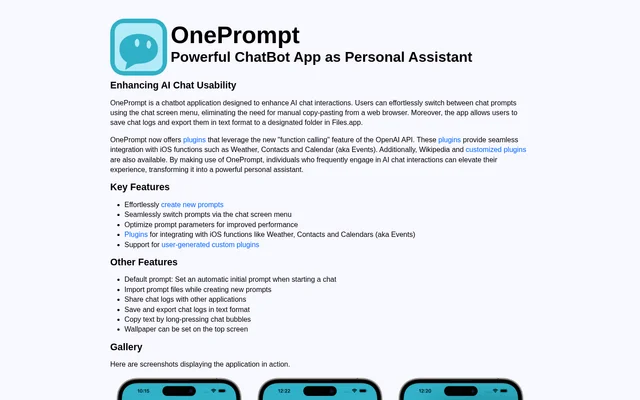
OnePrompt is an iOS chatbot app for people who frequently use AI chat and want to manage their prompts from the chat screen. Users can switch between prompts through a menu instead of returning to a browser to copy and paste text. OnePrompt also combines chat log export with plugins that connect conversations to iOS functions and other services.
What OnePrompt can do
OnePrompt provides controls for managing both the prompts that guide a chat and the text that comes out of it. Users can choose a default prompt for new chats, adjust prompt parameters, or import an existing prompt file while creating a prompt. For conversations worth keeping, the app offers file export and sharing.
- OnePrompt switches prompts from the chat screen menu.
- OnePrompt loads a default prompt when a new chat starts.
- OnePrompt exports chat logs as text files to a chosen folder in Files.app.
- OnePrompt shares chat logs with other apps.
- OnePrompt copies text when a user long-presses a chat bubble.
How OnePrompt works
OnePrompt uses the user's own OpenAI API key for chat. Its plugins use OpenAI API function calling to connect the chat with iOS Weather, Contacts, and Calendar, which the page also calls Events. OnePrompt offers a Wikipedia plugin alongside those iOS integrations. Users can also create custom plugins to work with other API services, and the page lists four templates.
Who OnePrompt is for
OnePrompt is aimed at frequent AI chat users on iOS, particularly those who reuse prompts or keep records of their conversations. A user who starts chats with the same instructions can set a default prompt, while someone who changes tasks can select another prompt from the chat menu. Users who want to keep complete conversations can export logs rather than copying messages individually.
- Switch between saved prompts for different tasks.
- Keep a text copy of a conversation in Files.app.
- Share a chat log with another app.
- Use Weather, Contacts, or Calendar through a chat plugin.
OnePrompt pricing and plans
OnePrompt advertises a 3-month free trial through the GET STARTED NOW redeem-code campaign. The product page does not list a subscription price, describe a permanent free plan, or explain what happens when the trial ends. The page separately states that OnePrompt uses the user's own OpenAI API key for chat.
Strengths and limitations of OnePrompt
OnePrompt brings prompt switching and chat export into the same iOS app. The prompt menu removes the need to keep a browser open just to retrieve instructions, and plain-text export lets users save complete chat logs to a chosen folder. Built-in plugins cover several iOS functions, while custom plugins are available for users who want to connect other API services.
- OnePrompt requires the user's own OpenAI API key.
- OnePrompt lists iOS devices only.
- OnePrompt does not publish a post-trial price on the product page.
Getting started with OnePrompt
OnePrompt can be used on iOS devices with the user's own OpenAI API key. Users can create a prompt or import a prompt file while creating one, then set a default if they want the same instructions to load with each new chat. The chat screen menu provides access to other prompts, and saved logs can be exported to a designated folder in Files.app.
OnePrompt FAQ
What is OnePrompt?
OnePrompt is an iOS chatbot app for frequent AI chat users who want to switch prompts from the chat screen, save and export conversations, and use plugins for iOS functions and other services.
Is OnePrompt free?
OnePrompt advertises a 3-month free trial through its GET STARTED NOW redeem-code campaign. The product page does not state whether there is a permanent free plan or list a price for continued use.
Does OnePrompt require an OpenAI API key?
OnePrompt uses the user's own OpenAI API key to provide chat functionality. Its plugins use the OpenAI API's function calling feature to connect conversations with services such as iOS Weather, Contacts, and Calendar.
Can OnePrompt export chat logs?
OnePrompt saves and exports chat logs as text files to a designated folder in Files.app. Users can also share logs with other apps or copy text from an individual chat bubble by long-pressing it.
What plugins does OnePrompt support?
OnePrompt offers built-in plugins for iOS Weather, Contacts, and Calendar, along with a Wikipedia plugin. OnePrompt also supports user-created plugins that use other API services and provides four templates.
From the community
No reviews yet
Be the first to review this tool. What you write helps the next person choose.