What is Open Interpreter?
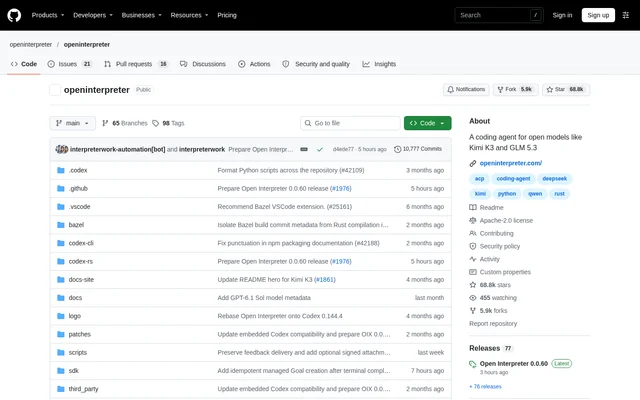
Open Interpreter is an open-source coding agent optimized for low-cost models. Open Interpreter is designed for developers who want agent-based coding workflows in a terminal or compatible editor. The current implementation is written in Rust and based on OpenAI's Codex, with an emphasis on emulating model-specific agent harnesses rather than requiring a single fixed setup.
Open Interpreter also emphasizes portability between compatible agents. The project uses shared instructions, skill directories, and protocols where practical, while keeping product-specific configuration and runtime state separate. The repository distinguishes this Rust implementation from the original Python project, which continues as a community-maintained fork.
What Open Interpreter can do
Open Interpreter combines command execution, model selection, harness switching, and interface testing in a coding-agent workflow. The documented features cover terminal use, connections to compatible editors, and reuse of applications built around the Codex SDK. A built-in QA skill extends the workflow to browser-based and native application interfaces.
- Open Interpreter runs commands inside native sandboxing on macOS, Linux, and Windows.
- Open Interpreter switches providers and models through /model.
- Open Interpreter inspects or changes Rust-native harnesses through /harness.
- Open Interpreter tests web applications with agent-browser and native applications with trycua.
- Open Interpreter connects to ACP-compatible editors through interpreter acp.
- Open Interpreter supports exec, MCP, skills, hooks, permissions, and AGENTS.md.
How Open Interpreter works
Open Interpreter provides shell-based installation commands for macOS and Linux and a PowerShell installation command for Windows. After installation, users enter i or interpreter in a terminal to start a session. The terminal interface exposes commands for selecting models and harnesses, while provider setup guides explain the relevant configuration and credentials.
Open Interpreter can also run as an Agent Client Protocol agent when a compatible client launches interpreter acp. Existing Codex SDK applications can point codexPathOverride to interpreter because Open Interpreter speaks the same Codex exec protocol. Documentation also describes a local streaming browser chat interface and Interpreter Workstation for desktop, browser, or headless clients.
Who Open Interpreter is for
Open Interpreter serves developers who use coding agents across terminal sessions, editors, and SDK-based applications. The documented workflows are relevant to users working with low-cost models, developers connecting an agent to an existing client, and people testing application interfaces. Shared instructions and skills also support moving between compatible agent setups.
- Developers can use Open Interpreter for terminal-based coding-agent sessions.
- Application testers can use Open Interpreter to operate web and native interfaces.
- SDK users can connect Open Interpreter to existing Codex SDK applications.
- Editor users can launch Open Interpreter through an ACP-compatible client.
Open Interpreter pricing and access
Open Interpreter is available as an open-source project under the Apache-2.0 license. The repository provides installation instructions and links to configuration, quickstart, and model-provider documentation. The supplied product text does not list subscription plans or model-provider prices. Live model sources require the provider credentials described in the provider documentation.
Open Interpreter strengths and limitations
Open Interpreter supports existing agent workflows through ACP, the Codex exec protocol, MCP, and shared instruction and skill directories. Cross-platform sandboxing and the built-in QA skill cover command execution and interface testing. Practical constraints include terminal-based installation, provider credential setup for live model sources, and a separate community fork for users seeking the original Python implementation.
- Open Interpreter requires terminal commands for the documented installation and startup workflow.
- Open Interpreter requires provider credentials for live model sources.
- Open Interpreter's original Python implementation resides in a separate community-maintained repository.
Open Interpreter FAQ
What is Open Interpreter?
Open Interpreter is an open-source coding agent optimized for low-cost models. The current Rust implementation is a fork of OpenAI's Codex and supports terminal sessions, model-specific harnesses, compatible editors, command execution, and web or native application testing.
Is Open Interpreter free?
Open Interpreter is available as an open-source project under the Apache-2.0 license. The product text does not list subscription plans or model-provider prices, and live model sources require credentials documented in the provider setup guides.
Which operating systems does Open Interpreter support?
Open Interpreter provides installation instructions for macOS, Linux, and Windows and runs commands inside native sandboxing on those operating systems. After installation, users start a session by entering i or interpreter in a terminal.
Does Open Interpreter work with editors and the Codex SDK?
Open Interpreter works with ACP-compatible editors and clients through interpreter acp. Open Interpreter also supports the Codex exec protocol, allowing existing Codex SDK applications to use the interpreter binary through the codexPathOverride setting.
Can Open Interpreter test web and native apps?
Open Interpreter includes a QA skill that lets models operate and test interfaces. Open Interpreter uses agent-browser to drive web applications in a real browser and trycua to operate and test native applications.
Is Open Interpreter still a Python project?
Open Interpreter's current repository contains a Rust version based on Codex. The original Python project continues as a community-maintained fork at endolith/open-interpreter, which the repository identifies separately from the current implementation.
From the community
No reviews yet
Be the first to review this tool. What you write helps the next person choose.