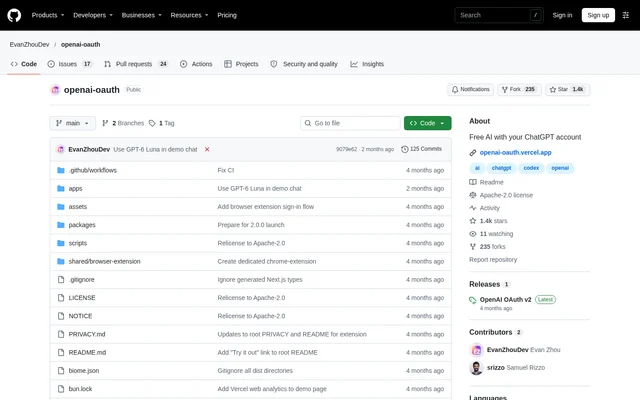
What is openai-oauth?
openai-oauth is an open-source toolkit for developers who want to use ChatGPT accounts in local software or let application users bring their own accounts. The project combines a local OpenAI-compatible API proxy, TypeScript packages and browser-based authentication components. The repository describes support across free and paid ChatGPT plans, rather than requiring a separate API key for the local proxy.
openai-oauth separates account credentials from client integrations. Credential sources obtain a ChatGPT OAuth session, while client adapters connect that session to tools such as Vercel AI SDK or the OpenAI JavaScript SDK. This structure supports both local authentication and request-bound credentials supplied by a signed-in browser user.
What openai-oauth can do
openai-oauth provides API compatibility and SDK integrations for text and image workflows. Supported text endpoints include responses, chat completions and model listing, with account-aware model discovery enabled by default. Image generation and editing use the same ChatGPT credentials and client adapters, including the local proxy and the documented JavaScript integrations.
- openai-oauth exposes an OpenAI-compatible API from a local development proxy.
- openai-oauth supports streaming responses, tool calls and reasoning traces.
- openai-oauth generates and edits images with GPT Image 2.
- openai-oauth connects ChatGPT credentials to Vercel AI SDK and the OpenAI JavaScript SDK.
- openai-oauth provides a Sign in with ChatGPT component for web applications.
How openai-oauth works
openai-oauth starts a local proxy with npx openai-oauth and prompts for local sign-in when needed. The CLI stores credentials in the same location used by Codex and can reuse an existing local Codex login. Developers point an OpenAI-compatible client at the proxy's base URL; the quickstart states that no API key is required.
openai-oauth also supports direct SDK access and browser-based credentials. The React sign-in flow prompts first-time users to install the Chrome or Firefox extension. Browser credentials are stored on the device in IndexedDB and encrypted at rest with WebCrypto by default. Application servers receive request-bound credentials when the browser sends them through openaiAuthHeaders().
Who openai-oauth is for
openai-oauth serves developers integrating ChatGPT account access into local applications and web products. TypeScript users can work directly with local credentials, while web developers can add account sign-in for their users. The documentation includes a Next.js example and states that the web integration works with any web framework and OpenAI-compatible client.
- Developers can connect existing OpenAI-compatible clients to local ChatGPT credentials.
- Web application developers can let users bring their own ChatGPT accounts.
- AI application developers can build text streaming and image generation workflows.
openai-oauth pricing and access
openai-oauth is presented as a free, open-source project and uses the Apache-2.0 license. The license permits use in both open-source and proprietary applications. Developers can obtain the CLI and SDK packages through npm, and the repository links to a Vercel demonstration. ChatGPT account support covers both free and paid plans.
openai-oauth strengths and limitations
openai-oauth combines local proxy access, reusable credential sources and multiple client adapters in one project. Background CLI operation includes commands for checking status, following logs and stopping the proxy. Account-aware model discovery reflects the connected account's available models, while configuration flags allow developers to override model listings and other proxy settings.
- First-time web authentication requires the Chrome or Firefox sign-in extension.
- Default model discovery is limited to models available to the connected account.
- Non-loopback host binding exposes the local proxy to the network.
openai-oauth FAQ
What is openai-oauth?
openai-oauth is an open-source developer toolkit for connecting ChatGPT accounts to applications. The project includes an OpenAI-compatible local proxy, a TypeScript SDK, client adapters and browser-based Sign in with ChatGPT components.
Is openai-oauth free?
openai-oauth is presented as a free, open-source project under the Apache-2.0 license. The project works with free and paid ChatGPT plans, and the license allows use in both open-source and proprietary applications.
Does openai-oauth work with the OpenAI SDK?
openai-oauth provides an adapter for the OpenAI JavaScript SDK and a provider for Vercel AI SDK. Custom adapters can also connect clients that accept a custom baseURL and fetch implementation.
Does openai-oauth require an API key?
openai-oauth does not require an API key for the documented local development proxy. The CLI connects the OpenAI-compatible endpoint to a ChatGPT account and prompts for local sign-in if credentials are not already available.
Can openai-oauth generate images?
openai-oauth supports image generation and editing with GPT Image 2 using ChatGPT credentials. The local proxy exposes image generation and editing endpoints, and the documentation includes Vercel AI SDK and OpenAI JavaScript SDK integration examples.
Does openai-oauth require a browser extension?
openai-oauth prompts first-time users of browser-based Sign in with ChatGPT to install an extension for Chrome or Firefox. Local CLI and TypeScript workflows are documented separately and can use credentials already stored by Codex.
From the community
No reviews yet
Be the first to review this tool. What you write helps the next person choose.