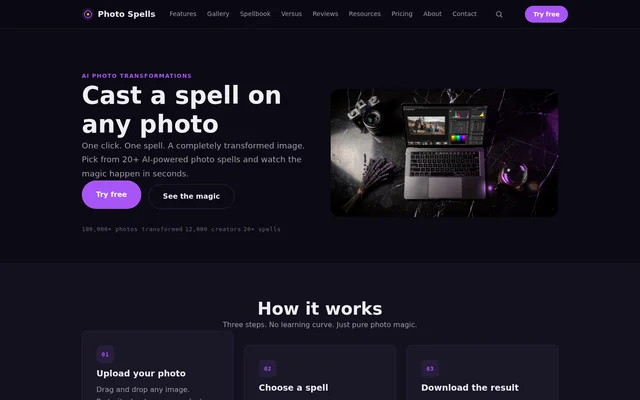
What is Photospells?
Photospells is an AI photo transformation tool that applies preset effects to uploaded images through a web editor. Photospells is intended for photographers, designers, content creators, and sellers working with product imagery. Supported image subjects include portraits, landscapes, and product shots, with transformations selected from a collection of effects called spells.
Photospells focuses on preset transformations rather than manual adjustment controls. The website describes effects that change seasons, turn photographs into paintings, or alter a product's setting. Access is available through free and paid plans, with differences in monthly allowances, export resolution, licensing, and processing features.
What Photospells can do
Photospells offers 20+ AI spells, with named effects including Season Swap, Time Travel, Style Alchemy, Scene Shift, and Mood Shift. Photospells also includes an interactive comparison slider for examining the original image beside the transformed result. Batch processing and API access extend the workflow on eligible paid plans.
- Photospells changes seasonal appearances, including summer-to-winter transformations.
- Photospells transforms photographs into artistic styles such as oil paintings.
- Photospells changes product settings through Scene Shift.
- Photospells displays interactive before-and-after comparisons.
- Photospells applies a single spell to multiple images through paid batch mode.
- Photospells supports all web editor spells through the Arcane API.
How Photospells works
Photospells uses an upload, select, and download workflow. Users drag and drop an image into the web editor, browse the spell collection, and choose an effect. The website says transformed results are ready in seconds. Photospells does not require sliders or complex settings for these preset transformations.
Photospells counts each transformation applied to an image as a spell. Applying different effects to the same image consumes separate spells, and re-running an effect also counts again. Batch mode applies a single spell across multiple images, with each image consuming a spell. All plans include access to the web editor.
Who Photospells is for
Photospells serves photographers, designers, and content creators who want preset photo transformations without a manual editing workflow. The website also presents uses for social media managers and e-commerce sellers. Commercial work requires Enchant or Arcane, while the free Spark plan is restricted to personal use.
- Photographers can change seasons or moods in existing images.
- Designers and creators can turn photographs into painting-style visuals.
- E-commerce sellers can place products in different settings.
- Social media managers can create transformed campaign imagery.
- Creators can share before-and-after comparisons with audiences or clients.
Photospells pricing and plans
Photospells offers Spark free forever with 10 spells per month, 5 basic spells, and exports up to 1024px on the longest edge. The pricing page specifies watermarks and personal-use restrictions for Spark. No credit card is required, and unused spells do not roll over to the next month.
Photospells Enchant costs $9/mo and includes 150 spells per month, all 20+ spells, exports up to 2048px, batches of 5 images, a commercial license, and no watermark. Arcane costs $29/mo and lists unlimited spells, exports up to 4096px, batches of 50 images, API access, priority rendering, and early access to new spells. Both paid plans include commercial licensing.
Photospells strengths and limitations
Photospells combines preset effects, comparison previews, and paid batch processing in a web editor. Photospells states that uploaded photos are processed on secure servers in the EU and deleted within 24 hours after transformation. Uploaded images are not used for training or marketing. The pricing page specifies watermarks for Spark despite the homepage's general statement about watermark-free downloads.
- Photospells restricts API access to Arcane, with a limit of 60 requests per minute.
- Photospells limits export resolution according to the selected plan.
- Photospells recommends originals at least as large as the target export resolution for best results.
- Photospells limits Spark to personal use and watermarked exports.
- Photospells counts repeated transformations as additional spell usage.
Photospells FAQ
What is Photospells?
Photospells is an AI photo transformation tool with a web editor for uploading images, selecting preset effects, and downloading transformed results. Photospells supports portraits, landscapes, and product shots, with spells for seasonal changes, artistic styles, scene changes, and other effects.
Is Photospells free?
Photospells offers a free Spark plan with 10 spells per month, 5 basic spells, and exports up to 1024px. No credit card is required. The pricing page specifies watermarked exports and personal use only, and unused spells do not roll over.
How much do Photospells paid plans cost?
Photospells offers Enchant at $9/mo with 150 spells per month and Arcane at $29/mo with unlimited spells. Enchant supports batches of 5 images and exports up to 2048px, while Arcane supports batches of 50 images, exports up to 4096px, and API access.
Does Photospells have an API?
Photospells provides API access exclusively on Arcane. Photospells supplies a personal API key and REST documentation, with rate limits of 60 requests per minute. The API supports all spells available in the web editor.
Can Photospells images be used commercially?
Photospells includes a commercial license with Enchant and Arcane. Transformed images from these plans can be used in client work, marketing materials, print products, and social media. Photospells restricts the free Spark plan to personal use.
How does Photospells handle uploaded photos?
Photospells processes uploaded photos on secure servers in the EU and deletes them within 24 hours after transformation. Photospells states that images are not used for training, marketing, or any purpose other than delivering transformation results.
From the community
No reviews yet
Be the first to review this tool. What you write helps the next person choose.