What is SeaArt?
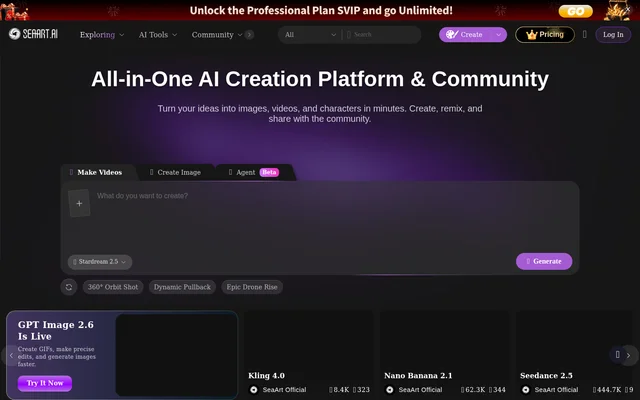
SeaArt is an AI creation platform and community for generating images, videos, and characters. SeaArt brings creation tools, model choices, and remixable examples into a shared destination for visual creators. The homepage presents image creation and video making as its main starting points, alongside an agent feature marked as beta.
SeaArt also includes a community area where visitors can explore creations and find examples to remix. The page combines these community examples with named tools, effects, and model listings. This makes SeaArt relevant to creators looking for both generation tools and existing visual concepts to adapt.
What SeaArt can do
SeaArt covers image generation, image editing, video creation, and effects. The image tools include an upscaler, filters, an eraser, and background removal, while the video tools include lip sync and reference-based generation. SeaArt also presents camera movement effects and motion-focused templates, with examples ranging from dance clips to cinematic stories and product videos.
- SeaArt generates AI images and videos.
- SeaArt upscales images and removes backgrounds.
- SeaArt offers image filters and an eraser.
- SeaArt turns images into videos.
- SeaArt provides video lip sync and reference-to-video tools.
- SeaArt offers motion control and camera movement effects.
- SeaArt supports remixing community creations.
How SeaArt works
SeaArt organizes its homepage around image tools, video tools, models, and examples. Creators can choose a creation type, explore a listed tool or template, and select from the available model options. The page explicitly presents model switching as a way to pursue different styles and output quality.
SeaArt lists models including Seedance, MiniMax, Kling AI, Wan AI, Veo, Pixverse, and Flux AI. Some model promotions describe specific workflows, such as combining text, image, video, and audio inputs or using multimodal references with synchronized audio. SeaArt also provides an app download and promotes remix actions beside community examples.
Who SeaArt is for
SeaArt is aimed at creators working with AI-generated visual content. The examples support uses such as cinematic storytelling, dance videos, product videos, character scenes, and stylized image effects. SeaArt also serves people who want to explore community work before choosing a template, effect, or model for their own creation.
- SeaArt helps visual creators generate and edit images.
- SeaArt provides video creators with cinematic and motion effects.
- SeaArt offers product video templates for promotional visuals.
- SeaArt gives community participants creations to explore and remix.
SeaArt strengths and limitations
SeaArt combines image and video tools with model selection, templates, and a creator community. The range of named tools covers both generation and editing tasks, including background removal, upscaling, lip sync, and face swaps. SeaArt also offers an app download. The agent entry is explicitly marked as beta, so that feature is presented differently from the main image and video creation options.
- SeaArt groups image and video workflows on the same website.
- SeaArt provides multiple model choices and remixable examples.
- SeaArt labels its agent feature as beta.
SeaArt FAQ
What is SeaArt?
SeaArt is an AI creation platform and community for making images, videos, and characters. SeaArt combines generation and editing tools with model choices, templates, effects, and community creations that users can explore and remix.
Is SeaArt only an image generator?
SeaArt is not limited to image generation; SeaArt also provides video generation, image-to-video creation, video lip sync, reference-to-video tools, and motion effects. The homepage also presents character creation and community remixing.
What image editing tools does SeaArt offer?
SeaArt offers an AI image upscaler, AI filters, an AI eraser, a background remover, and an AI image editor. SeaArt also lists image face swap tools alongside its image generation options.
Which AI models does SeaArt list?
SeaArt lists models including Seedance, MiniMax, Kling AI, Wan AI, Veo, Pixverse, Nano Banana, GPT, Krea, and Flux AI. SeaArt presents model switching as a way to choose different styles and output quality.
Does SeaArt have a community?
SeaArt has a community area for exploring creations, and the homepage displays examples with remix actions. SeaArt describes creating, remixing, and sharing with the community as part of its offering.
Does SeaArt have an app?
SeaArt offers an app download through the homepage, which includes a SeaArt app promotion. SeaArt also presents image tools, video tools, model choices, templates, and community creations on its website.
From the community
No reviews yet
Be the first to review this tool. What you write helps the next person choose.