What is Sinkin.ai?
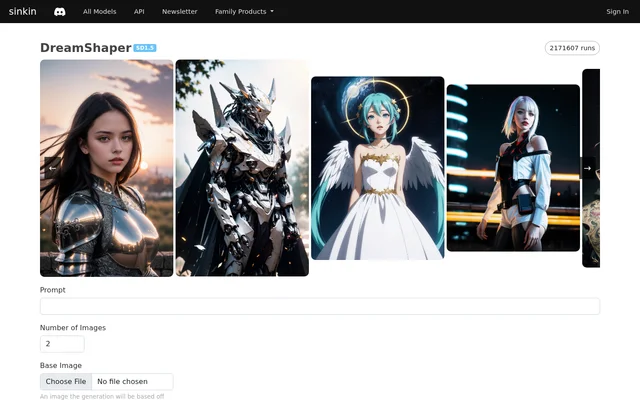
Sinkin.ai is an image generation interface whose supplied page features DreamShaper SD1.5. Sinkin.ai supports creating images from a written prompt and generating images based on an existing image. The interface is relevant to users who want to adjust image generation through model choices, style additions, structural guidance, and detailed output settings.
Sinkin.ai combines generation and upscaling controls on the page. The available settings include negative prompts, image dimensions, seeds, and schedulers, while additional controls cover ControlNet and LoRA. The source describes the available interface rather than broader company information, deployment options, or a complete pricing plan.
What Sinkin.ai can do
Sinkin.ai provides controls for changing image content, style, structure, and output size. Users can work from a prompt alone or supply a base image, then adjust transformation strength. The page also lists selectable additions for detail enhancement, contrast, and visual styles, with trigger words displayed for some selections.
- Sinkin.ai generates images using DreamShaper SD1.5.
- Sinkin.ai transforms a supplied base image with adjustable strength.
- Sinkin.ai offers Canny, Depth, and Pose ControlNet options.
- Sinkin.ai provides LoRA selection and a LoRA scale control.
- Sinkin.ai supports negative prompts and selectable schedulers.
- Sinkin.ai upscales images with Hi-Res Fix or ESRGAN.
How Sinkin.ai works
Sinkin.ai presents a prompt field, an image-count selector, and an optional base-image input. Users can choose ControlNet and LoRA settings before opening further generation controls. The additional settings include model version, negative prompt, inference steps, guidance scale, width, height, seed, and scheduler. A submit control starts generation, and the interface displays a progress state.
Sinkin.ai provides a separate upscaling workflow with a method selector, strength adjustment, and scale choices. Hi-Res Fix is described as highly detailed and costly, while ESRGAN is described as smoothing details and being cheap. These descriptions indicate relative processing choices, but the page does not provide a full cost comparison.
Who Sinkin.ai is for
Sinkin.ai is suited to users who want to generate images from text or alter an image they already have. Sinkin.ai exposes controls for users who want to compare model versions, adjust style influence, or change output settings. The source supports image-creation use cases but does not identify specific professions or industries.
- Sinkin.ai can create images from written prompts.
- Sinkin.ai can vary how strongly a base image is transformed.
- Sinkin.ai can apply listed style additions and detail enhancements.
- Sinkin.ai can upscale images after generation.
Sinkin.ai pricing and credit information
Sinkin.ai displays an upscale action costing 1 credit. Sinkin.ai also labels Hi-Res Fix as costly and ESRGAN as cheap, without explaining the complete credit schedule. The supplied page does not state subscription plans, credit purchase prices, or whether image generation includes free access, so broader access costs cannot be established from this source.
Sinkin.ai strengths and limitations
Sinkin.ai brings prompt-based generation, base-image transformation, style selection, structural guidance, and upscaling into the same interface. Sinkin.ai also exposes settings such as seeds and schedulers rather than restricting the workflow to a prompt field. The page states several limits that matter when configuring generation, particularly when ControlNet is enabled.
- Sinkin.ai truncates the prompt at approximately 70 words when ControlNet is on.
- Sinkin.ai sets a maximum of 50 inference steps.
- Sinkin.ai sets a maximum guidance scale of 20.
- Sinkin.ai lists a credit charge for the upscale action.
Sinkin.ai FAQ
What is Sinkin.ai?
Sinkin.ai is an image generation interface with a DreamShaper SD1.5 model page. Sinkin.ai supports written prompts, base-image transformation, ControlNet guidance, selectable LoRA additions, and image upscaling, with controls for dimensions, seeds, schedulers, and other generation settings.
Does Sinkin.ai support image-to-image generation?
Sinkin.ai supports image generation based on a supplied base image. Sinkin.ai includes a strength control described as determining how much to transform the base image, alongside prompt input and other generation settings.
Which ControlNet options does Sinkin.ai offer?
Sinkin.ai offers Canny, Depth, and Pose ControlNet options, as well as a None selection. Sinkin.ai notes that prompts are truncated at approximately 70 words when ControlNet is enabled.
Can Sinkin.ai upscale images?
Sinkin.ai offers Hi-Res Fix and ESRGAN upscaling. Sinkin.ai describes Hi-Res Fix as highly detailed and ESRGAN as smoothing details, provides scale and strength controls, and displays an upscale action costing 1 credit.
Is Sinkin.ai free?
Sinkin.ai does not state whether image generation is free on the supplied page. Sinkin.ai displays an upscale action costing 1 credit, but the source does not provide subscription plans, credit purchase prices, or a free-access allowance.
What image generation settings can users adjust in Sinkin.ai?
Sinkin.ai lets users adjust model version, negative prompt, inference steps, guidance scale, width, height, seed, and scheduler. Sinkin.ai also provides image-count selection, base-image transformation strength, ControlNet selection, and LoRA scale.
From the community
No reviews yet
Be the first to review this tool. What you write helps the next person choose.