What is Spline 3D?
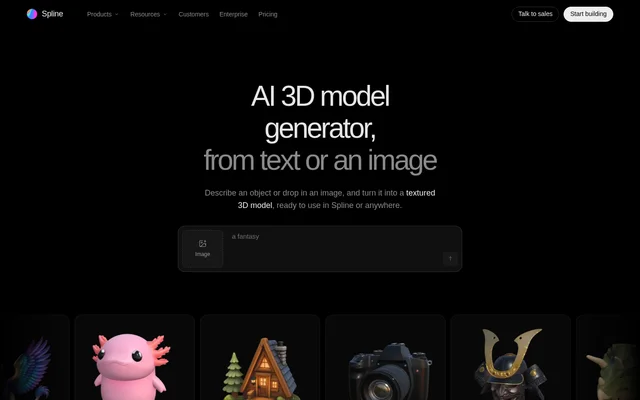
Spline 3D is a browser-based editor with AI tools for generating textured 3D models from written descriptions or reference images. Spline 3D supports workflows ranging from game assets and product visualization to concept blockouts and preparation for 3D printing. Generated models can be downloaded as GLB files or opened in the editor for further scene work. AI generation runs in the cloud, so special hardware or software is not required.
What Spline 3D can do
Spline 3D combines model generation with tools for inspecting the resulting mesh and materials. Users can choose among Hunyuan3D, Hunyuan 3.1 Pro, Trellis 2 and Meshy, including running the same reference image through different models for comparison. Generated assets include PBR maps, and the viewport exposes geometry statistics and rendering controls before users decide whether to iterate, download a file or continue editing.
- Spline 3D generates textured models from prompts, images or both.
- Spline 3D provides base color, metallic-roughness and normal maps.
- Spline 3D previews models in shaded, clay and wireframe modes.
- Spline 3D displays triangles, vertices, file size and available maps.
- Spline 3D stores generated images and models in a searchable library.
How Spline 3D works
Spline 3D starts with a description of a single object, a reference image or both. Supported images are PNG, JPG and WebP files up to 15 MB, with front-facing shots recommended. After a generation model is selected, Spline 3D presents image previews and builds a textured model from the chosen preview. Inside the editor, users can select the AI toolbar button and choose AI Generate to place the finished model directly into an open scene.
Who Spline 3D is for
Spline 3D serves creators who need generated objects for games, product presentations or early design exploration. GLB downloads can be imported into Blender, Unity and Unreal Engine, while the editor provides a path to lighting, animation and publishing. For printing workflows, a generated model can be opened in the editor and exported as STL on Pro or Max before being passed to a slicer.
- Game creators can generate props, characters and creatures.
- Product teams can turn photographs into models for websites or stores.
- Designers can test ideas with prompt-based or sketch-based concept blockouts.
Spline 3D pricing and plans
Spline 3D includes AI generation on Hobby, Pro and Max workspace plans, but not on Free. With annual billing, Hobby costs $12 per seat per month, Pro costs $25 and Max costs $60. Monthly allowances are 2,000, 3,000 and 10,000 AI credits respectively. Image previews and model generation are billed as separate steps, with an estimated cost shown before submission. Credits are shared across agents and generation tools and do not roll over.
Spline 3D strengths and limitations
Spline 3D connects generation, mesh inspection and scene editing in a browser workflow. GLB downloads support use in other 3D software, while rendering modes and material previews help users examine results before further work. Spline 3D also lets users compare generation models without abandoning the reference image. The source recommends describing a single object with its material and style, and notes that organic shapes work better than very sharp edges.
- Spline 3D requires a paid workspace plan for AI generation.
- Spline 3D limits reference image uploads to 15 MB.
- Spline 3D restricts USDZ and STL exports to Pro and Max.
- Spline 3D renews credits each billing cycle without accumulating unused balances.
Spline 3D FAQ
What is Spline 3D?
Spline 3D is a browser-based 3D editor with AI tools that convert text prompts and reference images into textured models. Spline 3D supports GLB downloads, mesh inspection, scene editing, lighting and animation, with use cases including game assets, product visualization and concept blockouts.
Is Spline 3D AI generation free?
Spline 3D AI generation is not included in the Free plan. Spline 3D provides AI generation through paid Hobby, Pro and Max workspace plans, each with monthly AI credits. Preview generation and model creation consume credits separately, and estimated costs appear before submission.
How do you turn an image into a model with Spline 3D?
Spline 3D converts a reference image into a model through Generate: users add an image, choose a generation model and select a preview. Spline 3D accepts PNG, JPG and WebP images up to 15 MB, with a front-facing image of a single object recommended.
Can Spline 3D models be used in Blender, Unity or Unreal Engine?
Spline 3D downloads generated models as GLB files, which Blender, Unity and Unreal Engine can import. Spline 3D also opens generated models in its editor, where scenes can be exported as GLTF or GLB, with USDZ and STL exports available on Pro and Max.
Does Spline 3D support MCP agents?
Spline 3D supports model generation into an editor scene through an agent connected over Spline MCP. Spline 3D also provides direct generation through the editor’s AI toolbar button, where selecting AI Generate inserts the finished model into the open scene.
Does Spline 3D use existing user files for AI?
Spline 3D states that its AI does not use users’ existing files or data. Spline 3D collects prompt-related data only when users choose to share feedback, and the source states that user data and AI data are handled on Spline’s own servers.
From the community
No reviews yet
Be the first to review this tool. What you write helps the next person choose.