What is TTS-Voice-Wizard?
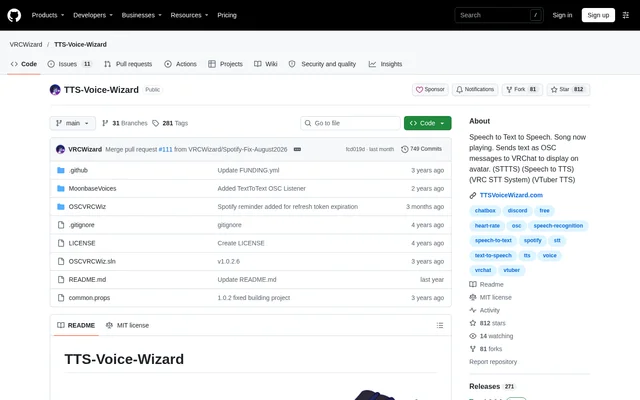
TTS-Voice-Wizard is an open-source speech-to-text and text-to-speech application with accessibility features for VRChat. TTS-Voice-Wizard converts speech into text and back into synthesized speech using multiple recognition and voice methods. The application also works outside VRChat, so its speech capabilities are not restricted to avatar communication.
TTS-Voice-Wizard is published in the VRCWizard GitHub repository under the MIT license. The repository links to installation instructions, a Quickstart Guide, a tutorial video, and additional feature-specific documentation. The stated system requirement is Windows 10/11, with no guarantee of compatibility on older Windows versions.
What TTS-Voice-Wizard can do
TTS-Voice-Wizard combines speech conversion with translation and VRChat text displays. The documented voice selection includes 100+ voices with customization options, while speech translation supports over 50 languages. Alongside spoken communication, the application can display music information and use companion tools to show battery or heart-rate information.
- TTS-Voice-Wizard converts speech to text and back to speech.
- TTS-Voice-Wizard sends OSC text to VRChat's chatbox and supported avatar displays.
- TTS-Voice-Wizard translates speech into over 50 supported languages.
- TTS-Voice-Wizard displays the current song from Spotify or a browser.
- TTS-Voice-Wizard controls VRChat avatar parameters with voice commands.
- TTS-Voice-Wizard displays customizable counters triggered by VRChat contact receivers.
How TTS-Voice-Wizard works
TTS-Voice-Wizard can be downloaded directly or installed through Scoop using the extras bucket. The Quickstart Guide and tutorial video explain setup for the basic features. Separate documentation covers speech recognition, text-to-speech, playing audio through a microphone, and getting text into VRChat.
TTS-Voice-Wizard sends spoken text as OSC messages for display through VRChat's chatbox, KillFrenzyAvatarText, or Frosty's Billboard. Battery displays work in conjunction with XSOverlay. Heart-rate displays use Pulsoid or HRtoVRChat_OSC. The wiki also includes guides for translation, word replacements, voice commands, and contact counters.
Who TTS-Voice-Wizard is for
TTS-Voice-Wizard serves VRChat users seeking speech accessibility and alternative ways to communicate through text or synthesized voices. The repository also identifies VTuber TTS as a use case and includes an OBS text guide for streaming and recording. Translation features support conversations between people who speak different languages.
- TTS-Voice-Wizard lets VRChat users display spoken communication as text.
- TTS-Voice-Wizard provides synthesized voices for speech-based communication.
- TTS-Voice-Wizard supports multilingual conversations through speech translation.
- TTS-Voice-Wizard offers documented OBS text workflows for streaming and recording.
TTS-Voice-Wizard pricing and plans
TTS-Voice-Wizard is a free, MIT-licensed project with optional VoiceWizardPro subscriptions through Ko-Fi or Patreon. VoiceWizardPro provides premium voices from Microsoft Azure, Amazon Polly, Google Cloud, and IBM Watson. The subscription also includes translation into 70+ supported languages and speech recognition through DeepGram's Nova-2 model.
TTS-Voice-Wizard strengths and limitations
TTS-Voice-Wizard combines speech conversion, translation, and VRChat display features in an open-source application. Direct downloads, Scoop installation, and feature-specific guides provide documented paths for setup. The application supports use outside VRChat, although several features depend on VRChat or named companion tools rather than working independently.
- TTS-Voice-Wizard requires Windows 10/11, and older Windows compatibility is not guaranteed.
- TTS-Voice-Wizard provides the listed premium cloud services through a VoiceWizardPro subscription.
- TTS-Voice-Wizard uses XSOverlay for tracker and controller battery displays.
- TTS-Voice-Wizard uses Pulsoid or HRtoVRChat_OSC for documented heart-rate displays.
TTS-Voice-Wizard FAQ
What is TTS-Voice-Wizard?
TTS-Voice-Wizard is an open-source Windows application that converts speech to text and synthesized speech. TTS-Voice-Wizard also translates speech and sends OSC messages to display spoken words in VRChat's chatbox or on supported avatar displays.
Is TTS-Voice-Wizard free?
TTS-Voice-Wizard is a free, MIT-licensed project with optional VoiceWizardPro subscriptions through Ko-Fi or Patreon. VoiceWizardPro adds premium cloud voices, translation into 70+ supported languages, and speech recognition through DeepGram's Nova-2 model.
Does TTS-Voice-Wizard work outside VRChat?
TTS-Voice-Wizard works outside VRChat, according to the repository's feature description. TTS-Voice-Wizard provides speech-to-text, text-to-speech, and translation capabilities, while avatar text, avatar voice commands, and contact counters are specifically described as VRChat features.
What operating system does TTS-Voice-Wizard require?
TTS-Voice-Wizard requires Windows 10/11, and compatibility with older Windows versions is not guaranteed. TTS-Voice-Wizard can be downloaded directly or installed through Scoop, with setup instructions available in the Quickstart Guide and tutorial video.
What integrations does TTS-Voice-Wizard support?
TTS-Voice-Wizard supports VRChat OSC text displays, Spotify or browser current-song displays, XSOverlay battery information, and heart-rate displays through Pulsoid or HRtoVRChat_OSC. TTS-Voice-Wizard also documents avatar text displays through KillFrenzyAvatarText and Frosty's Billboard.
How many voices and translation languages does TTS-Voice-Wizard offer?
TTS-Voice-Wizard lists 100+ voices with customization options and speech translation into over 50 supported languages. TTS-Voice-Wizard offers additional VoiceWizardPro benefits, including hundreds of premium cloud voices and translation into 70+ supported languages.
From the community
No reviews yet
Be the first to review this tool. What you write helps the next person choose.