What is TubeBuddy?
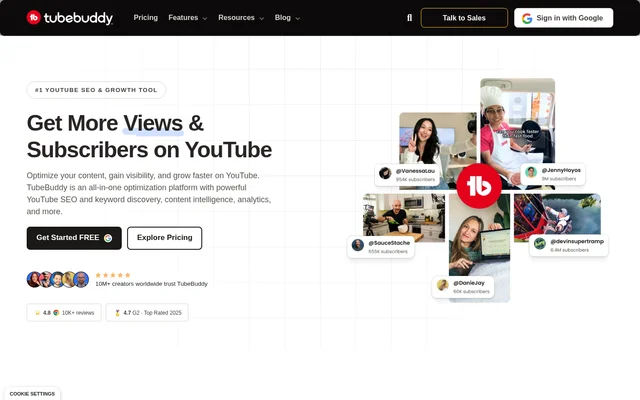
TubeBuddy is a YouTube SEO and creator workflow optimization tool for people publishing and managing YouTube videos. TubeBuddy brings together keyword discovery, search optimization, content testing, performance analytics, and publishing tools. The stated audiences range from creators preparing their first uploads to growing channels, agencies, and media companies managing a larger YouTube presence.
TubeBuddy organizes its tools around search ranking, growth and creation, content productivity, and audience discovery. These groups cover activities before and after publication, from choosing a topic and preparing metadata to comparing performance and updating existing videos. TubeBuddy is available through web access, a Chrome extension, and mobile apps for iOS and Android.
What TubeBuddy can do
TubeBuddy supports both video optimization and ongoing channel management. Keyword Explorer supplies keyword research and search volume data, while SEO Studio scores optimization in real time. Testing and analytics tools help creators compare content choices against measured performance. TubeBuddy also includes editing and scheduling tools for maintaining video libraries.
- TubeBuddy discovers YouTube keywords and topics using search volume and competition information.
- TubeBuddy recommends changes to video titles, tags, and descriptions.
- TubeBuddy automatically rotates A/B test variants and measures click-through rates.
- TubeBuddy tracks rankings, impressions, revenue, and video performance.
- TubeBuddy provides competitor analysis, channel insights, and retention analysis.
- TubeBuddy supports bulk text updates, card editing, and end screen editing.
- TubeBuddy includes title generation, thumbnail generation, and thumbnail analysis tools.
How TubeBuddy works
TubeBuddy provides insights and automation directly inside YouTube, with an extension installation option and Google sign-in listed on the website. A creator can use Keyword Explorer to research a topic, then use SEO Studio to score the associated video metadata and identify recommended changes. TubeBuddy’s testing tools compare thumbnail and title variants through automatic rotation and click-through rate measurement.
TubeBuddy’s analytics dashboard shows which content contributes views, subscribers, and revenue. Creators can use these measurements alongside competitor analysis and channel health reports to guide subsequent uploads. For maintenance tasks, TubeBuddy lists video scheduling, default upload profiles, chapter editing, related video management, and bulk find, replace, and append tools.
Who TubeBuddy is for
TubeBuddy addresses new creators, growing creators, and teams or brands with different channel management needs. New creators can research searchable topics and prepare video metadata. Growing creators can examine channel and competitor performance. Agencies and media companies can use bulk processing and cross-channel performance tools to manage a broader publishing workload.
- New creators can research keywords and optimize initial uploads.
- Growing creators can compare thumbnails, titles, and channel performance.
- Teams and brands can bulk update videos and monitor multiple channels.
TubeBuddy pricing and plans
TubeBuddy offers a free plan with no credit card required, alongside paid subscriptions with monthly or yearly billing. Paid subscriptions renew on the selected billing cycle unless cancelled. Users can upgrade through their accounts, and the unused portion of an existing license is credited toward an upgrade when applicable. TubeBuddy also states a 30-day refund policy.
- TubeBuddy ties a standard license to a single YouTube channel.
- TubeBuddy directs multiple-channel users and larger organizations to Enterprise options.
- TubeBuddy keeps paid features active until the current payment period ends after cancellation.
TubeBuddy strengths and limitations
TubeBuddy combines research, metadata optimization, testing, analytics, and bulk management in a YouTube-focused toolset. Automatic test rotation and bulk editing support workflows that otherwise involve repeated manual changes. The free starting option allows access without a credit card, but licensing and subscription terms remain relevant when evaluating ongoing channel management needs.
- TubeBuddy’s standard license does not cover multiple YouTube channels.
- TubeBuddy paid subscriptions continue renewing unless cancelled.
- TubeBuddy downgrades a channel to the free plan when the paid period ends after cancellation.
TubeBuddy FAQ
What is TubeBuddy?
TubeBuddy is a YouTube SEO and creator workflow optimization tool. TubeBuddy provides keyword research, video SEO scoring, thumbnail and title A/B testing, analytics, and bulk processing tools for creators, channel teams, and brands.
Is TubeBuddy free?
TubeBuddy offers a free plan with no credit card required, as well as paid subscriptions. TubeBuddy supports monthly and yearly billing, and users can upgrade their licenses through their accounts.
What can you use TubeBuddy for?
TubeBuddy supports YouTube keyword research, title and tag optimization, thumbnail testing, performance analysis, and bulk video management. TubeBuddy also includes video scheduling, chapter editing, end screen editing, competitor analysis, and tools for generating titles and thumbnails.
Does TubeBuddy work on mobile and Chrome?
TubeBuddy lists web access, a Chrome extension, and mobile apps for iOS and Android. TubeBuddy also describes its insights and automation as working directly inside YouTube and provides an extension installation option.
Can a TubeBuddy license cover multiple YouTube channels?
TubeBuddy ties a standard license to a single YouTube channel. TubeBuddy directs users managing multiple channels or larger organizations to its Enterprise options and lists team-oriented capabilities such as a multi-channel dashboard and brand permissions management.
Can you cancel a TubeBuddy subscription?
TubeBuddy subscriptions can be cancelled through the user’s account. TubeBuddy keeps paid features active for the remainder of the current payment period, then downgrades the channel to the free plan. TubeBuddy also states a 30-day refund policy.
From the community
No reviews yet
Be the first to review this tool. What you write helps the next person choose.