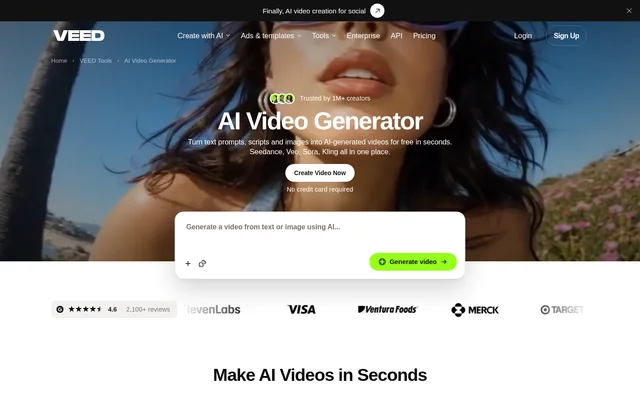
What is VEED, AI Video Generator?
VEED, AI Video Generator is an AI video creation tool that combines generative models with video editing. Creators and marketers can use prompts, scripts, product images, or existing clips to produce social content, advertisements, and explainers. Generated videos can include visuals, narration, and editable scenes.
VEED, AI Video Generator provides access to models including Seedance, Veo, Sora, Kling, Hailuo, and Fabric. Model selection depends on the required shot, visual style, and budget. The same workflow includes tools for adjusting scenes and adding captions, voiceovers, logos, and other brand assets.
What VEED, AI Video Generator can do
VEED, AI Video Generator supports creating new footage and modifying existing media. Users can replace individual scenes rather than regenerate an entire video, animate uploaded images, or change the appearance of an existing clip. Editing tools let users combine generated media with stock footage, text, graphics, music, and branding.
- VEED, AI Video Generator turns prompts and scripts into scenes with visuals and narration.
- VEED, AI Video Generator animates uploaded product images.
- VEED, AI Video Generator restyles existing footage while preserving its original motion.
- VEED, AI Video Generator creates talking character videos with lip sync through Fabric.
- VEED, AI Video Generator adds captions, voiceovers, music, and logos.
- VEED, AI Video Generator supports custom avatars, voice cloning, and multilingual dubbing.
How VEED, AI Video Generator works
VEED, AI Video Generator starts with a written description, a script, or an example prompt. The generator creates scenes that users can edit to match their message and brand voice. Customization includes choosing an aspect ratio, an avatar or voiceover, background music, and a caption style.
VEED, AI Video Generator lets users replace footage with uploaded media, stock videos, or newly generated visuals. Users can export the result or continue in the video editor to add captions and brand assets. For video-to-video generation, users select a model, upload a clip, and describe the desired change.
Who VEED, AI Video Generator is for
VEED, AI Video Generator serves creators and marketers producing videos for YouTube, Instagram, and TikTok, along with product ads and explanatory content. The source describes workflows for making content from scratch and refreshing existing footage. Branding controls also support edits made to meet brand guidelines or respond to client feedback.
- Creators can generate social media clips from text or scripts.
- Marketers can turn product photos into video advertisements.
- Content teams can build explainers with generated visuals and narration.
- Video editors can restyle older footage or replace individual scenes.
VEED, AI Video Generator pricing and plans
VEED, AI Video Generator offers free AI credits when users sign up, and the page states that no credit card is required. Each AI model consumes a different number of credits. Once the free allocation is used, users must upgrade to a paid plan to continue generating videos; the page directs users to its pricing page for details.
VEED, AI Video Generator strengths and limitations
VEED, AI Video Generator brings model selection and scene editing into the same workflow, allowing users to adjust footage, captions, audio, and branding after generation. Commercial use is permitted for videos users create, but copyright, trademark, harmful-content, and publishing-platform restrictions still apply. Generation also remains subject to credits and model-specific duration limits.
- VEED, AI Video Generator requires a paid plan after free generation credits are exhausted.
- VEED, AI Video Generator uses different credit amounts for different models.
- VEED, AI Video Generator lists Hailuo clips at 10 seconds, Sora videos at 12 seconds, and Fabric talking videos at up to 60 seconds.
VEED, AI Video Generator FAQ
What is VEED, AI Video Generator?
VEED, AI Video Generator is an AI video creation and editing tool that turns prompts, scripts, images, and existing footage into editable videos. Users can select generation models and customize scenes with narration, captions, music, and brand assets.
Is VEED, AI Video Generator free?
VEED, AI Video Generator provides free AI credits when users sign up, with no credit card required. Different models consume different amounts of credits. Users need a paid plan to continue generating videos after using their free credits.
Which AI video models does VEED, AI Video Generator offer?
VEED, AI Video Generator offers models including Seedance, Veo, Sora, Kling, Hailuo, PixVerse, Lightricks LTX, and Fabric. The page describes options for cinematic visuals with audio, realistic motion, multishot video, social media content, and talking character videos.
Can VEED, AI Video Generator edit an existing video?
VEED, AI Video Generator supports video-to-video models that change a clip's style, swap its subject, or add and remove elements while keeping the original motion. Users upload an existing clip, select a model, and describe the desired change.
Can videos made with VEED, AI Video Generator be used commercially?
VEED, AI Video Generator allows commercial use of videos users create and states that users retain rights to those videos. Users must avoid copyright or trademark infringement, harmful content, and defamation, and must check applicable publishing-platform terms.
Can VEED, AI Video Generator make talking head videos?
VEED, AI Video Generator supports talking head videos through Fabric 1.0, which animates character images with lip sync and motion for videos up to 60 seconds. Users can upload an image or choose a preset character, then record, upload, or generate speech.
From the community
No reviews yet
Be the first to review this tool. What you write helps the next person choose.