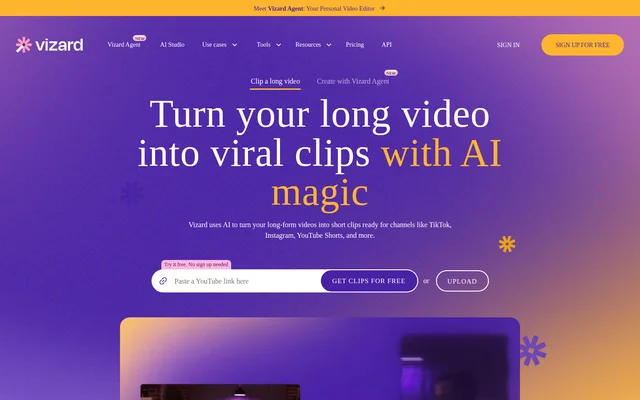
What is Vizard?
Vizard is an AI video clipping and editing tool that converts long-form videos into short clips for social media. Vizard serves creators, podcasters, marketers, coaches, business owners, agencies, and freelancers. Supported destinations named on the website include TikTok, Instagram, and YouTube Shorts.
Vizard combines automatic highlight selection with editing controls for refining the resulting clips. The website describes a workflow covering transcription, clip generation, reframing, editing, and distribution. Vizard also offers Vizard Agent, with templates covering formats such as product ads, tutorials, explainers, podcast clips, and event recaps.
What Vizard can do
Vizard handles both automatic clip generation and manual video refinement. AI clipping identifies engaging moments and centers key subjects in a vertical frame, while the editor provides transcript and timeline controls. Caption translation, aspect ratio changes, and reusable templates support adapting the same footage for different audiences and social channels.
- Vizard identifies video highlights and generates short clips.
- Vizard reframes footage and centers subjects for vertical video.
- Vizard trims videos when users delete corresponding transcript text.
- Vizard translates captions into over 100 languages.
- Vizard supports timeline adjustments and aspect ratio changes.
- Vizard lets users apply supplied templates or save their own.
- Vizard exports videos, shares links, and publishes directly.
How Vizard works
Vizard starts with a video upload and transcription. Users then select Get AI clips to generate clips formatted for their chosen social destination. Vizard allows further editing through the transcript or timeline before users download the results, share links, or publish directly from the tool.
Vizard provides a Team Workspace where leaders can invite members, manage projects, view work in real time, and share previews with clients or external collaborators. The pricing comparison also lists a Clipping API and MCP Connector, with API rate limits varying across the available plans.
Who Vizard is for
Vizard targets people and teams that reuse recorded video across social channels. The website specifically names creators, podcasters, coaches, business owners, marketers, agencies, and freelancers. The stated use cases focus on extracting content from longer recordings rather than requiring every social post to begin with a separate recording.
- Vizard helps podcasters turn long episodes into short clips.
- Vizard helps marketers repurpose webinars into social content.
- Vizard helps coaches and business owners clip client calls and interviews.
- Vizard helps agencies and freelancers produce clips for their workflows.
- Vizard supports teams sharing project previews with clients.
Vizard pricing and plans
Vizard offers Free, Creator, and Business plans, with monthly and yearly billing options for subscriptions. The Free plan includes 60 credits per month, AI-generated clips, animated subtitles, full access to the video editor, and 720p exports. Free video storage expires after 3 days.
Vizard Creator adds watermark removal, 4K exports, social post scheduling, management of 6 social media accounts, and 100 GB of storage. Vizard Business adds team invitations, project sharing, a brand kit, custom fonts, management of 20 social media accounts, and unlimited storage. Custom plans are available by contacting sales.
Vizard strengths and limitations
Vizard brings clipping, transcript editing, caption translation, and social distribution into the same workflow. Vizard also offers manual timeline controls when generated clips need refinement. The Free plan provides access to the editor, while higher tiers add export quality, branding, storage, and collaboration capabilities.
- Vizard Free exports are limited to 720p and include a watermark.
- Vizard Free storage expires after 3 days.
- Vizard Free uploads cannot exceed 60 minutes or 1GB.
- Vizard Creator and Business subscriptions renew automatically unless canceled.
Vizard FAQ
What is Vizard?
Vizard is an AI video clipping and editing tool that turns long videos into short clips for TikTok, Instagram, YouTube Shorts, and other channels. Vizard includes transcription, automatic highlight selection, vertical reframing, and manual editing controls.
Is Vizard free?
Vizard offers a Free plan with 60 credits per month, AI-generated clips, animated subtitles, full video editor access, and 720p exports. Vizard Free storage expires after 3 days, while Creator and Business subscriptions provide additional capabilities.
Who is Vizard for?
Vizard is for creators, podcasters, coaches, business owners, marketers, agencies, and freelancers. Vizard supports repurposing podcasts, webinars, interviews, and client calls into short social videos, with team workspace features for collaboration and sharing previews.
Can Vizard edit videos using a transcript?
Vizard supports text-based video editing by letting users trim footage through deleting the corresponding transcript text. Vizard also includes timeline editing for refining those changes, alongside caption translation, aspect ratio adjustments, and brand templates.
Can Vizard translate captions?
Vizard translates captions into over 100 languages to help users reach audiences in different languages. Vizard also provides animated subtitles and editing controls for adapting clips before downloading, sharing, or publishing the finished videos.
Does Vizard have an API?
Vizard lists a Clipping API and MCP Connector in its plan comparison. Vizard specifies different API rate limits across Free, Creator, and Business plans, so API usage limits depend on the selected plan.
From the community
No reviews yet
Be the first to review this tool. What you write helps the next person choose.